

Introduction
In this article, let us see how to render the SharePoint framework web part properties pane dynamically using SharePoint list data.
Here in the sample, I am using the solution created for my previous sample. It was created with react JS framework.
Property Configuration
The property configuration method contains the default return statement. It returns the configuration which has pages to be rendered on the property pane along with the groups and the respective properties on the groups. The following is the default code. It contains
- One page configuration with the page header
- One group with group name and a text property
- protected getPropertyPaneConfiguration(): IPropertyPaneConfiguration {
- return {
- pages: [
- {
- header: {
- description: strings.PropertyPaneDescription
- },
- groups: [
- {
- groupName: strings.BasicGroupName,
- groupFields: [
- PropertyPaneTextField('description', {
- label: strings.DescriptionFieldLabel
- })
- ]
- }
- ]
- }
- ]
- };
- }
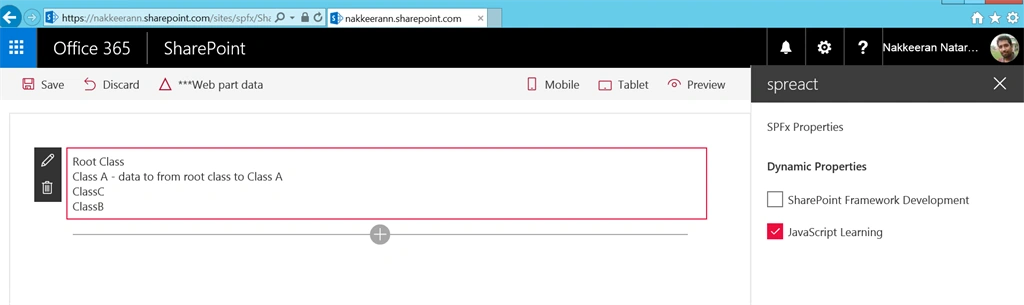
Here, in this sample, let us look at dynamically adding the list items in the properties pane of SharePoint Framework web part. Let us consider adding the check boxes to the properties pane.
The data to be pulled can be retrieved using the onPropertyPaneConfigurationStart method. The data from the list will not be available for rendering in the property configuration method, even though start method triggers before the configuration method. This is because the data to be retrieved from the list works asynchronously. The properties pane should be refreshed using the this.context.propertyPane.refresh() method in the code, which again triggers the properties configuration method. The property pane re-renders once the refresh method was called.
So, the property pane configuration start method will contain the code to retrieve the list items and dynamically build the check box properties and push it to the global array. The global array is then assigned to the group fields property in the property pane configuration method.
- protected onPropertyPaneConfigurationStart(): void {
- var self = this;
- var xmlhttp = new XMLHttpRequest();
- xmlhttp.onreadystatechange = function () {
- if (xmlhttp.readyState == XMLHttpRequest.DONE) {
- if (xmlhttp.status == 200) {
- var data = JSON.parse(xmlhttp.responseText);
- if (data != null) {
- self.dynamicProps = [];
- data.d.results.forEach(function(item){
- //self.dynamicProps.push({key: item.ID, text: item.Title});
- self.dynamicProps.push(
- PropertyPaneCheckbox(item.ID,
- {
- text:item.Title
- })
- );
- });
- self.context.propertyPane.refresh();
- }
- } else if (xmlhttp.status == 400) {
- console.log('There was an error 400');
- } else {
- console.log('something else other than 200 was returned');
- }
- }
- };
- var inputUrl = "https://nakkeerann.sharepoint.com/sites/spfx/_api/web/lists/getByTitle('TestList')/items";
- xmlhttp.open("GET", inputUrl, true);
- xmlhttp.setRequestHeader("Accept","application/json; odata=verbose");
- xmlhttp.send();
- }
- protected getPropertyPaneConfiguration(): IPropertyPaneConfiguration {
- return {
- pages: [
- {
- header: {
- description: "SPFx Properties"
- },
- groups: [
- {
- groupName: "Dynamic Properties",
- groupFields:
- this.dynamicProps
- }
- ]
- }
- ]
- };
- }
Code ConsultPosted Jan 7, 2019, 7:21 AM
Not working. Can you elaborate how can it map with target property? We are extremely looking for it but no solution works for us. If you can help with us then it will be our pleasure
Aurélien PlantardPosted May 23, 2018, 8:15 AM
Hello, thank you very much that's exactly what I was looking for but I have a problem implementing it. dynamic properties are not displayed. They are in the array (checked by displaying the array) but they are not displayed. So I guess the problem is the this.context.propertyPane.refresh(), but I have added it and still not working. Can you please help me with that ?
Snehasis SamalPosted May 16, 2018, 8:43 AM
Hi, How I can get all the selected checkboxes that has been set by the user? Also want to know how I can render this with other controls in existing group on the property pane? currently I think we are using a new group to render this.
Ashraf HasanPosted Dec 4, 2017, 1:39 PM
Thanks....How do I access those dynamic check boxes values in render method