

As per today’s web development, responsive pattern is the most import pattern for developing any web site or web application since today many users want to access those websites or applications not only in desktop computers, they also want to access those things in mobile, tab or other small devices. So becasue of this it is important to design our page in such a way so that the page acts correctly in all devices. The same concept needs to apply when we want to open any modal popup from our pages. Since in a normal scenario modal is actually rendered as a html div with a specific height and width, it is very important to design our html or css in such a way that it work perfectly on all devices.
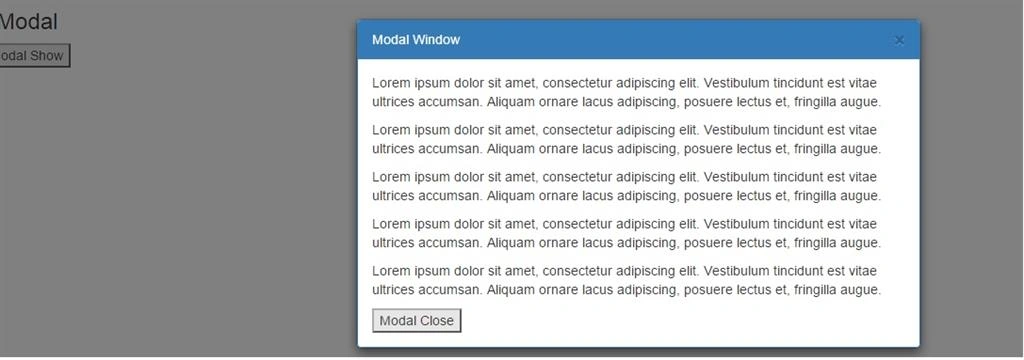
So, in this article, we will try to create an AngularJS directive for modal which is responsive. Since modal window meansthe developer needs to change the content of that window from page to page, for this reason, we use ng-transclude option for include html contents within the modal window. Required html code is needed to write in the page with the angular directive.
- .animated {
- -webkit-animation-duration: 1s;
- animation-duration: 1s;
- -webkit-animation-fill-mode: both;
- animation-fill-mode: both;
- z-index: 100;
- }
- .modal-backdrop { z-index: 2040 !important; }
- .modal { z-index: 2050 !important; }
- body.modal-open { padding-right: inherit !important; }
- body.modal-open .animated { animation-fill-mode: initial; }
- .modal-content .panel {margin-bottom:0;}
- 'use strict';
- var testApp = angular.module('TestApp', []);
- testApp.directive('ngModal', ['$http', '$timeout', function () {
- return {
- restrict: 'E',
- transclude: true,
- scope: {
- },
- bindToController: {
- param: '=',
- },
- template: '<div class="modal inmodal" id="{{model.param.controlId}}" tabindex="-1" role="dialog" aria-hidden="true" data-ng-style="{display : model.display}">' +
- ' <div class="modal-dialog">' +
- ' <div class="modal-content animated bounceInRight">' +
- ' <div class="panel panel-primary">' +
- ' <div class="panel-heading">{{model.param.caption}}' +
- ' <button type="button" class="close" data-dismiss="modal" data-ng-click="model.fnClose();"><span aria-hidden="true">×</span><span class="sr-only">Close</span></button>' +
- ' </div>' +
- ' <div class="panel-body" ng-transclude>' +
- ' </div>' +
- ' </div>' +
- ' </div>' +
- ' </div>' +
- '</div>' +
- '<div class="modal-backdrop in" data-ng-show="model.showModal"></div>',
- controllerAs: 'model',
- controller: function ($http, $timeout) {
- var self = this;
- if (self.param == undefined) {
- self.param = {};
- }
- self.display = 'none';
- self.fnClose = function () {
- self.showModal = false;
- self.display = 'none';
- }
- function assignModalMethod() {
- self.param.method = {
- show: function () {
- self.showModal = true;
- self.display = 'block';
- },
- close: function () {
- self.fnClose();
- },
- setTitle: function (args) {
- self.param.caption = args;
- }
- }
- }
- var initModalEvent = function () {
- $('#' + self.param.controlId).keyup(function (e) {
- if (e.which == 27) {
- $timeout(function () {
- self.fnClose();
- }, 50);
- }
- });
- }
- assignModalMethod();
- $timeout(function () {
- initModalEvent();
- }, 100);
- }
- }
- }]);
- testApp.controller('IndexController', ['$http', function ($http, urlService) {
- var self = this;
- self.message = 'Modal';
- self.modalArgs = {
- caption: 'Modal Window',
- controlId: 'modal1'
- };
- self.showModal = function () {
- self.modalArgs.method.show();
- }
- self.hideModal = function () {
- self.modalArgs.method.close();
- }
- }]);
- <!DOCTYPE html>
- <html xmlns="http://www.w3.org/1999/xhtml">
- <head>
- <title>Modal</title>
- <link href="../../RefStyle/bootstrap.min.css" rel="stylesheet" />
- <link href="style.css" rel="stylesheet" />
- <script src="../../RefScript/jquery-2.1.1.js"></script>
- <script src="../../Scripts/angular.min.js"></script>
- <script src="SampleDirective.js"></script>
- <script src="IndexController.js"></script>
- </head>
- <body data-ng-app="TestApp" data-ng-controller="IndexController as model">
- <div class="row animated fadeInRight">
- <div class="col-lg-12">
- <div class="rowDiv">
- <h3>{{model.message}}</h3>
- </div>
- </div>
- </div>
- <div class="actionBtn hideMini">
- <div class="row">
- <input type="button" class="btn-default active" value="Modal Show" data-ng-click="model.showModal();" />
- </div>
- </div>
- <ng-modal param="model.modalArgs">
- <p>Lorem ipsum dolor sit amet, consectetur adipiscing elit. Vestibulum tincidunt est vitae ultrices accumsan. Aliquam ornare lacus adipiscing, posuere lectus et, fringilla augue.</p>
- <p>Lorem ipsum dolor sit amet, consectetur adipiscing elit. Vestibulum tincidunt est vitae ultrices accumsan. Aliquam ornare lacus adipiscing, posuere lectus et, fringilla augue.</p>
- <p>Lorem ipsum dolor sit amet, consectetur adipiscing elit. Vestibulum tincidunt est vitae ultrices accumsan. Aliquam ornare lacus adipiscing, posuere lectus et, fringilla augue.</p>
- <p>Lorem ipsum dolor sit amet, consectetur adipiscing elit. Vestibulum tincidunt est vitae ultrices accumsan. Aliquam ornare lacus adipiscing, posuere lectus et, fringilla augue.</p>
- <p>Lorem ipsum dolor sit amet, consectetur adipiscing elit. Vestibulum tincidunt est vitae ultrices accumsan. Aliquam ornare lacus adipiscing, posuere lectus et, fringilla augue.</p>
- <input type="button" class="btn-default active" value="Modal Close" data-ng-click="model.hideModal();" />
- </ng-modal>
- </body>
- </html>
Sr KarthigaPosted Apr 16, 2016, 5:02 AM
good one
Sr KarthigaPosted Apr 16, 2016, 5:02 AM
Nice explanation
Former memberPosted Apr 12, 2016, 8:36 AM
good explanation not found to understand the code. this is just nothing but a code dump.
Mohammed IbrahimPosted Mar 14, 2016, 4:01 AM
nice
Asfend YarPosted Mar 13, 2016, 2:02 PM
good job
Ankur MistryPosted Mar 13, 2016, 1:03 AM
Thanks for sharing
Vignesh ManiPosted Mar 11, 2016, 5:39 PM
good
Kashif SohailPosted Mar 11, 2016, 2:36 PM
Nice article