

A long-awaited feature has come to Universal Windows programming; i.e.; the ability to programmatically restart the application. Previously we had to inform to the user with a prompt (like Message Dialog) to close and relaunch the application. Now relaunch is not required from the user side.
This article explains about how to implement this feature into our application.
Note
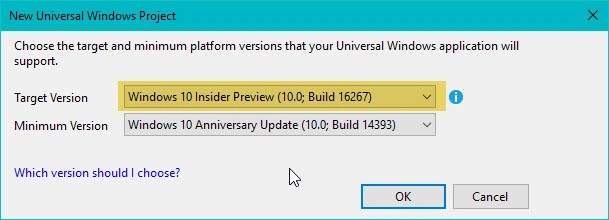
This API will be support Windows Insider Build version 16257 or greater, public version will be available on 17-Oct-17 (windows 10 fall creators update version) onwards
System Requirements
- Windows 10 Insider Build 16257 or greater
- Windows 10 16257 SDK
- Visual Studio 2017
RequestRestartAsync & RequestRestartForUserAsync API
RequestRestartAsync & RequestRestartForUserAsync is used to Restart the application, this API is available in CoreApplication class
- CoreApplication.RequestRestartAsync(string launchArguments)
- CoreApplication. RequestRestartForUserAsync (User user,string launchArguments)
launchArguments
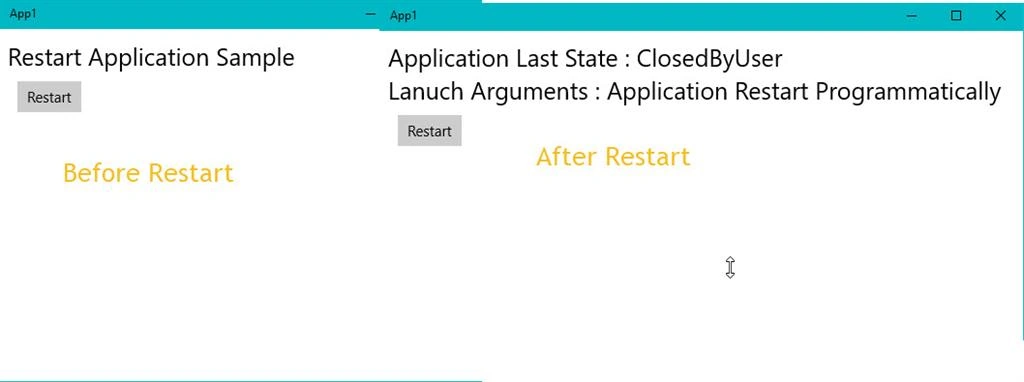
This argument is used to pass the information to the Restart Instance. Let see one simple example, how to restart the application programmatically and read the launchArguments in the new Instance
Open VisualStudio -> File -> Visual C# -> Windows Universal -> Blank App(Universal Windows)
- <Page
- x:Class="App1.MainPage"
- xmlns="http://schemas.microsoft.com/winfx/2006/xaml/presentation"
- xmlns:x="http://schemas.microsoft.com/winfx/2006/xaml"
- xmlns:local="using:App1"
- xmlns:d="http://schemas.microsoft.com/expression/blend/2008"
- xmlns:mc="http://schemas.openxmlformats.org/markup-compatibility/2006"
- mc:Ignorable="d">
- <Grid Background="{ThemeResource ApplicationPageBackgroundThemeBrush}" Margin="10,10,10,10">
- <Grid.RowDefinitions>
- <RowDefinition Height="Auto"/>
- <RowDefinition Height="Auto"/>
- <RowDefinition Height="Auto"/>
- </Grid.RowDefinitions>
- <TextBlock Name="TxtStatus" Grid.Row="0" Text="" FontSize="25" TextWrapping="WrapWholeWords"/>
- <Button Grid.Row="1" Content="Restart" Click="ButtonBase_OnClick" Margin="10,10,10,10"></Button>
- </Grid>
- </Page>
- using System;
- using System.Collections.Generic;
- using System.IO;
- using System.Linq;
- using System.Runtime.InteropServices.WindowsRuntime;
- using Windows.ApplicationModel.Activation;
- using Windows.ApplicationModel.Core;
- using Windows.Foundation;
- using Windows.Foundation.Collections;
- using Windows.System;
- using Windows.UI.Popups;
- using Windows.UI.Xaml;
- using Windows.UI.Xaml.Controls;
- using Windows.UI.Xaml.Controls.Primitives;
- using Windows.UI.Xaml.Data;
- using Windows.UI.Xaml.Input;
- using Windows.UI.Xaml.Media;
- using Windows.UI.Xaml.Navigation;
- // The Blank Page item template is documented at https://go.microsoft.com/fwlink/?LinkId=402352&clcid=0x409
- namespace App1
- {
- /// <summary>
- /// An empty page that can be used on its own or navigated to within a Frame.
- /// </summary>
- public sealed partial class MainPage : Page
- {
- public MainPage()
- {
- this.InitializeComponent();
- TxtStatus.Text = "Restart Application Sample";
- if (ReadAppData.ArgInfo != null)
- TxtStatus.Text = ReadAppData.ArgInfo;
- }
- private async void ButtonBase_OnClick(object sender, RoutedEventArgs e)
- {
- var result = await CoreApplication.RequestRestartAsync("Application Restart Programmatically ");
- if (result == AppRestartFailureReason.NotInForeground ||
- result == AppRestartFailureReason.RestartPending ||
- result == AppRestartFailureReason.Other)
- {
- var msgBox = new MessageDialog("Restart Failed", result.ToString());
- await msgBox.ShowAsync();
- }
- }
- }
- }
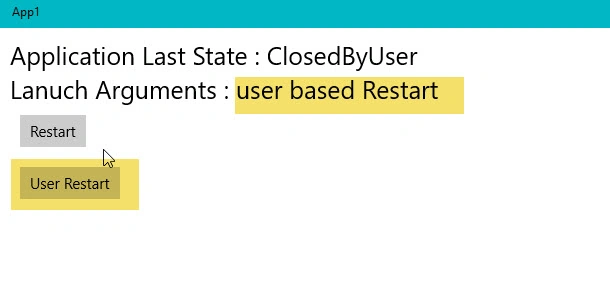
RequestRestartForUserAsync (User user, string launchArguments)
This API is used to enable user based conditions to restart the application. The first argument is User account; this argument is used to check the condition. For example, if the login user matches then it calls the restart API and the second argument is launchArguments which is used to the pass the information to the Restart Instance.
- private async void BtnUser_OnClick(object sender, RoutedEventArgs e)
- {
- var userList = await User.FindAllAsync();
- var lst = new List<string>()
- {
- KnownUserProperties.FirstName
- };
- foreach (var user in userList)
- {
- var accountName =await user.GetPropertiesAsync(lst);
- if (accountName != null)
- {
- var name = accountName[KnownUserProperties.FirstName].ToString();
- if (name == "Vinoth")
- {
- AppRestartFailureReason result =
- await CoreApplication.RequestRestartForUserAsync(user, "user based Restart");
- }
- }
- }
- }
Restart Failure
- AppRestartFailureReason.NotInForeground
- AppRestartFailureReason.RestartPending
- AppRestartFailureReason.Other
Both Restart API and launchArguments should be passed. Once the application gets restarted, this value reads from the OnLaunched function.
- protected override void OnLaunched(LaunchActivatedEventArgs e)
- {
- Frame rootFrame = Window.Current.Content as Frame;
- // Do not repeat app initialization when the Window already has content,
- // just ensure that the window is active
- if (rootFrame == null)
- {
- // Create a Frame to act as the navigation context and navigate to the first page
- rootFrame = new Frame();
- rootFrame.NavigationFailed += OnNavigationFailed;
- if (e.PreviousExecutionState == ApplicationExecutionState.Terminated)
- {
- //TODO: Load state from previously suspended application
- }
- // Place the frame in the current Window
- Window.Current.Content = rootFrame;
- }
- switch (e.Kind)
- {
- case ActivationKind.Launch:
- {
- string lanuch = e.Arguments;
- if (!string.IsNullOrEmpty(lanuch))
- {
- ReadAppData.ArgInfo = "Application Last State : " + e.PreviousExecutionState.ToString();
- ReadAppData.ArgInfo += Environment.NewLine + "Lanuch Arguments : " + lanuch;
- }
- }
- break;
- }
I hope you understood how to use Restart API.
Vikram KalalPosted Apr 27, 2021, 10:18 AM
App not restart in release mode
pranav sagarPosted Jan 25, 2021, 6:04 AM
Thanks for the article, is there any way to detect if the restart API is supported on a particular system or not? I mean can we check the build version and get the information?