

There are many ways to secure config files. In this article, you will see one of the approaches to securing the config files. If confidential information or data of the application is kept in the config file (like connection string, SMTP server configuration details and error logger information etc.) then we need to secure it.
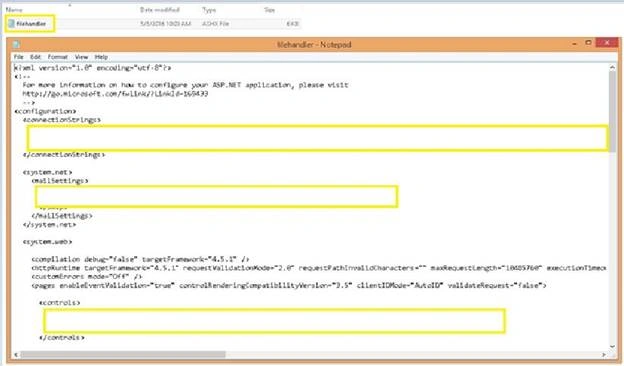
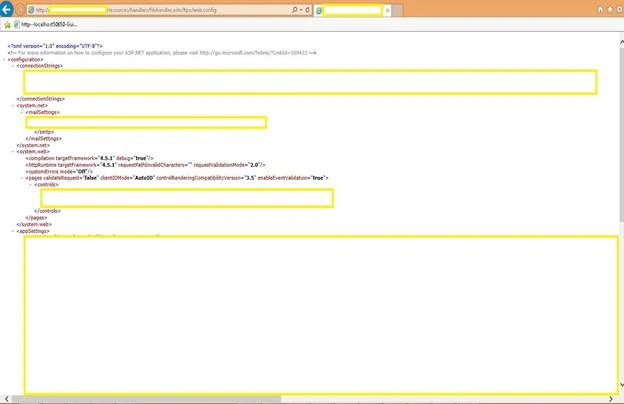
See the below screenshots (1, 2, 3), about how a hacker can steal the confidential information from config file.

Steps to secure config file
Step 1: Keep only framework related settings in application’s config file
Keep only framework related settings in your web.config / app.config file and remove all confidential information from web.config / app.config file.
Step 2: Create new config file and keep all the confidential information or data
Create one new web.config / app.config file and place all your confidential information in the required sections.
Step 3: Place newly created config file in your hard disk or in any secured server
Place the newly created web.config / app.config file in your hard disk or any secured server
(Let say you have placed your config file in your hard disk D:/).
Step 4: Read the config file
Read the required web.config / app.config section from the physical drive or from the secured server.
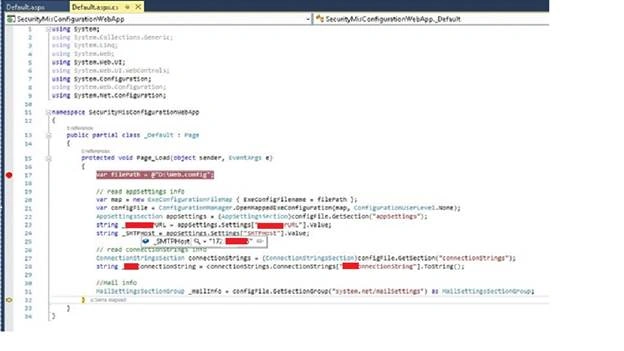
Below is the sample code snippet to read the required config sections from the config file.
- using System;
- using System.Collections.Generic;
- using System.Linq;
- using System.Web;
- using System.Web.UI;
- using System.Web.UI.WebControls;
- using System.Configuration;
- using System.Web.Configuration;
- using System.Net.Configuration;
- namespace SecurityMisConfigurationWebApp
- {
- public partial class _Default : Page
- {
- protected void Page_Load(object sender, EventArgs e)
- {
- var filePath = @"D:\Web.config";
- // read appSettings info
- var map = new ExeConfigurationFileMap { ExeConfigFilename = filePath };
- var configFile = ConfigurationManager.OpenMappedExeConfiguration(map, ConfigurationUserLevel.None);
- AppSettingsSection appSettings = (AppSettingsSection)configFile.GetSection("appSettings");
- string _gxxxxURL = appSettings.Settings["GxxxxURL"].Value;
- string _SMTPHost = appSettings.Settings["SMTPHost"].Value;
- // read connectionStrings info
- ConnectionStringsSection connectionStrings = (ConnectionStringsSection)configFile.GetSection("connectionStrings");
- string _aaaConnectionString = connectionStrings.ConnectionStrings["aaaConnectionString"].ToString();
- //Mail info
- MailSettingsSectionGroup _mailInfo = configFile.GetSectionGroup("system.net/mailSettings") as MailSettingsSectionGroup;
- }
- }
- }
Ravi LPosted Feb 25, 2020, 3:22 PM
The approach is to keep all the secure configuration information outside the web.config/app.config file. It does not really talk about securing the web.config using obfuscation/encryption. The title of the article is very misleading.
Kuppurasu NagarajPosted May 17, 2016, 11:49 AM
Nice sharing..
Debasis SahaPosted May 14, 2016, 1:54 AM
Good One..
Pankaj Kumar ChoudharyPosted May 13, 2016, 1:41 PM
Nice Explain ......
Sonu ChaudharyPosted May 13, 2016, 1:36 PM
good one
Bhuvanesh MohankumarPosted May 13, 2016, 11:18 AM
Good one
Vignesh ManiPosted May 13, 2016, 7:09 AM
nice one
Santosh Kumar AdidawarpuPosted May 13, 2016, 3:05 AM
Hello Sandeep, IIS allow you to download config file. I have tried the above steps for one of the live site and i am able to download its config file.
Francis SusaimichaelPosted May 13, 2016, 3:04 AM
Could you explain, what you are doing exactly in screen shots 1,2 and 3? As Sandeep told it is not possible to browse the web.config data. By default, IIS forbidden this.
Sandeep Singh ShekhawatPosted May 13, 2016, 2:52 AM
IIS will not allow you do open it through a browser assuming you are accessing it remotely. This is definately due to security because connection string and application specific information is usually stored in the web.config file.
Thiruppathi RPosted May 13, 2016, 2:25 AM
Nice Article..