

In this article, we are going to learn how to read values from "appsettings.json" file. You will ask why we want to read values from "appsettings.json" and what is there in "appsettings.json" that we would want to read it.
The "appsettings.json" file contains configuration settings. This file is similar to the Web.config file. In this file, we mostly store global values so that we can read those in the entire application. But Web.config file is in XML format and "appsettings.json" file is JSON format. We store the connection strings, keys, and value pairs mostly in "appsettings.json" file.
The way of the reading the values of Connection string and keys and value pairs in .NET application is given below.

But as we move towards .NET Core, the old style of reading values doesn’t work here. Let’s see the demo of how to set values and read values from "appsettings.json" file.
For doing this, let's create a .NET Core web application first.
Creating .Net Core web application
From Visual IDE, choose File Menu >> New >> Project.
After choosing the Project menu, a new dialog will pop up with the name “New Project”, as shown below.
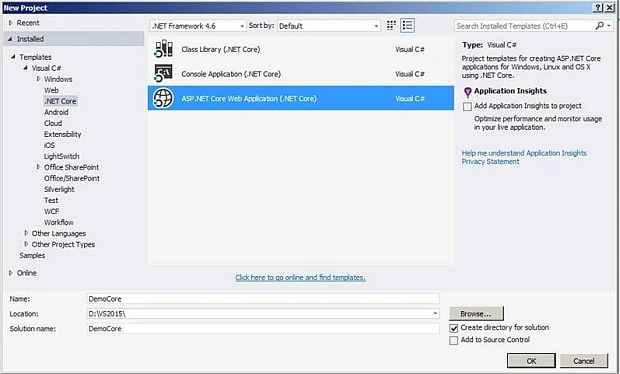
Creating new Web application project and naming it “DemoCore”
In this dialog, just have a look at the left panel [Templates]. Inside that, you will see a new option [.NET Core]. Just choose [.NET Core].
After that, in the middle panel, you will find all project templates related to .NET Core. Select the “ASP.NET Core Web Application (.NET Core)” template.
Now, we need to name the project. Here, we are naming this project as “DemoCore”. Finally, click on OK button to create the project.
In the next step, it asks for choosing project template. Here, we are going to choose "Web Application" template and click OK.
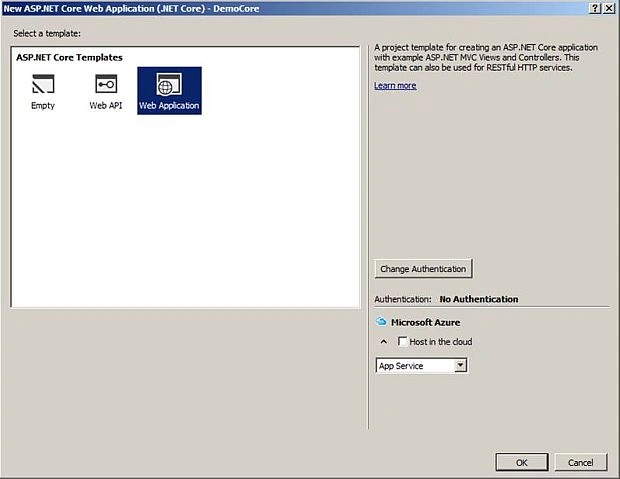
Choosing project template
Project Structure
The project structure after choosing the web application template:
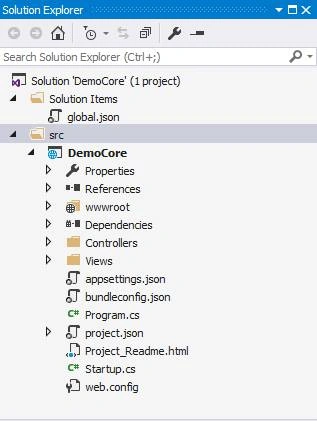
Project structure
You can see that the"appsettings.json" file is by default available in the new web application project.
Dependencies required for Using IConfiguration interface in project.json file
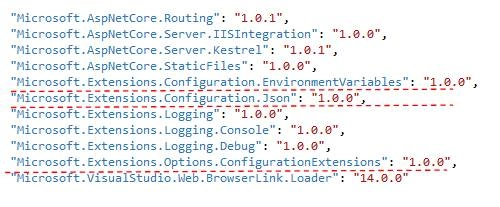
Dependencies required for Using IConfiguration interface in project.json file
Next, open the "appsettings.json" file in Visual Studio IDE.
appsettings.json file
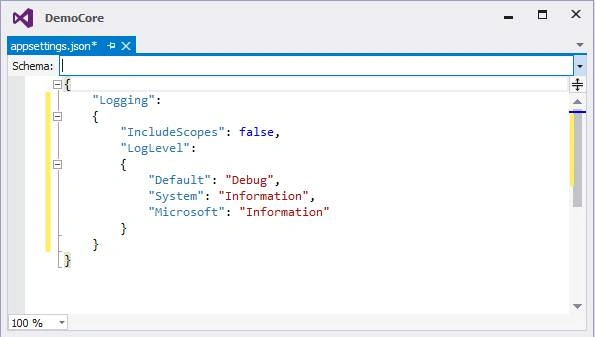
Appsettings.json file opened in edit mode
After opening the file in Visual Studio Editor, add the connection string, keys, and value pairs in it.
Adding Connection String and Key and Values in Appsettings.json file
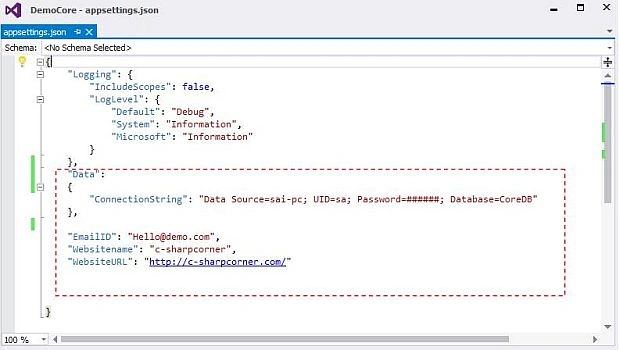
Adding new key and values in appsettings.json file
Adding new service in "ConfigureServices" Method in Startup class
In startup file, we need to add new Singleton instance in which we have passed Configuration class as instance. So, whenever we call IConfiguration Interface, their dependency injection will get an instance of Configuration class.
Note - In .NET core, dependency injection is a built-in feature.
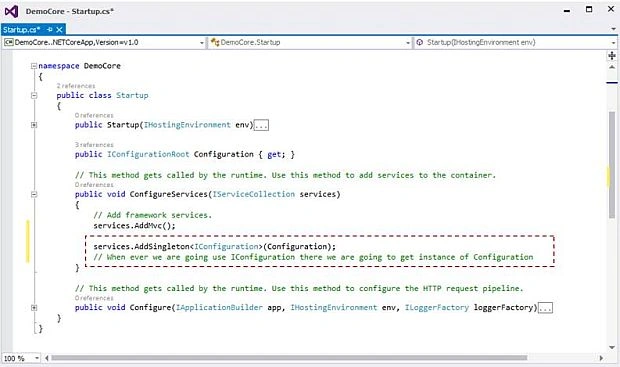
Adding new service for reading values of Appsettings.json file
Code snippet of Adding service in Appsettings.json
- public void ConfigureServices(IServiceCollection services) {
- services.AddMvc();
- services.AddSingleton < IConfiguration > (Configuration);
- }
Reading values from "appsettings.json" file
We are going to use Constructor injection with the homeController for reading the values. For that, I have added a Constructor named HomeController (same as class name) which takes IConfiguration Interface as an input parameter.
At runtime, when we call HomeController, this Constructor [HomeController(IConfiguration iconfiguration)] will get called and it will get resolved by its concrete class [Configuration] which we have set in Startup class.
From now on, we are not going to create instance but we are going to ask for instance.
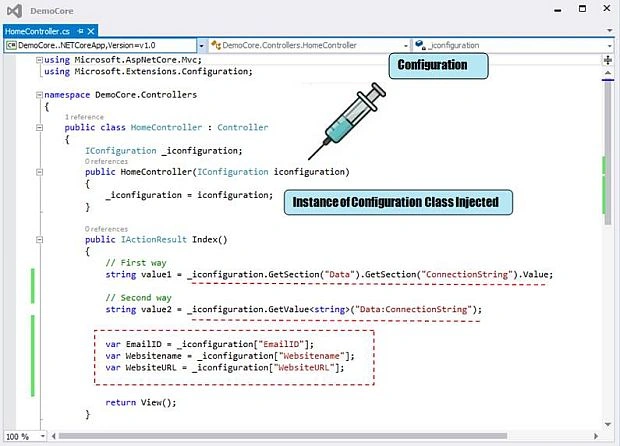
Reading values of Appsettings.json file
Code snippet of HomeController
- using Microsoft.AspNetCore.Mvc;
- using Microsoft.Extensions.Configuration;
- namespace DemoCore.Controllers {
- public class HomeController: Controller {
- IConfiguration _iconfiguration;
- public HomeController(IConfiguration iconfiguration) {
- _iconfiguration = iconfiguration;
- }
- public IActionResult Index() {
- // First way
- string value1 = _iconfiguration.GetSection("Data").GetSection("ConnectionString").Value;
- // Second way
- string value2 = _iconfiguration.GetValue < string > ("Data:ConnectionString");
- var EmailID = _iconfiguration["EmailID"];
- var Websitename = _iconfiguration["Websitename"];
- var WebsiteURL = _iconfiguration["WebsiteURL"];
- return View();
- }
- public IActionResult About() {
- ViewData["Message"] = "Your application description page.";
- return View();
- }
- public IActionResult Contact() {
- ViewData["Message"] = "Your contact page.";
- return View();
- }
- public IActionResult Error() {
- return View();
- }
- }
- }
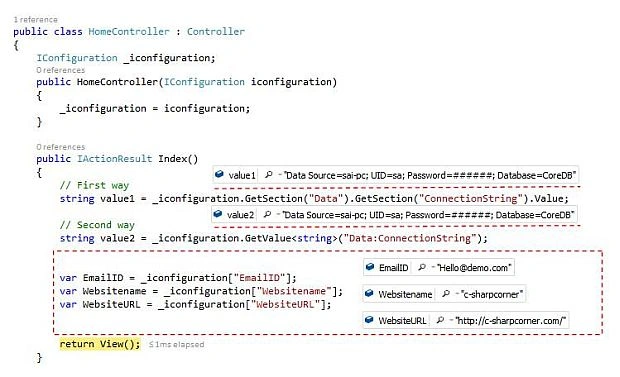
Snapshot of home controller while reading values from Appsettings.json file
SategoPosted Jun 8, 2022, 11:08 PM
Is there a way to update the data in the setting file?
NERY singerPosted Aug 10, 2021, 11:26 AM
Thank you, I was trying to do the same thing, but needing to create a class named "Settings" just to then put its data to my static Config class. Now I'm just passing the IConfiguration to my Config.Init() and it's working pretty well with half of the work.
Abdessamad JadidPosted Mar 21, 2021, 11:06 AM
Thanks dude , this is very useful
Brian DixonPosted Aug 1, 2019, 2:38 PM
Perhaps consider adding environment variable info and environment-specific appsettings<environment> JSON files and how they work.
Mahesh AllePosted Jul 24, 2019, 1:00 AM
Good Article. Well explained.
Sajith KPosted Jun 27, 2019, 9:07 AM
Thanks , this works like a charm
Ananth SakthivelPosted Jun 10, 2019, 7:20 AM
Appreciate it!. Your Solution is working good. Thanks For your support.
Gopal PandaPosted Mar 4, 2019, 7:09 PM
Your Solution does not work in ASP.Net Core 2.0 and above. I have downloaded your application, that itself is configured for Core 1.1
raghav subramanianPosted Jul 29, 2018, 1:29 AM
This article is quite useful. We used to create our own "config" class which would get values populated on startup and then dependency injected into classes that need it. Thanks to these extensions we no longer need those boilerplates
Arun SahooPosted May 15, 2018, 3:33 PM
Graet Sainesh, I am working .net core 2.0 and I don't think we need to add those dlls. Could you plese edit the article with new version and IOption examle.
Kapil JainPosted Apr 12, 2018, 11:44 PM
I have a web application made in asp.net which refer to some class library. Now I want to migrate web application to mvc core2.0. There is a class in class library which read web.config key. Now I have set all webconfig key into appsetting.json. Now appsetting keys are not found in class library. How to resolve this issue?
satyendra chPosted Dec 4, 2017, 1:34 AM
Good Explanation. I want to get these configuration setting from another project DAL?
Ramesh MaruthiPosted Dec 4, 2016, 9:30 PM
Excellent Sainesh, thanks for adding that point. Why I told that specifically is, it will be less secure and performance wise it will be worse. If you load every time the complete configuration set :)
Ramesh MaruthiPosted Dec 4, 2016, 1:08 AM
Hi Saineshwara, It would be great if you add about Ioptions in asp.net core. Instead of loading complete configuration everytime. We can use this option :)