

Table of Contents
- Introduction
- Objectives
- SSL Client Certificates
- How to Install SSL Certificate
- SSL Authentication Code
- IP Whitelisting
- References
Introduction
This document describes the purpose, features and implementation of SSL Certificate based authentication in Web API projects.
Objectives
Web API assumes that authentication happens in the host. For web-hosting, the host is IIS, which uses HTTP modules for authentication. You can configure your project to use any of the authentication modules built in to IIS or ASP.NET, or write your own HTTP module to perform custom authentication.
Several common authentication schemes are not secure over plain HTTP. In particular, Basic authentication and forms authentication send unencrypted credentials. To be secure, these authentication schemes must use SSL. In addition, SSL client certificates can be used to authenticate clients.
SSL Client Certificates
SSL provides authentication by using Public Key Infrastructure certificates. The server must provide a certificate that authenticates the server to the client. It is less common for the client to provide a certificate to the server, but this is one option for authenticating clients. To use client certificates with SSL, you need a way to distribute signed certificates to your users. For many application types, this will not be a good user experience, but in some environments (for example, enterprise) it may be feasible.
Advantages
- Certificate credentials are stronger than username/password.
- SSL provides a complete secure channel, with authentication, message integrity, and message encryption.
Disadvantages
- You must obtain and manage PKI certificates.
- The client platform must support SSL client certificates.
To configure IIS to accept client certificates, open IIS Manager and perform the following steps:
- Click the site node in the tree view.
- Double-click the SSL Settings feature in the middle pane.
- Under Client Certificates, select one of these options:
Accept: IIS will accept a certificate from the client, but does not require one.
Require: Require a client certificate. (To enable this option, you must also select "Require SSL")
Using Client Certificates in Web API
On the server side, you can get the client certificate by calling GetClientCertificate() on the request message. The method returns null if there is no client certificate. Otherwise, it returns an X509Certificate2 instance. Use this object to get information from the certificate, such as the issuer and subject. Then you can use this information for authentication and/or authorization.
How to Install SSL Certificate
There are total two certificates that you need to install and configure on your development machine,
- Install the Certificate.cer certificate in your Trusted Root Certification Authorities for the Local Machine store using MMC (right-click over the Trusted Root Certification Authorities folder | All Tasks | Import).
Example screenshot:
- Install the ClientCert.pfx certificate in the Personal store of Local Computer using MMC. Notice that the certificate shows it was issued by your Certificate Authority.
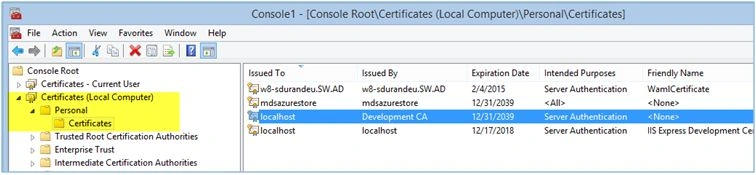
We already installed certificates on PY server. Following procedure shows how to install required certificates on server.
- Install above 2 certificates on server.
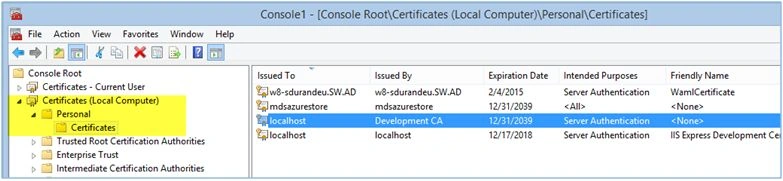
- Install the PvtSSLCert.pfx certificate in the Personal store of Local Computer using MMC. Notice that the certificate shows it was issued byyour Certificate Authority.
SSL Authentication Code
- using System;
- using System.Security.Claims;
- using System.Security.Cryptography.X509Certificates;
- using System.Threading.Tasks;
- using Microsoft.Owin;
- namespaceProject.Owin.Middleware
- {
- ///<summary>
- /// CertificateAuthenticationMiddleware class is used to secure the web API using certificate based
- /// Authentication. This class inherits OwinMiddlerware class.
- ///</summary>
- publicclassCertificateAuthenticationMiddleware: OwinMiddleware
- {
- conststring OwinCertFunc = "ssl.LoadClientCertAsync";
- conststring OwinCert = "ssl.ClientCertificate";
- conststring OwinCertError = "ssl.ClientCertificateErrors";
- public CertificateAuthenticationMiddleware(OwinMiddleware next): base(next)
- {}
- ///<summary>
- /// The Invoke() method is invocked from startup class of OWIN for security.
- ///</summary>
- ///<param name="context"></param>
- ///<returns></returns>
- publicasyncoverrideTask Invoke(IOwinContext context)
- {
- if (context.Environment.Keys.Contains(OwinCertFunc))
- {
- try
- {
- var task = (context.Environment[OwinCertFunc] asFunc < Task > );
- awaitTask.Run(task);
- if (context.Environment.Keys.Contains(OwinCert))
- {
- var cert = context.Environment[OwinCert] asX509Certificate;
- if (cert != null) context.Request.Environment.Add(SystemContants.OwinMannatechClientInfo, cert.Subject);
- else
- {
- context.Response.StatusCode = 403;
- return;
- }
- }
- else
- {
- context.Response.StatusCode = 403;
- return;
- }
- // Exception certError;
- if (context.Environment.Keys.Contains(OwinCertError))
- {
- //certError = context.Environment[OwinCertError] as Exception;
- context.Response.StatusCode = 403;
- return;
- }
- }
- catch (Exception ex)
- {
- context.Response.StatusCode = 403;
- return;
- }
- }
- else
- {
- context.Response.StatusCode = 403;
- return;
- }
- await Next.Invoke(context);
- }
- }
- }
Using the OWIN middleware here we can whitelist the range of IP Addresses or the specific IP address. If the request comes only from these whitelisted IP addresses then the API respond to that request.
Below is the code of IP whitelisting.
- using System.Collections.Generic;
- using System.Threading.Tasks;
- using Microsoft.Owin;
- namespaceProject.Owin.Middleware
- {
- ///<summary>
- /// IpWhiteListMiddleware class is used to secure the web API, It gives the acess only those IP addesss
- /// which are configured in "Web.config". This class inherits OwinMiddlerware class.
- ///</summary>
- publicclassIpWhiteListMiddleware: OwinMiddleware
- {
- privatereadonlyHashSet < string > _whitelistIps;
- public IpWhiteListMiddleware(OwinMiddleware next, HashSet < string > whitelistIps): base(next)
- {
- _whitelistIps = whitelistIps;
- }
- ///<summary>
- /// The Invoke() method is invocked from startup class of OWIN for security.
- ///</summary>
- ///<param name="context"></param>
- ///<returns></returns>
- publicasyncoverrideTask Invoke(IOwinContext context)
- {
- if (!_whitelistIps.Contains(context.Request.RemoteIpAddress) && !context.Request.IsLocal())
- {
- //context.Response.StatusCode = 404;
- var response = context.Response;
- var request = context.Request;
- response.OnSendingHeaders(state =>
- {
- var resp = (OwinResponse) state;
- resp.StatusCode = 200;
- resp.ReasonPhrase = "IP address is not registered"; // if you're going to change the status code
- // you probably should also change the reason phrase
- }, response);
- return;
- }
- await Next.Invoke(context);
- }
- }
- }
- publicclassStartup
- {
- ///<summary>
- /// Owin Configuration method for IP Whitelisting and the Certificate based authentication
- ///</summary>
- publicvoid Configuration(IAppBuilder app)
- {
- app.UseHttpTracking(newHttpTrackingOptions
- {
- TrackingStore = newHttpTrackingStore(),
- TrackingIdPropertyName = "x-tracking-id",
- MaximumRecordedRequestLength = 64 * 1024,
- MaximumRecordedResponseLength = 64 * 1024,
- });
- string[] IPList = ConfigurationManager.AppSettings["IPWhiteList"].Split(',').Select(s => s.ToString()).ToArray();
- var whitelistIps = newHashSet < string > (IPList);
- //var whitelistIps = new HashSet<string> { "14.140.150.214", "50.200.185.198", "67.208.128.168","10.77.5.52" };
- app.Use(typeof(IpWhiteListMiddleware), whitelistIps);
- app.Use(typeof(CertificateAuthenticationMiddleware));
- var config = newHttpConfiguration();
- WebApiConfig.Register(config);
- app.UseWebApi(config);
- config.Services.Clear(typeof(ModelValidatorProvider));
- log4net.Config.XmlConfigurator.Configure();
- }
- }
Matteo PeruPosted Mar 28, 2023, 3:34 PM
Can you please explain better what "SystemCostants.OwinMannatechClientInfo" refers to because I'm not finding references anywhere, it's just a key that I can assign arbitrarily? Thank you!
usharani KPosted Jun 17, 2016, 5:15 AM
I have tried the above code blocks for retrieving the Client ceriticate from the property "ssl.ClientCertificate".But still I am getting the null value for client certificate. Steps followed: 1. Enabled SSL configuration in IIS 2. Import the certificate in the necessary place in MMC 3. Mapped the certificate in my client application in IIS hosted is https. 4. Registered the port using netsh with thumbprint identification for client application 5. Hosted the Web Api in OWIN 6. Registered the port using netsh with thumbprint identification for Web API Is there anything I missed out in configuration? Can anyone help me out?
Kuppurasu NagarajPosted Apr 11, 2016, 1:48 PM
Nice Sharing
Humayun Kabir MamunPosted Apr 4, 2016, 5:58 AM
Nice...
Pruthwiraj JagadalePosted Mar 31, 2016, 6:06 AM
Thanks all
Mohammed IbrahimPosted Mar 31, 2016, 3:45 AM
nice
Sibeesh VenuPosted Mar 31, 2016, 2:30 AM
Nice Share
Maruthi PalllamalliPosted Mar 31, 2016, 2:09 AM
How do you say "Certificate credentials are stronger than username/password." ? There is a number of code snippets to skip validate certification so client doesn't perform any support for ssl certificates i think so. Your api is one of the part in site applications and Any way your site has certificate. Then what is the need to add certificate to only API.
Debendra DashPosted Mar 30, 2016, 3:19 PM
good one........
Jaipal ReddyPosted Mar 30, 2016, 12:00 PM
Nice. .
Debasis SahaPosted Mar 30, 2016, 9:03 AM
Good One..
Vignesh ManiPosted Mar 30, 2016, 8:43 AM
nice