

Introduction
In this article, you can see an integration of Swagger in WebApi2. Swashbuckle/Swagger is simple and powerful representation of any RESTful Web API. Swagger is and simple works as client to call Restfull Web API with an Application. There is no need to use other third party testing tool (Postman, Fiddler etc.). You can see in the list, given below-

- What is Swashbuckle/Swagger ?
- How to integrate Swagger with WebApi in MVC?
- How to use swagger in Web Application?
- How to customize Swagger?
- End point representation in Swagger UI.
- Advantage of Swagger.
What is washbuckle/Swagger?
Swagger is an advance technique to represent RESTfull Web API. Swagger is working with an Application. You can configure Swagger inside your Application. Its very easy to use and integrate inside your MVC WebAPI project.
Technically, we can say, Swagger is a formal specification, which is surrounded by a large ecosystem of tools, which includes each and everything from the front-end user interfaces. This is having low-level code libraries and commercial API management solutions.
Swagger is an advance technique to represent RESTfull Web API. Swagger is working with an Application. You can configure Swagger inside your Application. Its very easy to use and integrate inside your MVC WebAPI project.
Technically, we can say, Swagger is a formal specification, which is surrounded by a large ecosystem of tools, which includes each and everything from the front-end user interfaces. This is having low-level code libraries and commercial API management solutions.
How to integrate with WebAPI in MVC?
If you are going to integrate Swagger to test WebAPI in MVC Application, follow some steps, which are given below-
If you are going to integrate Swagger to test WebAPI in MVC Application, follow some steps, which are given below-
Step 1- Create a MVC Application, using Visual Studio (2012-latest version). I am giving to you an example, which is created on Visual Studio 2012 4.5. See the image, given below-
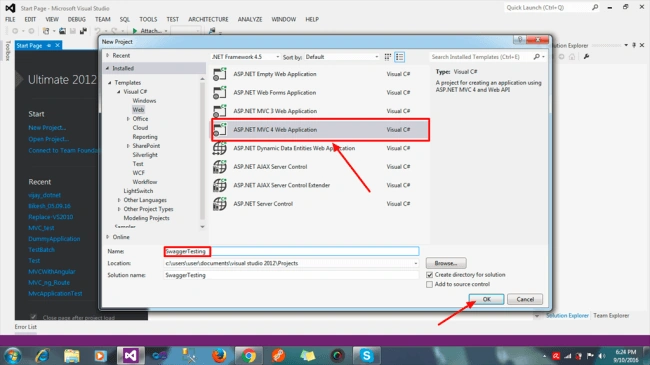
In this, I am creating a MVC 4 Application, select and type your project name and click "OK".
In this, I am creating a MVC 4 Application, select and type your project name and click "OK".
Step 2- After clicking "OK", you can see the screen, which is given below-
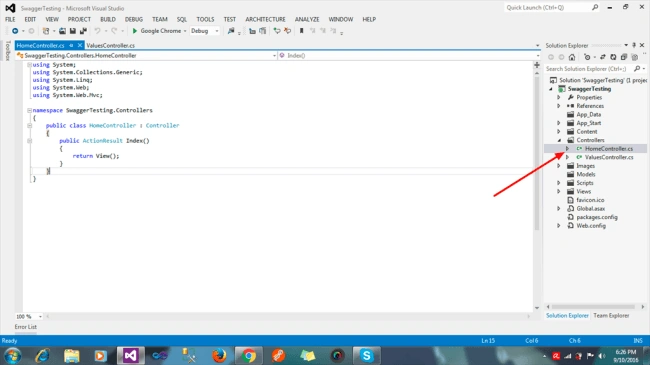
In this image, you can see two "controller" and "App_start", created by default. In this image, there are two controllers "Home" is its normal MVC controller and second is "value", which is Apicontroller. Swagger doesn't list the normal controller.
Step 3- Go your Application "SwaggerTesting"=>Right click=>click on "Manage NuGet Packages". Thereafter, you can see a screen. See the image, given below-
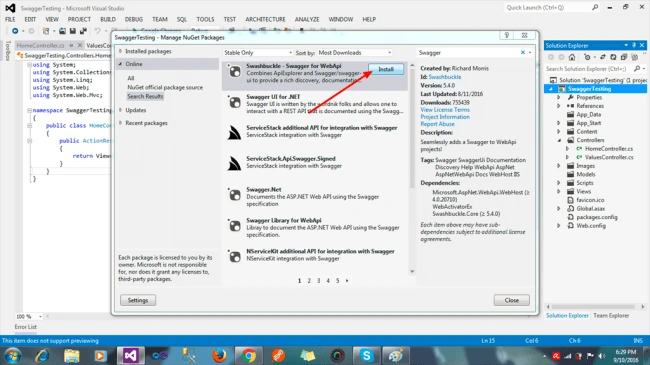
After this screen, type "swagger" in search textbox=>click install and you should wait for 1 minute, because it will take approximate 30 sec-1 minute.
After this screen, type "swagger" in search textbox=>click install and you should wait for 1 minute, because it will take approximate 30 sec-1 minute.
Or
Go to "TOOLS" menu on the top of the screen=>Library package manager=>Package manager console. Afterwards, this will open new Window on bottom of the editor.
PM>Install-Package Swashbuckle -Version 5.4.0
Afterwards, swagger.config file will add automatically in your App_Start folder. See the image, given below-
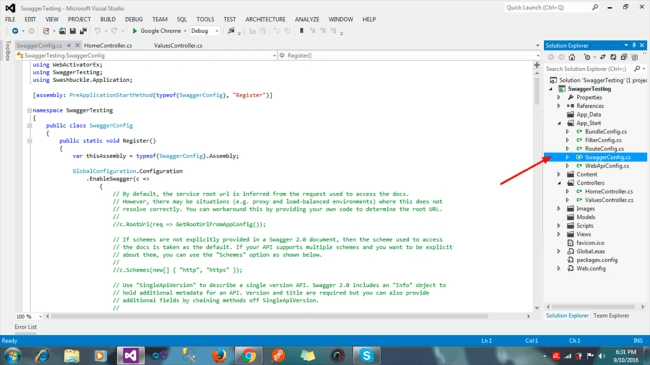
You can see swagger.config file is added in App_start folder. Now, you are ready to use Swagger in your Application. There is no need to do any custom configuration, as it is by default and you can use.
Afterwards, swagger.config file will add automatically in your App_Start folder. See the image, given below-
You can see swagger.config file is added in App_start folder. Now, you are ready to use Swagger in your Application. There is no need to do any custom configuration, as it is by default and you can use.
How to use Swagger ?
Swagger works same as Web Application. You can run same as well as MVC controller, action and view. I am going to explain, how to use Swagger.
Swagger works same as Web Application. You can run same as well as MVC controller, action and view. I am going to explain, how to use Swagger.
Step 4- Run your Application without any customization in the Application. See the image, given below-
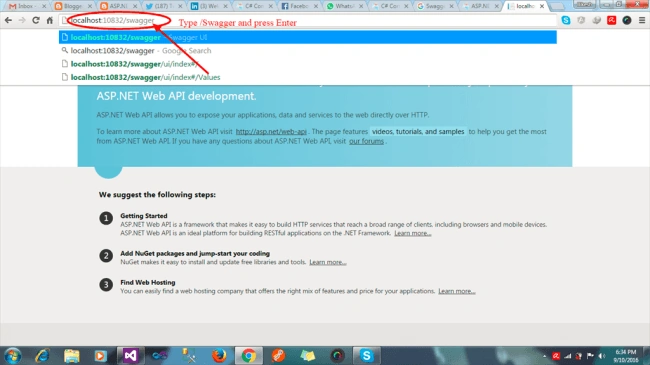
After running the Application, the default page will open via this end point "http://localhost:10832/". To use Swagger, type "/swagger" and click enter. Your end point("http://localhost:10832/swagger") will open a new UI page. As per the image, you can see an example-
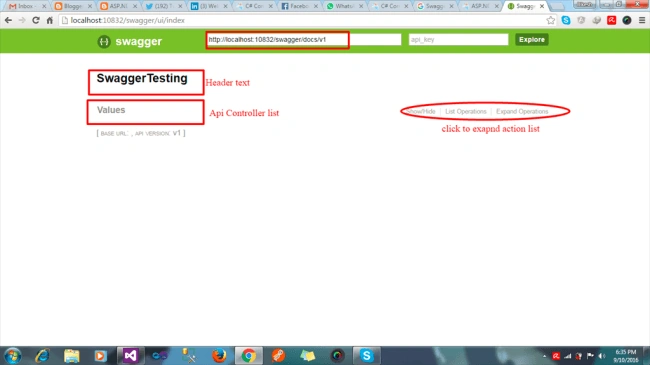
This is Swagger UI page. You can see here "swaggerTesting" is a header text. You can customize it, as per you requirement.
In this, you can see Swagger is listed in only API controller and not the simple controller. Click "Value" row and you can see each action with the header, parameter, action name, GET, POST etc.
Step 5-Click "Value"=>Expand all API list with the request method.
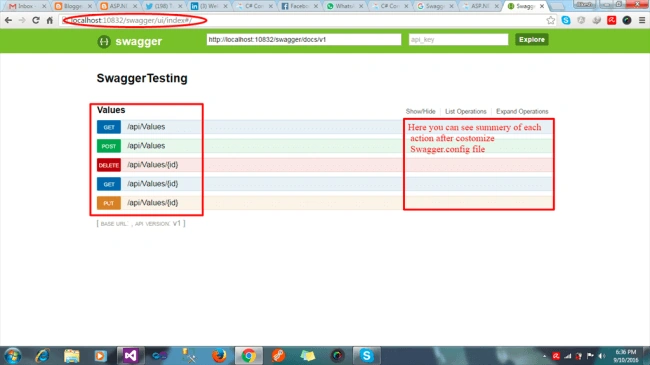
You can see all API list. According to HTTP method, colour is different. Now, click any and test to show the output. See the image, given below,
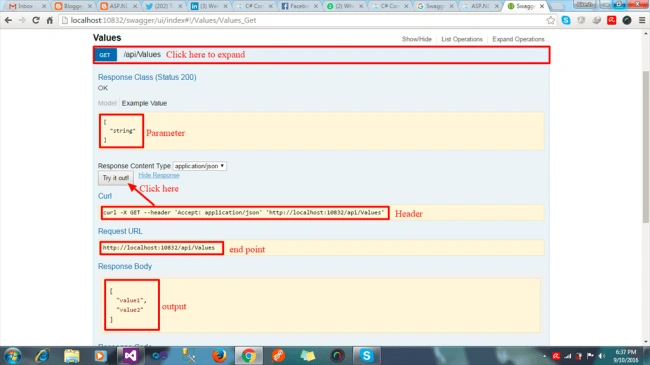
Step 6- Now, click any Web API and you can see all the details of Web API. Afterwards, set the parameter and click "Try it out".
The output will be shown at the bottom of the screen.
Customization of swagger.config
Customization of Swagger means Show API details from XML content, change the layout. Now, I am going to explain, how to show the details of each API on Swagger UI page. i am going to change swagger.config file to display API details on the right corner of the screen.
Customization of Swagger means Show API details from XML content, change the layout. Now, I am going to explain, how to show the details of each API on Swagger UI page. i am going to change swagger.config file to display API details on the right corner of the screen.
Step 7-Go to Application=>right click=>property=>select Build=>check "xml document file" to enable get XML content. See the image, given below,
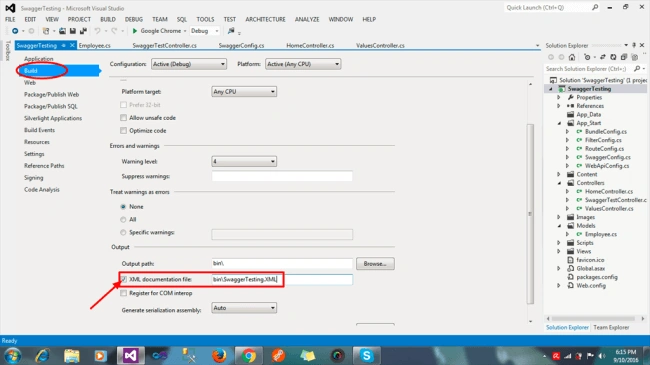
In this image, you can see, I have checked on the checkbox to enable XML document. Also, i have added one more fresh APIController.
- using System;
- using System.Collections.Generic;
- using System.Linq;
- using System.Net;
- using System.Net.Http;
- using System.Web.Http;
- using SwaggerTesting.Models;
- namespace SwaggerTesting.Controllers
- {
- public class SwaggerTestController : ApiController
- {
- /// <summary>
- /// get simple string
- /// </summary>
- [HttpGet]
- public string ResultGet()
- {
- return "swagger testing for get";
- }
- /// <summary>
- /// Post simple string
- /// </summary>
- [HttpPost]
- public string ResultPost()
- {
- return "swagger testing for post";
- }
- /// <summary>
- /// To Update databse using EmpId
- /// </summary>
- /// <param name="EmpId"></param>
- [HttpPut]
- public string UpdateEmployee(Employee Emp)
- {
- /////////type code according your application
- return "data Updated";
- }
- }
- }
Step 8- After completing that step, go on Swagger. Config file creates new method to get XML document like-
- protected static string GetXmlCommentsPath()
- {
- return Path.Combine(System.Web.HttpRuntime.AppDomainAppPath, "bin", "SwaggerTesting.XML");
- }
Uncomment "c.IncludeXmlComments(GetXmlCommentsPath());" this line of code.
End point representation in swagger UI
It means you see whole details of endpoint, using Swagger. See the image, which is given below,
like this "/api/swaggertest" with get method.
It means you see whole details of endpoint, using Swagger. See the image, which is given below,
like this "/api/swaggertest" with get method.
Step 9- Run again and follow the previous step to open Swagger UI. Just type "/swagger" in the URL and see the image, given below-
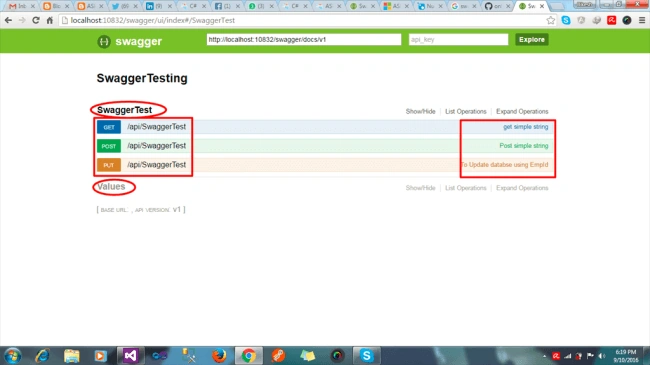
In this image, you can see new controller, which i have created with the details on the right corner.
Step 10- Click any to set the parameter and click "try it out". It will return an output. See the image, given below-
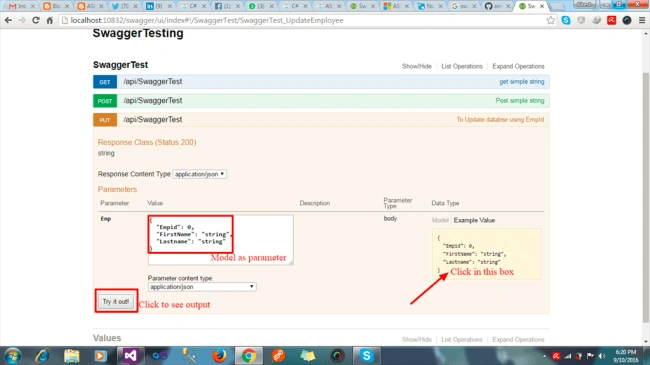
You can understand more and see the image, given below,
Advantages of Swagger
- End point user standing about Web API.
- No need to add any extra configuration.
- This can integrate easily with the Application.
- No need to use other resources like POSTMAN etc.
- Easy to understand parameter, model, datatypes, header to anyone.
Conclusion
In this article, I explained about Swagger. I hope, you understood it. Actually, I am creating a dummy Application. Thus, you need to use routing, but if you are going to create Web API, which is set the route for each Web API.
In this article, I explained about Swagger. I hope, you understood it. Actually, I am creating a dummy Application. Thus, you need to use routing, but if you are going to create Web API, which is set the route for each Web API.
Khushbu SainiPosted Dec 7, 2020, 2:50 AM
Great article..):-
Ganesh GanesanPosted Apr 22, 2019, 6:23 AM
Hi Bikesh. Can u help me on this. This is urgent one
Ganesh GanesanPosted Apr 22, 2019, 6:20 AM
Guys. We have two controllers(SwaggerTestController, valuesController) and displayed in Swagger appropriately. But assume that we have two or more controllers, but I want to display a particular controller based on our needs at run time. Could anyone explain how to perform this.
Naman UpadhyayPosted Mar 22, 2019, 5:03 AM
In this bottom of swagger doc where base URL is empty how we can add our base path of our API??
Venkat KumarPosted Apr 9, 2018, 3:08 AM
Hi Bikesh, How to hide "Try it out" button in swagger ui in .net framework project?
Jeff ReynoldsPosted Jan 28, 2018, 1:11 PM
Great article! I'm having an issue with Swagger not recognizing new public methods added to my restful service. I previously added Swagger to my Visual Studio 2012 web api2 project. It worked beautifully. I then added a new public method and it does not appear on the Swagger page when I run my app and navigate browser to load it. As a test, I commented an existing method Swagger previously documented, and rebuilt my solution. The commented method still appears on the Swagger page as if it is valid. It is probably something very simple. Thanks!
Hamid KhanPosted Jan 27, 2018, 1:40 PM
Great article....................
Dhulhum khanPosted Apr 4, 2017, 10:17 AM
Thanks for this tutorial.I have one doubt. In my application i am using routing something like this.. [HttpGet] [Route("api/GetCookingInstr", Name = "api/GetCookingInstr")] public string GetCookingInstr() { DataTable list = new DataTable(); String cmd = ""; cmd = "select cookseq,cookinstr from Cookinginstr"; db.SelectData(list, cmd); String JSONString = String.Empty; JSONString = JsonConvert.SerializeObject(list); return JSONString; } [HttpGet] [Route("api/GetTables", Name = "api/GetTables")] public string GetTables() { DataTable list = new DataTable(); String cmd = ""; cmd = "select TBSEQ,TBDESC,TBTABLEMODE from dinetables"; db.SelectData(list, cmd); String JSONString = String.Empty; JSONString = JsonConvert.SerializeObject(list); return JSONString; } In SwaggerUI , i am not getting this routes. Its blank..no api..how to solve this...can u please help.
Dhulhum khanPosted Apr 4, 2017, 10:16 AM
Thanks for this tutorial.I have one doubt. In my application i am using routing something like this.. [HttpGet] [Route("api/GetCookingInstr", Name = "api/GetCookingInstr")] public string GetCookingInstr() { DataTable list = new DataTable(); String cmd = ""; cmd = "select cookseq,cookinstr from Cookinginstr"; db.SelectData(list, cmd); String JSONString = String.Empty; JSONString = JsonConvert.SerializeObject(list); return JSONString; } [HttpGet] [Route("api/GetTables", Name = "api/GetTables")] public string GetTables() { DataTable list = new DataTable(); String cmd = ""; cmd = "select TBSEQ,TBDESC,TBTABLEMODE from dinetables"; db.SelectData(list, cmd); String JSONString = String.Empty; JSONString = JsonConvert.SerializeObject(list); return JSONString; } In SwaggerUI , i am not getting this routes. Its blank..no api..how to solve this...can u please help.
Neha AmbastaPosted Mar 27, 2017, 6:33 AM
Helpful for me! Thanks :)
Vignesh ManiPosted Sep 16, 2016, 8:31 AM
Good one
Ramesh MaruthiPosted Sep 13, 2016, 11:09 AM
Excellent Article Bikesh !
Ravi PatelPosted Sep 13, 2016, 6:51 AM
Thanks for nice article