

I am again here to continue the discussion around Threading. Today we will discuss about Mutex and related concepts. Before starting, let us visit the previous articles of the series,
- Threading Simplified: Part 1 (Threads Inception)
- Threading Simplified: Part 2 (Multithreading Concepts)
- Threading Simplified: Part 3 (Threads type)
- Threading Simplified: Part 4 (Threads Creation)
- Threading Simplified: Part 5 (Thread Pools)
- Threading Simplified: Part 6 (Exception Handling)
- Threading Simplified: Part 7 (Thread Priority)
- Threading Simplified: Part 8 (Synchronization Basics and Thread Blocking)
- Threading Simplified: Part 9 (Thread Locking)
- Threading Simplified: Part 10 (Monitor)
- Threading Simplified: Part 11 (Thread Atomicity & Deadlock)
Let’s start by putting some questions to understand the concepts.
What is Mutex in Multithreading and how is it different to lock?
Mutex stands for Mutual Exclusion and can be used for inter-process synchronization. Mutex works similarly to lock except that it’s an operating system level lock and hence can be used to lock across processes. On the contrary lock only works across threads in an AppDpmain of a process.
Mutex object can also be passed as a method parameter unlike lock.
Why Mutex is required?
Mutex can be used in cases when we want to make sure that any piece of code if locked, should not be accessed across processes. We can also use Mutex to check if another instance of the application using the same Mutex is running or not.
What is unnamed and named Mutex?
Unnamed mutex is a mutex when you don’t specify its name while creation. Unnamed mutex works across App Domains in a process.
Whereas named mutex has a bigger scope and it works across processes in an operating system.
Does lock and unnamed Mutex have similar locking scope?
No. Lock works across threads in an App Domain whereas unnamed mutex works across App domains in a process.
How to use Mutex in an application?
Mutex can be activated by WaitOne method and can be released by ReleaseMutex.
Another way to release Mutex is to close or release the mutex variable.
Similar to lock, Mutex can be released only by the thread which has activated it and not by any other running threads.
Let’s understand this by simple example.
Let’s first see an example by which we can determine that another instance of the program is running or not.
To test this, execute the below code in two different projects one after another, the later one should print “Already running”. The reason is first instance will create Mutex of name “ThreadingDemo” and hence it won’t allow another instance or process to create the same Mutex as it’s already present.
It also demonstrates that Mutex works cross processes.
What is Mutex in Multithreading and how is it different to lock?
Mutex stands for Mutual Exclusion and can be used for inter-process synchronization. Mutex works similarly to lock except that it’s an operating system level lock and hence can be used to lock across processes. On the contrary lock only works across threads in an AppDpmain of a process.
Mutex object can also be passed as a method parameter unlike lock.
Why Mutex is required?
Mutex can be used in cases when we want to make sure that any piece of code if locked, should not be accessed across processes. We can also use Mutex to check if another instance of the application using the same Mutex is running or not.
What is unnamed and named Mutex?
Unnamed mutex is a mutex when you don’t specify its name while creation. Unnamed mutex works across App Domains in a process.
Whereas named mutex has a bigger scope and it works across processes in an operating system.
Does lock and unnamed Mutex have similar locking scope?
No. Lock works across threads in an App Domain whereas unnamed mutex works across App domains in a process.
How to use Mutex in an application?
Mutex can be activated by WaitOne method and can be released by ReleaseMutex.
Another way to release Mutex is to close or release the mutex variable.
Similar to lock, Mutex can be released only by the thread which has activated it and not by any other running threads.
Let’s understand this by simple example.
Let’s first see an example by which we can determine that another instance of the program is running or not.
To test this, execute the below code in two different projects one after another, the later one should print “Already running”. The reason is first instance will create Mutex of name “ThreadingDemo” and hence it won’t allow another instance or process to create the same Mutex as it’s already present.
It also demonstrates that Mutex works cross processes.
- static void Main(string[] args)
- {
- Console.Title = "Mutex Demo";
- bool createdNew;
- using (Mutex m = new Mutex(false, "ThreadingDemo", out createdNew))
- {
- if (createdNew)
- {
- Console.WriteLine("Not running");
- }
- else
- {
- Console.WriteLine("Already running");
- }
- }
- }
- static bool IsSingleInstanceExists()
- {
- try
- {
- // Try to open existing mutex.
- Mutex.OpenExisting("ThreadingDemo");
- }
- catch
- {
- // If exception occurred, there is no such mutex present.
- Mutex m = new Mutex(true, "ThreadingDemo");
- return true;
- }
- // More than one instances are present.
- return false;
- }
- static void Main(string[] args)
- {
- Console.Title = "Mutex Demo";
- Console.WriteLine("Is only instance running: {0}", IsSingleInstanceExists());
- }


So far, we discussed what Mutex is and how it’s different from lock and how to check if another instance holding the same Mutex is running or not. Now let’s see how to use it.
- private static readonly Mutex mutex = new Mutex();
- static Thread thread1 = new Thread(DoWork);
- static Thread thread2 = new Thread(DoWork);
- public static void DoWork()
- {
- mutex.WaitOne();
- try
- {
- Console.WriteLine("{0} has entered", thread1.Name);
- //Safe Code
- Thread.Sleep(2000);
- Console.WriteLine("{0} has exited", thread2.Name);
- }
- finally
- {
- mutex.ReleaseMutex();
- }
- }
- static void Main(string[] args)
- {
- Console.Title = "Mutex Demo";
- thread1.Name = "Thread1";
- thread1.Start();
- thread2.Name = "Thread2";
- thread2.Start();
- }
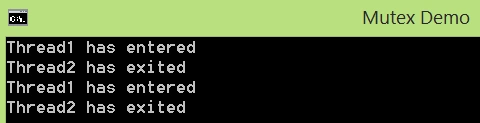
As you can see that how Thread1 and Thread2 has entered and exited from Mutex.
Hope you have liked the article. Look forward for your comments/suggestions.
Read more articles on Threading:
Prakash TripathiPosted Aug 2, 2016, 2:25 PM
Thnx Vivek for reading.
Vivek KumarPosted Aug 2, 2016, 1:56 PM
Nice one
Prakash TripathiPosted Apr 22, 2016, 12:17 PM
Thnx Nagraj.
Kuppurasu NagarajPosted Apr 22, 2016, 12:04 PM
Nice Sharing..
Prakash TripathiPosted Apr 22, 2016, 6:47 AM
Thnx KP Singh.
K P Singh ChundawatPosted Apr 22, 2016, 6:32 AM
Nice Share
Prakash TripathiPosted Apr 21, 2016, 8:38 PM
Thnx Debasis.
Debasis SahaPosted Apr 21, 2016, 1:28 PM
Nice One..
Prakash TripathiPosted Apr 21, 2016, 9:30 AM
Thnx Rahul.
Rahul Kumar SaxenaPosted Apr 21, 2016, 9:05 AM
Good series
Prakash TripathiPosted Apr 21, 2016, 8:48 AM
Thnx Vignesh.
Vignesh ManiPosted Apr 21, 2016, 8:22 AM
Good
Prakash TripathiPosted Apr 21, 2016, 6:47 AM
Thnx Gowtham.
Gowtham RajamanickamPosted Apr 21, 2016, 6:37 AM
very good