
How to implement versioning in ASP.NET Core Web API.
SolutionCreate an empty project, and add the following NuGet package.
- Microsoft.AspNetCore.Mvc.Versioning
Update the Startup class to add services and middleware for MVC.
- public void ConfigureServices(
- IServiceCollection services)
- {
- services.AddApiVersioning(options =>
- {
- options.ReportApiVersions = true;
- options.AssumeDefaultVersionWhenUnspecified = true;
- options.DefaultApiVersion = new ApiVersion(1, 0);
- });
- services.AddMvc();
- }
- public void Configure(
- IApplicationBuilder app,
- IHostingEnvironment env)
- {
- app.UseDeveloperExceptionPage();
- app.UseMvcWithDefaultRoute();
- }
Add controllers for different versions that can be accessed via query string.
- /movies?api-version=2.0
- [ApiVersion("1.0")]
- [Route("movies")]
- public class MoviesControllerV1 : Controller
- {
- [HttpGet]
- public IActionResult Get() => Content("Version 1");
- }
- [ApiVersion("2.0")]
- [Route("movies")]
- public class MoviesControllerV2 : Controller
- {
- [HttpGet]
- public IActionResult Get() => Content("Version 2");
- }
Add controllers for different versions that can be accessed via URL.
- /actors/v2.0
- [ApiVersion("1.0")]
- [Route("actors/v{ver:apiVersion}")]
- public class ActorsControllerV1 : Controller
- {
- [HttpGet]
- public IActionResult Get() => Content("Version 1");
- }
- [ApiVersion("2.0")]
- [Route("actors/v{ver:apiVersion}")]
- public class ActorsControllerV2 : Controller
- {
- [HttpGet]
- public IActionResult Get() => Content("Version 2");
- }
Add controllers for different versions that can be accessed via HTTP Header.
- /reviews
- [ApiVersion("1.0")]
- [Route("reviews")]
- public class ReviewsControllerV1 : Controller
- {
- [HttpGet]
- public IActionResult Get() => Content("Version 1");
- }
- [ApiVersion("2.0")]
- [Route("reviews")]
- public class ReviewsControllerV2 : Controller
- {
- [HttpGet]
- public IActionResult Get() => Content("Version 2");
- }
You can pass the header using Postman.
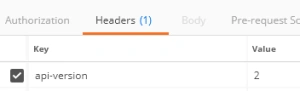
As your Web API changes, you would need to add versioning support in order for clients to continue working correctly. Adding versioning support in ASP.NET Core involves first configuring services in Startup and then choosing a versioning strategy, i.e., via the query string, URL, or HTTP header.
Note: I prefer using HTTP headers to supply version number as it keeps the URL free of clutter, however, you could choose option better suited for your needs.
Configuring ServicesDuring configuration, you could set the following properties.
- ReportApiVersions: adds a response header api-supported-versions.
- AssumeDefaultVersionWhenUnspecified: For clients that don’t specify the version, the default will be used, otherwise, they will get an error (UnsupportedApiVersion).
- DefaultApiVersion: specify default version number using ApiVersion
- ApiVersionReader: specify the location from where version v is read. The default is a query string, however, to use HTTP header, you need to specify this (see section below).
- Conventions: instead of using [ApiVersion] attribute, you could specify versions of various controllers here (see section below).
Note
You could read the current version of the request by using the GetRequestedApiVersion method on HttpContext, which returns ApiVersion type.
The default method of specifying version number is via query string api-version parameter.
URLYou could use a route and apiVersion constraint to specify the version number in the URL. Note that specifying the version in query string will no longer work (it will be ignored since the route will hit a specific controller):
- [ApiVersion("2.0")]
- [Route("actors/v{ver:apiVersion}")]
- public class ActorsControllerV2 : Controller
HTTP Header
To use HTTP headers to pass in version number, you need to first configure the version reader, which tells the middleware how to read version. Once this option is configured, specifying the version in query string won’t work:
- options.ApiVersionReader = new HeaderApiVersionReader("api-version");
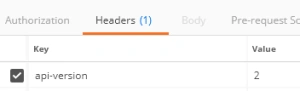
Note that you can choose the header key, however, I’ve used “api-version” just to keep it consistent with query string and URL based methods.
ConventionsInstead of using [ApiVersion] attribute, you could configure version numbers on controllers by using Conventions property.
- options.Conventions.Controller<WritersControllerV1>()
- .HasApiVersion(new ApiVersion(1, 0));
- options.Conventions.Controller<WritersControllerV2>()
- .HasApiVersion(new ApiVersion(2, 0));
Now, the controllers don’t need any extra attributes.
- [Route("writers")]
- public class WritersControllerV1 : Controller
- {
- [HttpGet]
- public IActionResult Get() => Content("Version 1");
- }
- [Route("writers")]
- public class WritersControllerV2 : Controller
- {
- [HttpGet]
- public IActionResult Get() => Content("Version 2");
- }
Versioning Action Methods
You could also version the action methods within a controller using [MapToApiVersion] attribute.
- [ApiVersion("1.0")]
- [ApiVersion("2.0")]
- [Route("directors")]
- public class DirectorsController : Controller
- {
- [HttpGet]
- public IActionResult Get() => Content("Version 1");
- [HttpGet, MapToApiVersion("2.0")]
- public IActionResult GetV2() => Content("Version 2");
- }
Deprecating Versions
You could specify whether a version of API is deprecated by setting Deprecated property on the [ApiVersion] attribute.
- [ApiVersion("1.0", Deprecated = true)]
- [Route("genres")]
- public class GenresControllerV1 : Controller
- {
- [HttpGet]
- public IActionResult Get() => Content("Version 1");
- }
- [ApiVersion("2.0")]
- [Route("genres")]
- public class GenresControllerV2 : Controller
- {
- [HttpGet]
- public IActionResult Get() => Content("Version 2");
- }
Note that this doesn’t stop clients from using the version and will only output response headers.
Source Code
Tridip BhattacharjeePosted Feb 15, 2018, 3:45 AM
@jiisdtoal i asked totally different question. i asked this attribute [ApiVersion("1.0")] is available with web api2 or is it specific to dotnet core?
Tridip BhattacharjeePosted Dec 18, 2017, 2:29 AM
Thanks for answer. tell me when we develop web api v2 with vs2013 IDE then this attribute called [ApiVersion("1.0")] is available there or it is specific to asp.net core only?
Tridip BhattacharjeePosted Dec 15, 2017, 3:11 AM
This [ApiVersion("1.0")] we can use when we develop web api 2 with VS2013? i saw people use attribute routing to version their api. which one is best?
Vishal PrajapatiPosted Dec 14, 2017, 1:50 AM
Awesome sir.......:)