

Introduction
In general terms, caching takes place where the frequently-used data is stored, so that the application can quickly access the data rather than accessing the data from the source. Caching can improve the performance and scalability of the application dramatically and can help us to remove the unnecessary requests from the external data sources for the data that changes infrequently.
ASP.NET Core has a rich support for caching and it supports different kinds of caching. In my past article, I explained about the In-memory caching. In this article, we will talk about distributed cache. It can help us to improve the performance and scalability of the application, when the application is hosted on the web farm or cloud environment.
In distributed caching, cache is not stored in to an individual web server’s memory. Cache data is centrally managed and the same data is available to all the app servers. The distributed caching has several advantages, as shown below.
- The cache is stored centrally, so all the users get the same data and data is not dependent on which web server handles its request.
- The cache data is not impacted if any problem happens with the web server; i.e., restart, new server is added, a server is removed.
The distributed cache can be configured with either Redis or SQL Server. The implementation of the caching is not dependent on the configuration; the application interacts with the cache, using IDistributedCache interface.
IDistributedCache Interface
This interface has methods, which allow us to add, remove, and retrieve the distributed cache. This interface contains synchronous and asynchronous methods.
- Get, GetAsync
It retrieves the data from the cache, using key. It returns byte[], if the key is not found in to cache. - Set, SetAsync
It adds the item to cache as byte[]. - Refresh, RefreshAsync
It refreshes the item in the cache and also resets its sliding expiration timeout, if any. - Remove, RemoveAsync
It removes the entry from the cache, using key.
We need to perform the three simple steps given below to configure distributed cache in ASP.NET Core.
- Define cache dependencies into project.json file.
- Configure cache Service ConfigureServices method of Startup class.
- Dependency is automatically injected to the application's middleware or MVC controller constructor. Using this instance of cache dependency object, we can perform the operation related to distributed cache
Distributed Cache with SQL Server
SqlServerCache allows the distributed cache to use SQL Server as cache storing purpose. Prior to using SQL Server as a cache, we must create a table with the schema given below.
- CREATE TABLE[dbo].[SQLCache](
- [Id][nvarchar](449) NOT NULL,
- [Value][varbinary](max) NOT NULL,
- [ExpiresAtTime][datetimeoffset](7) NOT NULL,
- [SlidingExpirationInSeconds][bigint] NULL,
- [AbsoluteExpiration][datetimeoffset](7) NULL,
- CONSTRAINT[pk_Id] PRIMARY KEY CLUSTERED([Id] ASC) WITH(PAD_INDEX = OFF, STATISTICS_NORECOMPUTE = OFF, IGNORE_DUP_KEY = OFF, ALLOW_ROW_LOCKS = ON, ALLOW_PAGE_LOCKS = ON)
- ON[PRIMARY]) ON[PRIMARY] TEXTIMAGE_ON[PRIMARY]
- {
- "version": "1.0.0-*",
- "buildOptions": {
- "preserveCompilationContext": true,
- "debugType": "portable",
- "emitEntryPoint": true
- },
- "tool": {
- "Microsoft.Extensions.Caching.SqlConfig.Tools": "1.0.0-preview2-final"
- },
- "dependencies": {},
- "frameworks": {
- "netcoreapp1.0": {
- "dependencies": {
- "Microsoft.NETCore.App": {
- "type": "platform",
- "version": "1.0.1"
- },
- "Microsoft.AspNetCore.Server.Kestrel": "1.0.0",
- "Microsoft.AspNetCore.Mvc": "1.0.0",
- "Microsoft.Extensions.Caching.Memory": "1.0.0",
- "Microsoft.Extensions.Caching.SqlServer": "1.0.0"
- },
- "imports": "dnxcore50"
- }
- }
- }
Startup.cs
- public void ConfigureServices(IServiceCollection services) {
- services.AddMvc();
- services.AddDistributedSqlServerCache(opt => {
- opt.ConnectionString = @ "server=DESKTOP-HP\SQL;Database=CachingTest;Trusted_Connection=True;";
- opt.SchemaName = "dbo";
- opt.TableName = "SQLCache";
- });
- }
In the following example, I have created methods for creating cache, retrieving cache and removing cache in controller. ASP.NET Core MVC Controller is able to request their dependencies explicitly via their constructors. We utilize the caching in our application by requesting an instance of IDistributedCache in our Controller (or middleware) constructor. In the code snippet given below, I have created controller class with three methods SetCacheData, GetCacheData and RemoveCacheData.
HomeController.cs
- using System;
- using System.Text;
- using Microsoft.AspNetCore.Mvc;
- using Microsoft.Extensions.Caching.Distributed;
- public class HomeController: Controller {
- IDistributedCache _memoryCache;
- public HomeController(IDistributedCache memoryCache) {
- _memoryCache = memoryCache;
- }
- [Route("home/SetCacheData")]
- public IActionResult SetCacheData() {
- var Time = DateTime.Now.ToLocalTime().ToString();
- var cacheOptions = new DistributedCacheEntryOptions {
- AbsoluteExpiration = DateTime.Now.AddYears(1)
- };
- _memoryCache.Set("Time", Encoding.UTF8.GetBytes(Time), cacheOptions);
- return View();
- }
- [Route("home/GetCacheData")]
- public IActionResult GetCacheData() {
- string Time = string.Empty;
- Time = Encoding.UTF8.GetString(_memoryCache.Get("Time"));
- ViewBag.data = Time;
- return View();
- }
- [Route("home/RemoveCacheData")]
- public bool RemoveCacheData() {
- _memoryCache.Remove("Time");
- return true;
- }
- }
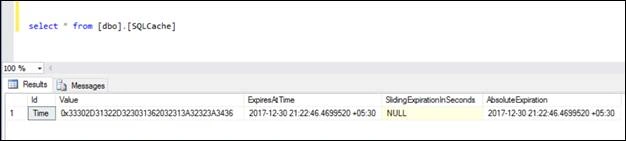
When we call the setCacheData of the controller, it stores the data into SQL table, which is specified in the configuration. The snippet is given below, which shows how SQL Server stores the data.
Distributed Cache with Redis
Redis is an open source and in-memory data store, which is used as a distributed cache. We can install it locally and configure it. Also, we can configure an Azure Redis Cache. The easiest way to install Redis on a Windows machine is chocolatey. To install chocolatey in a local machine, run the command given below from PowerShell (with administrative mode).
PS C:\>iex ((new-object net.webclient).DownloadString('https://chocolatey.org/install.ps1'))
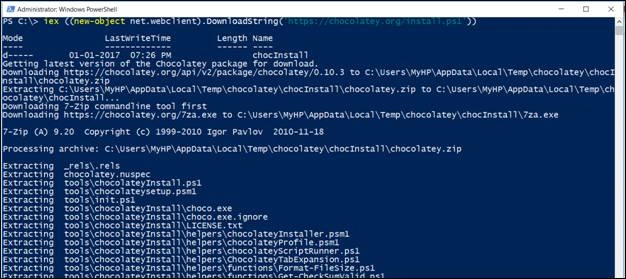
This command downloads the chocalatey installer for Windows and using the command given below, we can install Redis on the local machine.
PS C:\>choco install redis-64
Once Redis Server is installed, use the command given below, where we can start Redis Server.
PS C:\>redis-server
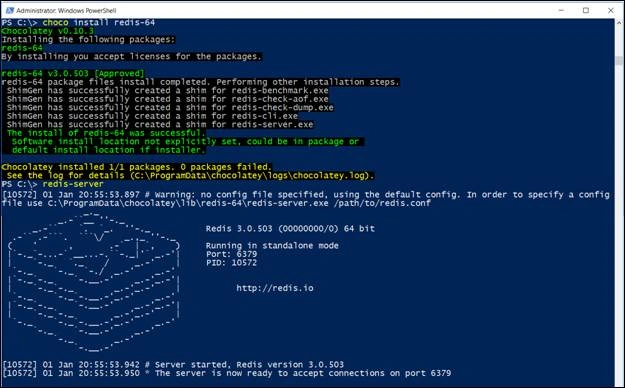
To check whether Redis Server starts working properly, we can ping this Server, using Redis client.
If the server is working correctly, it returns “PONG” as the response.

Now, Redis Server is ready to be used as a distributed cache. We need to add highlighted dependency given below in to project.json file. Here, Redis dependency only works with .NET framework 4.5.1 or 4.5.2, so I am using .NET framework 4.5.1.
Project.json
- {
- "buildOptions": {
- "preserveCompilationContext": true,
- "debugType": "portable",
- "emitEntryPoint": true
- },
- "dependencies": {
- "Microsoft.AspNetCore.Server.Kestrel": "1.0.0",
- "Microsoft.AspNetCore.Mvc": "1.0.0",
- "Microsoft.Extensions.Caching.Redis": "1.0.0"
- },
- "frameworks": {
- "net451": {},
- }
- }
Statup.cs
- public void ConfigureServices(IServiceCollection services) {
- services.AddMvc();
- services.AddDistributedRedisCache(options => {
- options.Configuration = "localhost:6379";
- options.InstanceName = "";
- });
- }
127.0.0.1:6379> keys *

Summary
If we compare in-memory cache and distributed cache then in-memory cache is much faster than the distributed cache but it has some disadvantages. If we compare the above two described options for distributed cache, Redis Server is faster than SQL server. To improve the performance for SQL server distributed cache, we can use memory-optimized tables for caching but varbinary(max) and datetimeoffset data types are not supported in memory-optimized tables. If we want to use SQL Server for caching, we can use "dbcc pintable" to ensure the table is kept in the memory.
Anait MinasianPosted Jun 24, 2020, 1:57 AM
If in my server I use 2 types of cache. How is the DI should be defined?
David RevoledoPosted Apr 9, 2017, 4:19 PM
Great post, I recommend redis distributed cache over sql for the perfomance.
Mehul SathwaraPosted Mar 31, 2017, 10:45 AM
Very Good Articles, but i have one question. I have Two clustered node A and B in Azure Server. and i have installed Redis Server on node B. and i can't access it through node A. it throws an error "It was not possible to connect to the redis server(s); to create a disconnected multiplexer, disable AbortOnConnectFail". Here your help would be more appreciated .
pankaj sharmaPosted Mar 22, 2017, 4:44 AM
How can i specify the database no like 0 to 15 in redis configuration in asp.net core ?
Former memberPosted Jan 5, 2017, 4:03 AM
I have small question regarding caching and invalidate cache. suppose i cache product data and when any product data will change then i need to invalidate cache and re-cache the product data or i need a way to updated product data into cache. would you guide me how to achieve it with asp.net new caching technique where cached data is stored in db. thanks
Nigel FernandesPosted Jan 3, 2017, 7:25 PM
Also i read the article link you provided on pintable https://technet.microsoft.com/en-us/library/ms178015(v=sql.90).aspx , it says the command has been depreciated..
Nigel FernandesPosted Jan 3, 2017, 7:23 PM
Interesting article , I did not know of dbcc pintable . ... Also did you mean Redis instead of Radis ??
Former memberPosted Jan 3, 2017, 4:40 AM
One thing is not clear that you configure sql server to store cache dataopt.ConnectionString = @ "server=DESKTOP-HP\SQL;Database=CachingTest;Trusted_Connection=True;"; you are talking about distribute cache but here you just mention one sql server where cache data will be stored. so it means some where sql server will be installed in a single pc and cache will be maintain in single pc. am i right. if cache will be maintain in single pc then how this can be consider as distributed. some how the pc where sql server is running crash then asp.net can not store or fetch anything to cache. so this kind of caching can be consider as distributed caching ? please help me to understand what you try to mean distributed caching. thanks
Former memberPosted Jan 3, 2017, 4:32 AM
Good start up article on caching but which sql server version we need to use for storing cache data in sql server. can we use any sql server version to cache data ? can we give any different name for cache table instead of SQLCache ?