

Today, I am going to share a simple tip about how generate a dropdownlist, using the widget Spinner in a Xamarin Android Application, using Visual Studio 2015 and Xamarin.
Let´s get started...
- Create a new project, using VS 2015 community.
- Select Visual C# language and Android-> Blank app (Android) template.
- Open Main.axml in folder Resources/layout in design mode.
- Open the toolbox and scroll down to TextView. Drag it onto the design surface. Repeat this step and put Spinner below TextView.
See the layout.
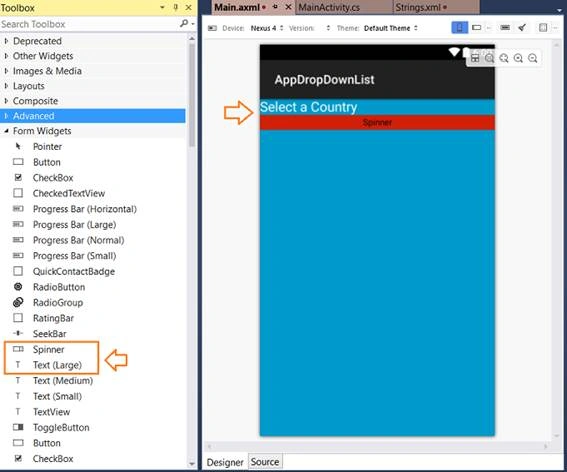
Switch over to source view and do the changes in the code, which are given below.
- <?xml version="1.0" encoding="utf-8"?>
- <LinearLayout xmlns:android="http://schemas.android.com/apk/res/android"
- android:orientation="vertical"
- android:layout_width="match_parent"
- android:layout_height="match_parent"
- android:minWidth="25px"
- android:minHeight="25px"
- android:background="@android:color/holo_blue_dark">
- <TextView
- android:text="Selecione o Estado"
- android:textAppearance="?android:attr/textAppearanceLarge"
- android:layout_width="match_parent"
- android:layout_height="wrap_content"
- android:id="@+id/textView1" />
- <Spinner
- android:padding="2dp"
- android:entries="@array/dropdown_arrays"
- android:backgroundTint="#d11f08"
- android:background="@android:color/holo_green_dark"
- android:layout_width="match_parent"
- android:layout_height="wrap_content"
- android:id="@+id/spinner1" />
- </LinearLayout>
In the next step I'll create the name of array of items.
Open Strings.xml file in the folder values and include the code, given below (in Italics).
- <?xml version="1.0" encoding="utf-8"?>
- <resources>
- <string name="Hello">Hello World, Click Me!</string>
- <string name="ApplicationName">AppDropDownList</string>
- <string-array name="dropdown_arrays">
- <item>Spain</item>
- <item>USA</item>
- <item>Italy</item>
- <item>Japan</item>
- <item>Germany</item>
- <item>England</item>
- </string-array>
- </resources>
Now, we are ready to put the things to work in the file MainActivity.cs.
Open MainActivity.cs file and put the code, given below.
- using Android.App;
- using Android.OS;
- using Android.Widget;
- namespace AppDropDownList
- {
- [Activity(Label = "AppDropDownList", MainLauncher = true, Icon = "@drawable/icon")]
- public class MainActivity : Activity
- {
- protected override void OnCreate(Bundle bundle)
- {
- base.OnCreate(bundle);
- // Set our view from the "main" layout resource
- SetContentView(Resource.Layout.Main);
- var spin = FindViewById<Spinner>(Resource.Id.spinner1);
- spin.ItemSelected += (s, e) =>
- {
- Toast.MakeText(this, "Você selecionou " + e.Parent.GetItemAtPosition(e.Position).ToString(), ToastLength.Short).Show();
- };
- }
- }
- }
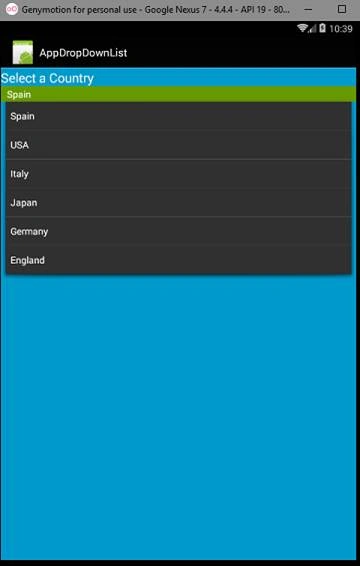
It is pretty simple and is shown below.
Geethanjana IllangasinghePosted Aug 17, 2017, 4:31 AM
How to Populating Xamarin Android Spinner data from SQLite Database