

Let's Start with step by step instructions to create the WPF browser application for scanning the documents.
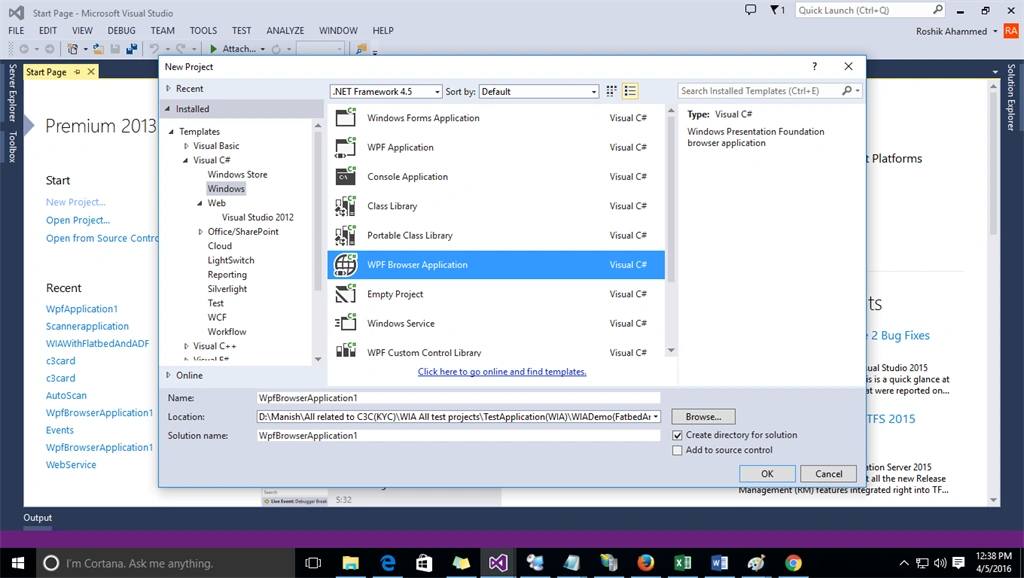
Step 1: First open the visual studio and select the project type WPF Browser based Application.
Check in this Image how to create WPF browser application,
Step 2: In the second step design your page as you want to view in browser accordingly.
Step 3: Now you have to add the Interop.WIA.dll and itextsharp.dll in your project reference.
Step 4: Now you have to add System.Drawing and System.Web Assemblies.
Step 5: Now Generate the click event to start the scanning.
Step 6: Here I have given all the code, just go through that and you can change the code according to your requirement or just copy and paste into your cs page.
Step 6: Here I have given all the code, just go through that and you can change the code according to your requirement or just copy and paste into your cs page.
- using System;
- using System.Collections.Generic;
- using System.Linq;
- using System.Text;
- using System.Threading.Tasks;
- using System.Windows;
- using System.Windows.Controls;
- using System.Windows.Data;
- using System.Windows.Documents;
- using System.Windows.Input;
- using System.Windows.Media;
- using System.Windows.Media.Imaging;
- using System.Windows.Navigation;
- using System.Windows.Shapes;
- using WIA;
- using System.Deployment.Application;
- using System.Runtime.InteropServices;
- using System.Windows.Interop;
- using System.Collections.Specialized;
- using System.Web;
- using System.Security.Cryptography;
- using System.Reflection;
- using System.Configuration;
- using System.IO;
- using System.Drawing.Imaging;
- namespace WpfBrowserApplication1
- {
- /// <summary>
- /// Interaction logic for Page1.xaml
- /// </summary>
- public partial class Page1 : Page
- {
- List<System.Drawing.Image> obj = new List<System.Drawing.Image>();
- List<Scannerdata> objListSD = new List<Scannerdata>();
- int GlobalSquence = 1;
- int count = 0;
- int SequenceTotal = 1;
- public Page1()
- {
- InitializeComponent();
- _deviceId = GetDefaultDeviceID();
- _deviceInfo = FindDevice(_deviceId);
- _device = _deviceInfo.Connect();
- btnPreview.IsEnabled = false;
- btnNext.IsEnabled = false;
- }
- #region WIA constants
- public const int WIA_DPS_DOCUMENT_HANDLING_CAPABILITIES = 3086;
- public const int WIA_DPS_DOCUMENT_HANDLING_STATUS = 3087;
- public const int WIA_DPS_DOCUMENT_HANDLING_SELECT = 3088;
- public const string WIA_FORMAT_JPEG = "{B96B3CAE-0728-11D3-9D7B-0000F81EF32E}";
- public const int FEED_READY = 0x00000001;
- public const int FLATBED_READY = 0x00000002;
- public const uint BASE_VAL_WIA_ERROR = 0x80210000;
- public const uint WIA_ERROR_PAPER_EMPTY = BASE_VAL_WIA_ERROR + 3;
- #endregion
- private string _deviceId;
- private DeviceInfo _deviceInfo;
- private Device _device;
- private DeviceInfo FindDevice(string deviceId)
- {
- DeviceManager manager = new DeviceManager();
- foreach (DeviceInfo info in manager.DeviceInfos)
- if (info.DeviceID == deviceId)
- return info;
- return null;
- }
- private string GetDefaultDeviceID()
- {
- string deviceId = string.Empty;
- //string deviceId = Properties.Settings.Default.ScannerDeviceID;
- //if (String.IsNullOrEmpty(deviceId))
- //{
- Device d = null;
- WIA.CommonDialog wiaDiag = new WIA.CommonDialog();
- try
- {
- d = wiaDiag.ShowSelectDevice(WiaDeviceType.ScannerDeviceType, true, false);
- if (d != null)
- {
- deviceId = d.DeviceID;
- Properties.Settings.Default.ScannerDeviceID = deviceId;
- Properties.Settings.Default.Save();
- }
- else
- {
- MessageBox.Show("Check the Device Connection \n or \n Change the Scanner Device", "Device Not Found!", MessageBoxButton.OKCancel, MessageBoxImage.Exclamation);
- var hostScript = BrowserInteropHelper.HostScript;
- hostScript.document.ResponseData("");
- }
- }
- catch (Exception err)
- {
- MessageBox.Show("Scaner device not found in your system", "Devic Not Found!", MessageBoxButton.OKCancel, MessageBoxImage.Error);
- var hostScript = BrowserInteropHelper.HostScript;
- hostScript.document.ResponseData("");
- }
- return deviceId;
- }
- public List<System.Drawing.Image> ScanPages(int dpi = 150, double width = 8.27, double height = 11.69)
- {
- Item item = _device.Items[1];
- // configure item
- SetDeviceItemProperty(ref item, 6146, 2); // greyscale
- SetDeviceItemProperty(ref item, 6147, dpi); // 150 dpi
- SetDeviceItemProperty(ref item, 6148, dpi); // 150 dpi
- SetDeviceItemProperty(ref item, 6151, (int)(dpi * width)); // scan width
- SetDeviceItemProperty(ref item, 6152, (int)(dpi * height)); // scan height
- SetDeviceItemProperty(ref item, 4104, 8); // bit depth
- // TODO: Detect if the ADF is loaded, if not use the flatbed
- List<System.Drawing.Image> images = GetPagesFromScanner(ScanSource.DocumentFeeder, item);
- if (images.Count == 0)
- {
- // Try from flatbed
- // DialogResult dialogResult;
- MessageBoxResult dialogResult;
- do
- {
- List<System.Drawing.Image> singlePage = GetPagesFromScanner(ScanSource.Flatbed, item);
- images.AddRange(singlePage);
- dialogResult = MessageBox.Show("Do you want to scan another page?", "ScanToEvernote", MessageBoxButton.YesNo, MessageBoxImage.Question);
- }
- while (dialogResult == MessageBoxResult.Yes);
- }
- return images;
- }
- private List<System.Drawing.Image> GetPagesFromScanner(ScanSource source, Item item)
- {
- SetDeviceProperty(ref _device, 3088, (int)source);
- List<System.Drawing.Image> images = new List<System.Drawing.Image>();
- int handlingStatus = GetDeviceProperty(ref _device, WIA_DPS_DOCUMENT_HANDLING_STATUS);
- if ((source == ScanSource.DocumentFeeder && handlingStatus == FEED_READY) || (source == ScanSource.Flatbed && handlingStatus == FLATBED_READY))
- {
- do
- {
- ImageFile wiaImage = null;
- try
- {
- wiaImage = item.Transfer(WIA_FORMAT_JPEG);
- }
- catch (COMException ex)
- {
- if ((uint)ex.ErrorCode == WIA_ERROR_PAPER_EMPTY)
- break;
- else
- throw;
- }
- if (wiaImage != null)
- {
- System.Diagnostics.Trace.WriteLine(String.Format("Image is {0} x {1} pixels", (float)wiaImage.Width / 150, (float)wiaImage.Height / 150));
- System.Drawing.Image image = ConvertToImage(wiaImage);
- images.Add(image);
- }
- }
- while (source == ScanSource.DocumentFeeder);
- }
- return images;
- }
- private static System.Drawing.Image ConvertToImage(ImageFile wiaImage)
- {
- byte[] imageBytes = (byte[])wiaImage.FileData.get_BinaryData();
- MemoryStream ms = new MemoryStream(imageBytes);
- System.Drawing.Image image = System.Drawing.Image.FromStream(ms);
- // Image image = Image.FromStream(ms);
- return image;
- }
- #region Get/set device properties
- private void SetDeviceProperty(ref Device device, int propertyID, int propertyValue)
- {
- foreach (Property p in device.Properties)
- {
- if (p.PropertyID == propertyID)
- {
- object value = propertyValue;
- p.set_Value(ref value);
- break;
- }
- }
- }
- private int GetDeviceProperty(ref Device device, int propertyID)
- {
- int ret = -1;
- foreach (Property p in device.Properties)
- {
- if (p.PropertyID == propertyID)
- {
- ret = (int)p.get_Value();
- break;
- }
- }
- return ret;
- }
- private void SetDeviceItemProperty(ref Item item, int propertyID, int propertyValue)
- {
- foreach (Property p in item.Properties)
- {
- if (p.PropertyID == propertyID)
- {
- object value = propertyValue;
- p.set_Value(ref value);
- break;
- }
- }
- }
- private int GetDeviceItemProperty(ref Item item, int propertyID)
- {
- int ret = -1;
- foreach (Property p in item.Properties)
- {
- if (p.PropertyID == propertyID)
- {
- ret = (int)p.get_Value();
- break;
- }
- }
- return ret;
- }
- #endregion
- private delegate void UpdateProgressBarDelegate(System.Windows.DependencyProperty dp, Object value);
- /// <summary>
- /// Button_Click Used for start the sacnning
- /// </summary>
- /// <param name="sender"></param>
- /// <param name="e"></param>
- private void Button_Click(object sender, RoutedEventArgs e)
- {
- //Make butone enable false
- btnAttach.IsEnabled = false;
- btnScan.IsEnabled = false;
- pic_scan.Source = null;
- lbl_message.Content = string.Empty;
- //Configure the ProgressBar
- ProgressBar1.Minimum = 0;
- ProgressBar1.Maximum = 1000;
- ProgressBar1.Value = 0;
- //Stores the value of the ProgressBar
- double value = 0;
- //Create a new instance of our ProgressBar Delegate that points
- // to the ProgressBar's SetValue method.
- UpdateProgressBarDelegate updatePbDelegate = new UpdateProgressBarDelegate(ProgressBar1.SetValue);
- //Tight Loop: Loop until the ProgressBar.Value reaches the max
- do
- {
- value += 1;
- /*Update the Value of the ProgressBar:
- 1) Pass the "updatePbDelegate" delegate that points to the ProgressBar1.SetValue method
- 2) Set the DispatcherPriority to "Background"
- 3) Pass an Object() Array containing the property to update (ProgressBar.ValueProperty) and the new value */
- Dispatcher.Invoke(updatePbDelegate,
- System.Windows.Threading.DispatcherPriority.Background,
- new object[] { ProgressBar.ValueProperty, value });
- }
- while (ProgressBar1.Value != ProgressBar1.Maximum);
- if (ProgressBar1.Value == ProgressBar1.Maximum)
- {
- ProgressBar1.IsEnabled = true;
- obj = ScanPages();//start scan method
- foreach (System.Drawing.Image aa in obj)
- {
- Scannerdata objSD = new Scannerdata();
- objSD.Sequence = SequenceTotal;
- objSD.ImageObj = aa;
- objListSD.Add(objSD);
- SequenceTotal++;
- }
- Scannerdata first = (from row in objListSD where row.Sequence == GlobalSquence select row).FirstOrDefault();
- LoadImage(first.ImageObj);
- // Application.Current.Properties["Objliost"] = obj.ToList();
- }
- if (obj.Count == 1)
- {
- btnPreview.IsEnabled = false;
- btnNext.IsEnabled = false;
- lbl_message.Visibility = Visibility.Visible;
- lbl_message.Content = "Single page scaning Completed.";
- }
- else if (obj.Count > 1)
- {
- //btnPreview.IsEnabled = true;
- btnNext.IsEnabled = true;
- lbl_message.Visibility = Visibility.Visible;
- lbl_message.Content = "Multiple page scaning Completed.";
- }
- btnAttach.IsEnabled = true;
- btnScan.IsEnabled = true;
- ProgressBar1.Value = 0;
- }
- /// <summary>
- /// Use for Load the Image in Image Box
- /// </summary>
- /// <param name="loaddata"></param>
- /// <returns></returns>
- public byte[] LoadImage(System.Drawing.Image loaddata)
- {
- BitmapImage bi = new BitmapImage();
- bi.BeginInit();
- MemoryStream ms = new MemoryStream();
- // Save to a memory stream...
- loaddata.Save(ms, ImageFormat.Jpeg);
- // Rewind the stream...
- ms.Seek(0, SeekOrigin.Begin);
- // cache the image
- bi.CacheOption = BitmapCacheOption.OnLoad;
- // Tell the WPF image to use this stream...
- bi.StreamSource = ms;
- bi.EndInit();
- pic_scan.Source = bi;
- bi.Freeze();
- return ms.ToArray();
- }
- /// <summary>
- /// Button_Click_3 used for saved the scanned documents in pdf.
- /// </summary>
- private void Button_Click_3(object sender, RoutedEventArgs e)
- {
- using (var ms = new MemoryStream())
- {
- var document = new iTextSharp.text.Document(iTextSharp.text.PageSize.LETTER.Rotate(), 0, 0, 0, 0);
- iTextSharp.text.pdf.PdfWriter.GetInstance(document, ms).SetFullCompression();
- document.Open();
- foreach (System.Drawing.Image aa in obj)
- {
- MemoryStream msimage = new MemoryStream();
- aa.Save(msimage, ImageFormat.Jpeg);
- var image = iTextSharp.text.Image.GetInstance(msimage.ToArray());
- image.ScaleToFit(document.PageSize.Width, document.PageSize.Height);
- document.Add(image);
- }
- document.Close();
- //Path will come from App config
- string Path = ConfigurationManager.AppSettings["uploadfolderpath"].ToString();//confige path
- string filename = "C3kycDMS" + DateTime.Now.ToString("yyyy-MM-dd HHmmss") + ".pdf";
- //Save using drive name
- File.WriteAllBytes(Path + filename, ms.ToArray());
- byte[] test = ms.ToArray();
- MessageBox.Show("File Uploaded Successfully", "Success!", MessageBoxButton.OKCancel);
- pic_scan.Source = null;
- }
- }
- /// <summary>
- /// Used for Next button to see the images
- /// </summary>
- /// <param name="sender"></param>
- /// <param name="e"></param>
- private void Button_Click_2(object sender, RoutedEventArgs e)
- {
- btnPreview.IsEnabled = true;
- if (GlobalSquence < SequenceTotal)
- {
- GlobalSquence++;
- }
- Scannerdata first = (from row in objListSD where row.Sequence == GlobalSquence select row).FirstOrDefault();
- LoadImage(first.ImageObj);
- if (GlobalSquence == SequenceTotal - 1)
- {
- btnNext.IsEnabled = false;
- }
- }
- /// <summary>
- /// Used for Preview the page
- /// </summary>
- /// <param name="sender"></param>
- /// <param name="e"></param>
- private void Button_Click_1(object sender, RoutedEventArgs e)
- {
- btnNext.IsEnabled = true;
- if (GlobalSquence < SequenceTotal)
- {
- GlobalSquence--;
- }
- Scannerdata first = (from row in objListSD where row.Sequence == GlobalSquence select row).FirstOrDefault();
- LoadImage(first.ImageObj);
- if (GlobalSquence == 1)
- {
- btnPreview.IsEnabled = false;
- }
- }
- }
- enum ScanSource
- {
- DocumentFeeder = 1,
- Flatbed = 2,
- }
- }
- public class Scannerdata
- {
- public int Sequence { get; set; }
- public System.Drawing.Image ImageObj { get; set; }
- }
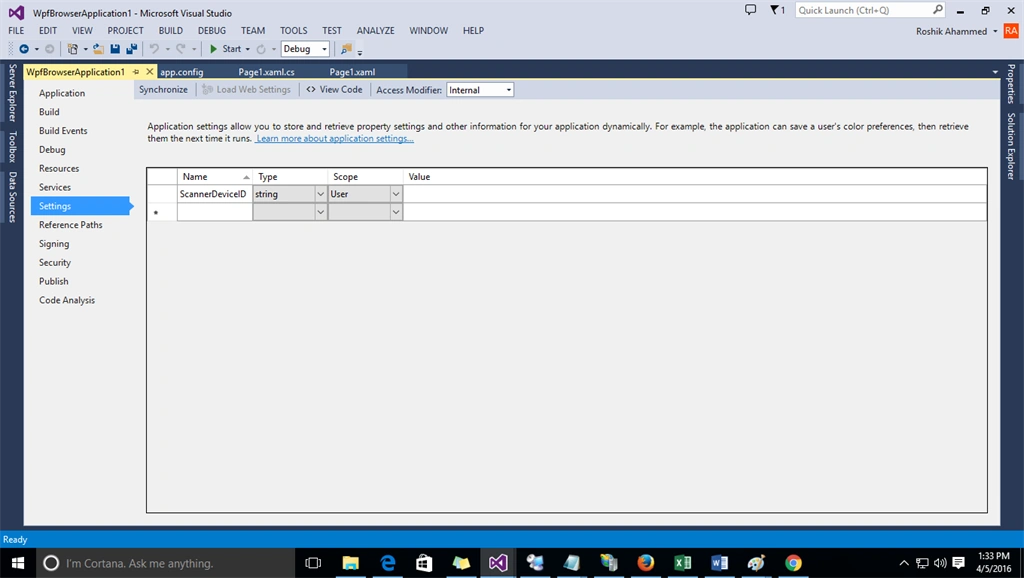
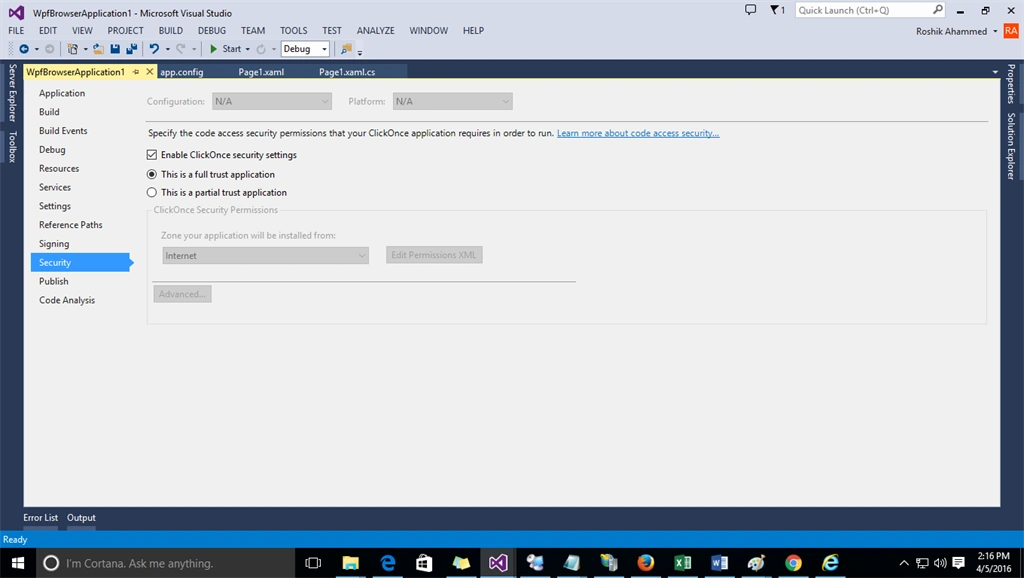
Step 8: If you are running WPF browser application make sure your site is a fuly trusted site if it is not you have to make this a fully trusted site.
To make it a fully trusted site follow this steps.
Goto SoluationExplorer -> Rightclick -> goto Properties -> select Security option -> now select Radio button Full trusted application -> Save and run.
To make it a fully trusted site follow this steps.
Goto SoluationExplorer -> Rightclick -> goto Properties -> select Security option -> now select Radio button Full trusted application -> Save and run.
Check in this Image,
I think this will help you but if you have any doubts or queries you can reach me any time.
Note: Same solution you can find with WINDOWS FORM -- to check this click on below link and check in my blogs,
Murali Krishna DPosted Nov 15, 2020, 4:04 AM
Is this support 64bit OS?
Nassim BouzidPosted Jul 13, 2017, 9:28 AM
I have lot of errors that i can't fix i need help plz
Sonu ChaudharyPosted Jun 7, 2016, 12:43 PM
nice share