

Today I will show how to "Generate a PDF file of an open record in just one click." The image below will give you a clear understanding about what we are going to discuss.
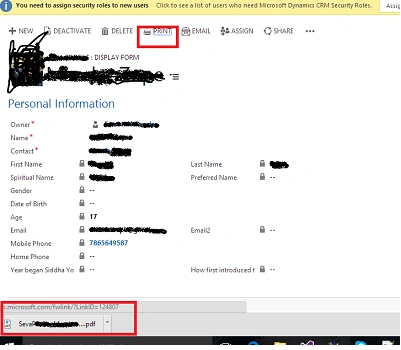
The idea to solve this problem was simple: First develop a SSRS Report and save it as PDF. Here are the steps required to follow to solve this requirement:
The idea to solve this problem was simple: First develop a SSRS Report and save it as PDF. Here are the steps required to follow to solve this requirement:
- You need to create an SSRS Report for your Record by passing "RecordId" as parameter.
- Get the ReportSession and ControlId for the called report.
- Open the Report as a PDF Format.
After the SSRS Report has been Added in CRM Instance, you need to add a Button on Form Ribbon. Once we are done with SSRS Report and Button we will create a Java script file and the code will be,
Method to get the SessionID and ControlID for the SSRSReport
- getReportingSession: function()
- {
- var selectedIds = Xrm.Page.data.entity.getId();
- var reportName = "NameofReport.rdl";
- var reportGuid = getReportGuidByName("NameofReport"); //OR Report GUID - Replace with your report GUID
- var pth = Xrm.Page.context.getClientUrl() + "/CRMReports/rsviewer/QuirksReportViewer.aspx";
- var retrieveEntityReq = new XMLHttpRequest();
- retrieveEntityReq.open("POST", pth, false);
- retrieveEntityReq.setRequestHeader("Accept", "*/*");
- retrieveEntityReq.setRequestHeader("Content-Type", "application/x-www-form-urlencoded");
- retrieveEntityReq.send("id=%7B" + reportGuid + "%7D&uniquename=" + Xrm.Page.context.getOrgUniqueName() + "&iscustomreport=true&reportnameonsrs=&reportName=" + reportName + "&isScheduledReport=false&p:parameterNamespecified in ssrs report=" + selectedIds);
- var x = retrieveEntityReq.responseText.lastIndexOf("ReportSession=");
- var y = retrieveEntityReq.responseText.lastIndexOf("ControlID=");
- var ret = new Array();
- ret[0] = retrieveEntityReq.responseText.substr(x + 14, 24);
- ret[1] = retrieveEntityReq.responseText.substr(x + 10, 32);
- return ret;
- }
Replace the Value which is specified with the Red Color in the code.
After we have received the Session Array we will call a method which will download the PDF file to our local drive.
After we have received the Session Array we will call a method which will download the PDF file to our local drive.
Code is here.
Method to Download PDF
Hope this would help you in your custom development. If you have any Query related to the code please mention in comments section below.
Method to Download PDF
- runReportToPrint: function()
- {
- var params = getReportingSession();
- var newPth = Xrm.Page.context.getClientUrl() + "/Reserved.ReportViewerWebControl.axd?ReportSession=" + params[0] + "&Culture=1033&CultureOverrides=True&UICulture=1033&UICultureOverrides=True&ReportStack=1&ControlID=" + params[1] + "&OpType=Export&FileName=public&ContentDisposition=OnlyHtmlInline&Format=PDF";
- window.open(newPth, "_self");
- }
MFasih AkbarPosted Oct 13, 2021, 4:13 PM
Can you please suggest some links to download reports in Dynamics 365 online latest version? OR send code to do that in Dynamics 365?
Gaurav GPosted Jul 20, 2020, 10:30 PM
Hi i have stuck with the button and it is not working i have checked the api response as well and it is not working
aakash chaudharyPosted May 1, 2019, 3:56 AM
Hii it is working in crm online ?
aakash chaudharyPosted May 1, 2019, 3:54 AM
Hii i am getting html of report instead of report session in ajax response
riya dalviPosted Nov 10, 2017, 12:32 AM
I tried this but its not working for me when i debug my code. the contents of the report are not retrieved. I just get an HTML file
weharcPosted May 20, 2017, 2:44 AM
Line 25 has a typo - instead of "x + 10" it should be "y + 10".
Rabison RajbhandariPosted Mar 24, 2017, 6:18 AM
It is not working in Dynamics 365 online. Could anyone please help if you have faced and resolved this issue.
Hashim kPosted Feb 5, 2017, 10:37 AM
Is there any way to generate word document?
Muhammad Fasih AkbarPosted Jul 16, 2016, 1:47 PM
I was in alot of trouble with a very complicated process of creation of PDF. But this is really a charm & easy one & works without any issue.
Muhammad Fasih AkbarPosted Jul 16, 2016, 1:46 PM
Lovely piece of work. I solute you man for this great great great work
Bhuvanesh MohankumarPosted Apr 30, 2016, 3:13 PM
Good one...
sonu kumar AmarjeetPosted Mar 1, 2016, 11:54 PM
good Job bro...
Vivek KumarPosted Mar 1, 2016, 11:47 PM
Nice share
Amit Kumar SinghPosted Mar 1, 2016, 10:26 AM
Nice Share