

In this blog I will show you how can we apply validation in WPF as displayed in below screenshot:
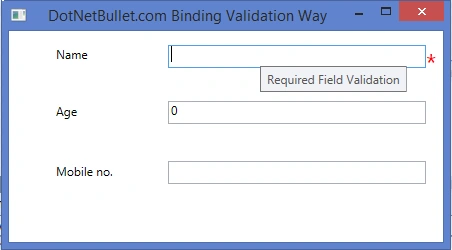
Step 1: Design a keying screen like the image being displayed below,
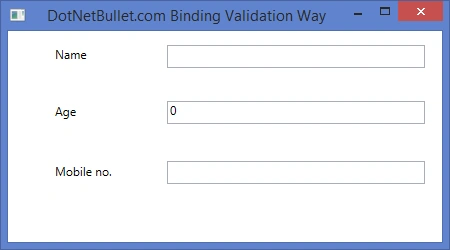
Step 2: Add a class User.cs,
- namespace DotnetBullet.WPFValidationWay1
- {
- public class User
- {
- #region Variables
- string _userName = string.Empty;
- int _age;
- string _mobileNo = string.Empty;
- #endregion
- #region Properties
- /// <summary>
- /// Gets or sets the name of the user.
- /// </summary>
- /// <value>
- /// The name of the user.
- /// </value>
- public string UserName
- {
- get
- {
- return _userName;
- }
- set
- {
- _userName = value;
- }
- }
- /// <summary>
- /// Gets or sets the age.
- /// </summary>
- /// <value>
- /// The age.
- /// </value>
- public int Age
- {
- get
- {
- return _age;
- }
- set
- {
- _age = value;
- }
- }
- /// <summary>
- /// Gets or sets the mobile no.
- /// </summary>
- /// <value>
- /// The mobile no.
- /// </value>
- public string MobileNo
- {
- get
- {
- return _mobileNo;
- }
- set
- {
- _mobileNo = value;
- }
- }
- #endregion
- }
- }
- using System.Globalization;
- using System.Windows.Controls;
- namespace DotnetBullet.WPFValidationWay1
- {
- class RequiredFiedValidationRule : ValidationRule
- {
- public RequiredFiedValidationRule()
- {
- }
- public override ValidationResult Validate(object value, CultureInfo cultureInfo)
- {
- if (value.ToString().Length > 0)
- {
- return new ValidationResult(true, null);
- }
- else
- {
- return new ValidationResult(false, "Required Field Validation");
- }
- }
- }
- }
- <ControlTemplate x:Key="validationTemplate">
- <DockPanel>
- <TextBlock Foreground="Red" FontSize="25" Text="*" DockPanel.Dock="Right">
- </TextBlock>
- <AdornedElementPlaceholder/>
- </DockPanel>
- </ControlTemplate>
- <Style x:Key="InputControlErrors" TargetType="{x:Type TextBox}">
- <Style.Triggers>
- <Trigger Property="Validation.HasError" Value="true">
- <Setter Property="ToolTip"
- Value="{Binding RelativeSource={x:Static RelativeSource.Self},
- Path=(Validation.Errors)[0].ErrorContent}"/>
- </Trigger>
- </Style.Triggers>
- </Style>
- <TextBox HorizontalAlignment="Left" Height="23" Margin="159,14,0,0" TextWrapping="Wrap" VerticalAlignment="Top" Width="258"
- Validation.ErrorTemplate="{StaticResource validationTemplate}" Style="{StaticResource InputControlErrors}"
- Name="txtName">
- <TextBox.Text>
- <Binding Path="UserName" Source="{StaticResource user}" UpdateSourceTrigger="PropertyChanged">
- <Binding.ValidationRules>
- <c:RequiredFiedValidationRule></c:RequiredFiedValidationRule>
- </Binding.ValidationRules>
- </Binding>
- </TextBox.Text>
- </TextBox>
The complete XAML code for UI is as follows:
- <Window x:Class="DotnetBullet.WPFValidationWay1.MainWindow"
- xmlns="http://schemas.microsoft.com/winfx/2006/xaml/presentation"
- xmlns:x="http://schemas.microsoft.com/winfx/2006/xaml"
- xmlns:c="clr-namespace:DotnetBullet.WPFValidationWay1"
- Title="DotNetBullet.com Binding Validation Way" Height="250" Width="450">
- <Window.Resources>
- <c:User x:Key="user"/>
- <ControlTemplate x:Key="validationTemplate">
- <DockPanel>
- <TextBlock Foreground="Red" FontSize="25" Text="*" DockPanel.Dock="Right"></TextBlock>
- <AdornedElementPlaceholder/>
- </DockPanel>
- </ControlTemplate>
- <Style x:Key="InputControlErrors" TargetType="{x:Type TextBox}">
- <Style.Triggers>
- <Trigger Property="Validation.HasError" Value="true">
- <Setter Property="ToolTip"
- Value="{Binding RelativeSource={x:Static RelativeSource.Self},
- Path=(Validation.Errors)[0].ErrorContent}"/>
- </Trigger>
- </Style.Triggers>
- </Style>
- </Window.Resources>
- <Grid Margin="0,0,0,5">
- <Label Content="Name" HorizontalAlignment="Left" Margin="42,10,0,0" VerticalAlignment="Top"/>
- <Label Content="Age" HorizontalAlignment="Left" Margin="42,67,0,0" VerticalAlignment="Top"/>
- <Label Content="Mobile no." HorizontalAlignment="Left" Margin="42,127,0,0" VerticalAlignment="Top"/>
- <TextBox HorizontalAlignment="Left" Height="23" Margin="159,14,0,0" TextWrapping="Wrap" VerticalAlignment="Top" Width="258"
- Validation.ErrorTemplate="{StaticResource validationTemplate}" Style="{StaticResource InputControlErrors}"
- Name="txtName">
- <TextBox.Text>
- <Binding Path="UserName" Source="{StaticResource user}" UpdateSourceTrigger="PropertyChanged">
- <Binding.ValidationRules>
- <c:RequiredFiedValidationRule></c:RequiredFiedValidationRule>
- </Binding.ValidationRules>
- </Binding>
- </TextBox.Text>
- </TextBox>
- <TextBox HorizontalAlignment="Left" Height="23" Margin="159,70,0,0" TextWrapping="Wrap" VerticalAlignment="Top" Width="258"
- Validation.ErrorTemplate="{StaticResource validationTemplate}" Style="{StaticResource InputControlErrors}"
- Name="txtAge">
- <TextBox.Text>
- <Binding Path="Age" Source="{StaticResource user}" UpdateSourceTrigger="PropertyChanged">
- <Binding.ValidationRules>
- <c:RequiredFiedValidationRule></c:RequiredFiedValidationRule>
- </Binding.ValidationRules>
- </Binding>
- </TextBox.Text>
- </TextBox>
- <TextBox HorizontalAlignment="Left" Height="23" Margin="159,130,0,0" TextWrapping="Wrap" VerticalAlignment="Top" Width="258"
- Validation.ErrorTemplate="{StaticResource validationTemplate}" Style="{StaticResource InputControlErrors}"
- Name="txtMobileNo">
- <TextBox.Text>
- <Binding Path="MobileNo" Source="{StaticResource user}" UpdateSourceTrigger="PropertyChanged">
- <Binding.ValidationRules>
- <c:RequiredFiedValidationRule></c:RequiredFiedValidationRule>
- </Binding.ValidationRules>
- </Binding>
- </TextBox.Text>
- </TextBox>
- </Grid>
- </Window>
law kaijianPosted Jan 20, 2023, 2:25 AM
Please help! it showing the name "User" does not exist in the namespace "clr-namespace:Fruit_shop". I already put the xmlns:c="clr-namespace:Fruit_Shop" at the top.
minakshi khairePosted Mar 22, 2018, 5:50 AM
It is not working.it gives the error.which is: the name <c:RequiredFieldValidationRule></c:RequiredFieldValidationRule> doesnot exist in the namespace clr:namespace:HR>
Santhakumar MunuswamyPosted Nov 16, 2015, 11:52 PM
Nice share
Suman VermaPosted Nov 13, 2015, 2:30 AM
Thanks for sharing