

1. The following web service add with web application by click on Add Web Reference:
http://www.webservicex.net/CurrencyConvertor.asmx?WSDL
Paste this url in the URL: block and click on Go.
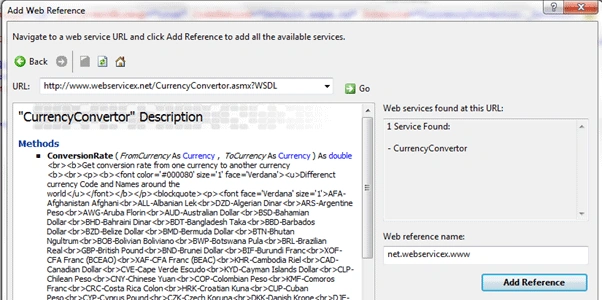
Figure 1. Web service Reference add
Here we get the method:
ConversionRate ( FromCurrency As Currency , ToCurrency As Currency ) As double
2. Create a web form that is:
<table>
<tr>
<td>Value</td>
<td> <asp:TextBox ID="txtvalue" runat="server"></asp:TextBox> </td>
<td>From</td>
<td><asp:DropDownList ID="ddfromcurrency" runat="server"></asp:DropDownList></td>
<td>To</td>
<td><asp:DropDownList ID="ddtocurrency" runat="server"></asp:DropDownList></td>
<td><asp:Button ID="btnconvert" runat="server" Text="Convert"
onclick="btnconvert_Click"/></td>
</tr>
</table>
<asp:Label ID="lblcurrency" runat="server" Visible="false"></asp:Label>
3. Now on .aspx.cs we fill DropDownList by web service on Page Load.
protected void Page_Load(object sender, EventArgs e)
{
if (!Page.IsPostBack)
{
// Fill from currency dropdown by web service
ddfromcurrency.DataSource = Enum.GetValues(typeof(net.webservicex.www.Currency));/*net.webservice * x.www.Currency is an Enum type in WSDL*/
ddfromcurrency.DataBind();
// Fill To currency dropdown by web service
ddtocurrency.DataSource = Enum.GetValues(typeof(net.webservicex.www.Currency));
ddtocurrency.DataBind();
}
4. Now for the Convert button's Click Event use for conversion currency rate.
protected void btnconvert_Click(object sender, EventArgs e)
{
net.webservicex.www.CurrencyConvertor conver = new net.webservicex.www.CurrencyConvertor();
net.webservicex.www.Currency From = (net.webservicex.www.Currency)Enum.Parse(typeo
(net.webservicex.www.Currency),
ddfromcurrency.SelectedValue.ToString(), true);
net.webservicex.www.Currency To = (net.webservicex.www.Currency)Enum.Parse(typeof(net.webservicex.www.Currency
,
ddtocurrency.SelectedValue.ToString(), true);
double d = conver.ConversionRate(From, To);/* web service * method to call for conversion currency rate */
lblcurrency.Text="Convert Currency : "+(d * Convert.ToDouble(txtvalue.Text)).ToString(); lblcurrency.Visible = true;
}
5. Run the application and click on the Convert Button and get the result:
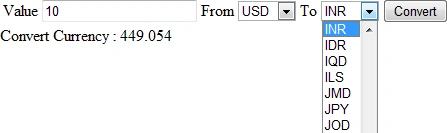
Figure 2 : Currency Conversion Output
Conclusion : Consume web service in ASP.Net.
siva prasadPosted Oct 10, 2013, 11:51 AM
Good stuff...
Imtiyaz AnsariPosted Jun 13, 2013, 4:28 PM
it's really beneficial..........
CHAITANYA KIRAN KASANIPosted May 28, 2013, 1:11 AM
hi sandeep.... i am getting the exception "WebException was unhandled by the user code. The request failed with HTTP status 417: Expectation failed."..How can i resolve this exception..give me your valuable suggestion...thanks in advance..
Abid AliPosted Feb 15, 2013, 10:35 AM
sir i need ur help, i am developing currency convertor using web service http://www.webservicex.net/CurrencyConvertor.asmx?WSDL , but found an error on "Dim usdToinr As Double = objWS.ConversionRate(CurrencyConversionWS.Currency.PKR, CurrencyConversionWS.Currency.USD)" error: System.InvalidOperationException was unhandled Message=An error occurred creating the form. See Exception.InnerException for details. The error is: System.Web.Services.Protocols.SoapException: Server was unable to process request. ---> System.IO.IOException: There is not enough space on the disk. Pleas help me at System.IO.__Error.WinIOError(Int32 errorCode, String maybeFullPath) at System.IO.FileStream.WriteCore(Byte[] buffer, Int32 offset, Int32 count) at System.IO.FileStream.FlushWrite(Boolean calledFromFinalizer) at System.IO.FileStream.Dispose(Boolean disposing) at System.IO.Stream.Close() at System.IO.StreamWriter.Dispose(Boolean disposing) at System.IO.TextWriter.Dispose() at Microsoft.CSharp.CSharpCodeGenerator.FromSourceBatch(CompilerParameters options, String[] sources) at Microsoft.CSharp.CSharpCodeGenerator.System.CodeDom.Compiler.ICodeCompiler.CompileAssemblyFromSourceBatch(CompilerParameters options, String[] sources) at System.CodeDom.Compiler.CodeDomProvider.CompileAssemblyFromSource(CompilerParameters options, String[] sources) at System.Xml.Serialization.Compiler.Compile(Assembly parent, String ns, XmlSerializerCompilerParameters xmlParameters, Evidence evidence) at System.Xml.Serialization.TempAssembly.GenerateAssembly(XmlMapping[] xmlMappings, Type[] types, String defaultNamespace, Evidence evidence, XmlSerializerCompilerParameters parameters, Assembly assembly, Hashtable assemblies) at System.Xml.Serialization.TempAssembly..ctor(XmlMapping[] xmlMappings, Type[] types, String defaultNamespace, String location, Evidence evidence) at System.Xml.Serialization.XmlSerializer.FromMappings(XmlMapping[] mappings, Type type) at System.Web.Services.Protocols.SoapServerType..ctor(Type type, WebServiceProtocols protocolsSupported) at System.Web.Services.Protocols.SoapServerProtocol.Initialize() at System.Web.Services.Protocols.ServerProtocolFactory.Create(Type type, HttpContext context, HttpRequest request, HttpResponse response, Boolean& abortProcessing) --- End of inner exception stack trace --- Source=WebIntegration StackTrace: at WebIntegration.My.MyProject.MyForms.Create__Instance__[T](T Instance) in 17d14f5c-a337-4978-8281-53493378c1071.vb:line 190 at WebIntegration.My.MyProject.MyForms.get_frmmain() at WebIntegration.My.MyApplication.OnCreateMainForm() in D:\WebIntegration\WebIntegration\My Project\Application.Designer.vb:line 35 at Microsoft.VisualBasic.ApplicationServices.WindowsFormsApplicationBase.OnRun() at Microsoft.VisualBasic.ApplicationServices.WindowsFormsApplicationBase.DoApplicationModel() at Microsoft.VisualBasic.ApplicationServices.WindowsFormsApplicationBase.Run(String[] commandLine) at WebIntegration.My.MyApplication.Main(String[] Args) in 17d14f5c-a337-4978-8281-53493378c1071.vb:line 81 at System.AppDomain._nExecuteAssembly(Assembly assembly, String[] args) at System.AppDomain.ExecuteAssembly(String assemblyFile, Evidence assemblySecurity, String[] args) at Microsoft.VisualStudio.HostingProcess.HostProc.RunUsersAssembly() at System.Threading.ThreadHelper.ThreadStart_Context(Object state) at System.Threading.ExecutionContext.Run(ExecutionContext executionContext, ContextCallback callback, Object state) at System.Threading.ThreadHelper.ThreadStart() InnerException: System.Web.Services.Protocols.SoapException Message=System.Web.Services.Protocols.SoapException: Server was unable to process request. ---> System.IO.IOException: There is not enough space on the disk. at System.IO.__Error.WinIOError(Int32 errorCode, String maybeFullPath) at System.IO.FileStream.WriteCore(Byte[] buffer, Int32 offset, Int32 count) at System.IO.FileStream.FlushWrite(Boolean calledFromFinalizer) at System.IO.FileStream.Dispose(Boolean disposing) at System.IO.Stream.Close() at System.IO.StreamWriter.Dispose(Boolean disposing) at System.IO.TextWriter.Dispose() at Microsoft.CSharp.CSharpCodeGenerator.FromSourceBatch(CompilerParameters options, String[] sources) at Microsoft.CSharp.CSharpCodeGenerator.System.CodeDom.Compiler.ICodeCompiler.CompileAssemblyFromSourceBatch(CompilerParameters options, String[] sources) at System.CodeDom.Compiler.CodeDomProvider.CompileAssemblyFromSource(CompilerParameters options, String[] sources) at System.Xml.Serialization.Compiler.Compile(Assembly parent, String ns, XmlSerializerCompilerParameters xmlParameters, Evidence evidence) at System.Xml.Serialization.TempAssembly.GenerateAssembly(XmlMapping[] xmlMappings, Type[] types, String defaultNamespace, Evidence evidence, XmlSerializerCompilerParameters parameters, Assembly assembly, Hashtable assemblies) at System.Xml.Serialization.TempAssembly..ctor(XmlMapping[] xmlMappings, Type[] types, String defaultNamespace, String location, Evidence evidence) at System.Xml.Serialization.XmlSerializer.FromMappings(XmlMapping[] mappings, Type type) at System.Web.Services.Protocols.SoapServerType..ctor(Type type, WebServiceProtocols protocolsSupported) at System.Web.Services.Protocols.SoapServerProtocol.Initialize() at System.Web.Services.Protocols.ServerProtocolFactory.Create(Type type, HttpContext context, HttpRequest request, HttpResponse response, Boolean& abortProcessing) --- End of inner exception stack trace --- Source=System.Web.Services Actor="" Lang="" Node="" Role="" StackTrace: at System.Web.Services.Protocols.SoapHttpClientProtocol.ReadResponse(SoapClientMessage message, WebResponse response, Stream responseStream, Boolean asyncCall) at System.Web.Services.Protocols.SoapHttpClientProtocol.Invoke(String methodName, Object[] parameters) at WebIntegration.CurrencyConversionWS.CurrencyConvertor.ConversionRate(Currency FromCurrency, Currency ToCurrency) in D:\WebIntegration\WebIntegration\Web References\CurrencyConversionWS\Reference.vb:line 80 at WebIntegration.frmmain..ctor() in D:\WebIntegration\WebIntegration\frmmain.vb:line 19 InnerException:
Soe SoePosted Jan 29, 2013, 5:07 AM
thank for guiding me how to pass dropdown value to Enum type