

Introduction
An IP address is an integral part of networking. This may be not as important from the C# point of view, but we will start to explore the System.Net namespace from here.
In this, we just find the IP Address of the local device.

Background
In general, we can find our IP address by CMD command, in other words, ipconfig. If you execute this on your Administrator Command Prompt, then you will get the basic Network details like Host Name, IP Address, and Gateway.
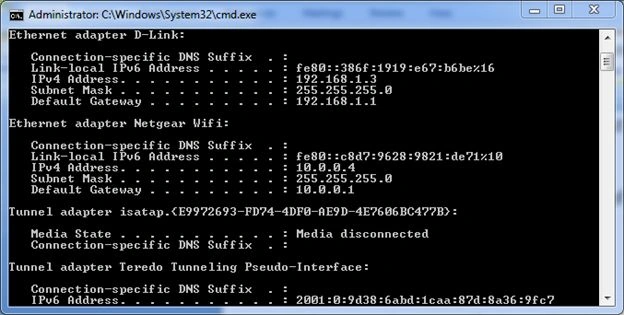
So, to handle this thing, we have a few classes in the System.Net namespace. In this article, we deal with a few.
Procedure To Get IP Address Using C#
Step 1. Start a new Console project in your Visual Studio.
Step 2. Add a namespace in your project as in the following:
Using System.Net;
Step 3. Before fetching the IP Address, we need to know whose IP Address we really want. It's quite understood that we want our own PC. But that must be specified in my code because computers are dumb.
So, we can fetch the machine Name (or Host Name) by the GetHostName() Method. This is inside the DNS class.
Step 4. We are now ready to get the IP address of the Host.
For this, we need to use the GetHostByName() method followed by the AddressList array (first Index).
And, in GetHostByName's argument, we "hostname".
Then, our code looks like this.
using System;
using System.Collections.Generic;
using System.Linq;
using System.Text;
using System.Net; //Include this namespace


namespace IpProto
{
    class Program
    {
        static void Main(string[] args)
        {
            string hostName = Dns.GetHostName(); // Retrive the Name of HOST
            Console.WriteLine(hostName);
           // Get the IP
            string myIP = Dns.GetHostByName(hostName).AddressList[0].ToString();
            Console.WriteLine("My IP Address is :"+myIP);
            Console.ReadKey();
        }
    }
}
Output
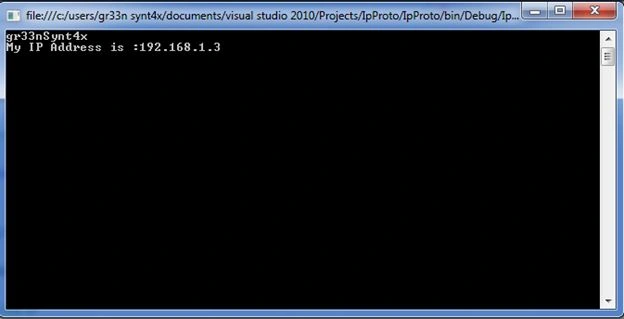
And this is my Local IP, so don't be confused. You will have your own.
Conclusion
This was our first step in the System.Net namespace. In a future article, we will deal with a more complex one. For this, I have enclosed my solution file with it.
Doug RoyerPosted Apr 15, 2024, 6:49 PM
That get the first it finds, which can be the loopback addresses 127.0.0.1 and ::1.
Kent KakoraPosted Dec 20, 2022, 12:40 PM
The GetHostByName is now obsolete
prideaux90Posted Nov 20, 2020, 11:42 PM
Why do you assume the first entry [0] is the correct local IP? you may get MULTIPLE local ip addresses if for example if have Ethernet vs Wireless, installed a Virtual Machine, ipV4, ipV6,
Esteban Serrano SeguraPosted May 30, 2019, 2:03 PM
Tengo una duda tengo una pagina web publicada y debo obtener la ip pero de la maquina local , pero cuando ejecuto el comando me obtiene la ip de la maquina en que esta publicada
mhamd abdPosted Dec 12, 2018, 3:50 PM
Have you Idea how to get the IP internet?
Anslemo PelcastrePosted Oct 23, 2018, 5:25 PM
Hi, I need to obtain the ip address but of client using asp mvc net core2.0, do you have a example for this please ?
Mohnish PandyaPosted Jul 4, 2018, 12:15 AM
How to make sure that one with zero index will be primary IP?
ERP TestingPosted Dec 22, 2016, 11:26 PM
This code is running in local system but when host it then it return always server ip
Praveen KumarPosted Sep 18, 2015, 7:11 AM
Nice
Vaikesh K PPosted Aug 25, 2015, 4:41 AM
Good info :)
John JuanPosted Aug 25, 2015, 4:38 AM
how to get ip address of other computers in the LAN?
Brijendra GautamPosted Mar 14, 2014, 12:01 AM
Dns.GetHostByName is obsolated by MicroSoft instead you can use Dns.GetHostEntry or Dns.GetHostAddresses both will give all the IP address associate with the HostName.