Insert, Update and Delete in DataGrid in ASP.Net
To do insert, update and delete in ASP.Net we need to add a DataGrid control on the page, by default it is not visible in the data control category; just right-click on the data control category and select "Choose Items..." from it.
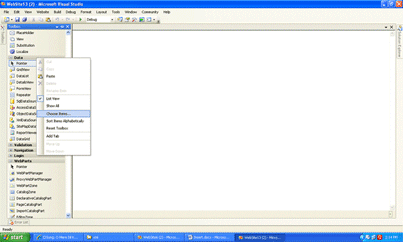
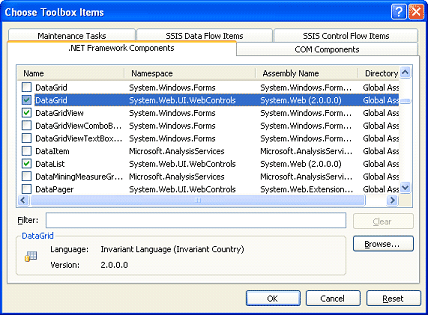
A "Choose Toolbox Items" dialog box appears; select DataGrid from it and click on ok. You'll find the DataGrid control in the data category toolbox. Now just drag and drop it on the web form.
Assume we have a table in the database with the name Emp and the fields Empid, EmpName and EmpAdd.
Now set the following properties of the DataGrid.
Set the AutoGenerateColumns to false.
Click on the smart tag of the DataGrid.
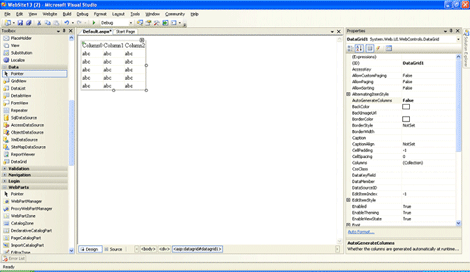
And select the property builder option from it. Click on the columns tab and add 3 bound columns to it and add edit and delete command fields to it, the bound fileds will appear in the selected columns set the header text of the three bound fileds.
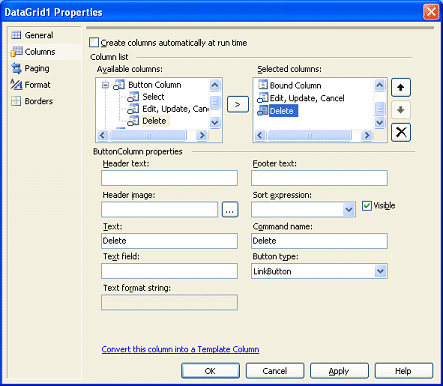
After adding columns your form will look like this.
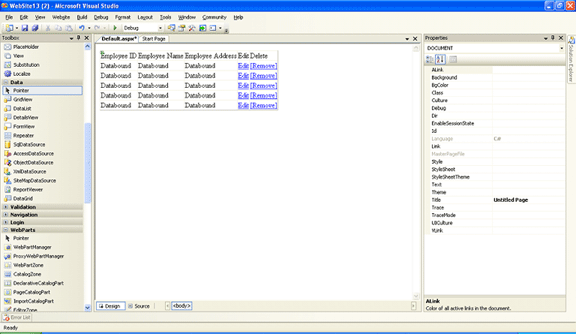
The following is the source code:-
<%@ Page Language="C#" AutoEventWireup="true" CodeFile="Default.aspx.cs" Inherits="_Default" %>
<!DOCTYPE html PUBLIC "-//W3C//DTD XHTML 1.0 Transitional//EN" "http://www.w3.org/TR/xhtml1/DTD/xhtml1-transitional.dtd">
<html xmlns="http://www.w3.org/1999/xhtml" >
<head runat="server">
<title>Untitled Page</title>
</head>
<body>
<form id="form1" runat="server">
<div>
<asp:DataGrid ID="DataGrid1" runat="server" AutoGenerateColumns="False" DataKeyField="EmpId" OnDeleteCommand="DataGrid1_DeleteCommand">
<Columns>
<asp:TemplateColumn HeaderText="Employee ID">
<EditItemTemplate>
<asp:Label ID="lblid_e" runat="server" Text='<%# DataBinder.Eval(Container, "DataItem.EmpId") %>'></asp:Label>
</EditItemTemplate>
<ItemTemplate>
<asp:Label ID="lblEmpid" runat="server" Text='<%# DataBinder.Eval(Container, "DataItem.EmpId") %>'></asp:Label>
</ItemTemplate>
<FooterTemplate>
<asp:Button ID="btnAdd" runat="server" CommandName="AddNew" Text="Insert" />
</FooterTemplate>
</asp:TemplateColumn>
<asp:TemplateColumn HeaderText="Employee Name">
<EditItemTemplate>
<asp:TextBox ID="txtname_e" runat="server" Text='<%# DataBinder.Eval(Container, "DataItem.EmpName") %>'></asp:TextBox>
</EditItemTemplate>
<ItemTemplate>
<asp:Label ID="lblname" runat="server" Text='<%# DataBinder.Eval(Container, "DataItem.EmpName") %>'></asp:Label>
</ItemTemplate>
<FooterTemplate>
<asp:TextBox ID="txtname_f" runat="server"></asp:TextBox>
</FooterTemplate>
</asp:TemplateColumn>
<asp:TemplateColumn HeaderText="Employee Address">
<EditItemTemplate>
<asp:TextBox ID="txtadd_e" runat="server" Text='<%# DataBinder.Eval(Container, "DataItem.EmpAdd") %>'></asp:TextBox>
</EditItemTemplate>
<ItemTemplate>
<asp:Label ID="lbladd" runat="server" Text='<%# DataBinder.Eval(Container, "DataItem.EmpAdd") %>'></asp:Label>
</ItemTemplate>
<FooterTemplate>
<asp:TextBox ID="txtadd_f" runat="server"></asp:TextBox>
</FooterTemplate>
</asp:TemplateColumn>
<asp:EditCommandColumn CancelText="Cancel" EditText="Edit" HeaderText="Edit" UpdateText="Update">
</asp:EditCommandColumn>
<asp:ButtonColumn CommandName="Delete" HeaderText="Delete" Text="[Remove]"></asp:ButtonColumn>
</Columns>
</asp:DataGrid></div>
<asp:Button ID="Button1" runat="server" OnClick="Button1_Click" Text="Add New Rec" />
</form>
</body>
</html>
Specify the DataKeyField of the DataGrid to EmpId which is the primary key of our table.
Now we just need to do the coding part.
using System;
using System.Data;
using System.Configuration;
using System.Web;
using System.Web.Security;
using System.Web.UI;
using System.Web.UI.WebControls;
using System.Web.UI.WebControls.WebParts;
using System.Web.UI.HtmlControls;
using System.Data.SqlClient;
public partial class _Default : System.Web.UI.Page
{
string dbcon = ConfigurationManager.ConnectionStrings["AdvWorks"].ConnectionString;
SqlConnection con;
SqlCommand cmd;
SqlDataAdapter da;
DataSet ds;
protected void Page_Load(object sender, EventArgs e)
{
if (!IsPostBack)
{
BindData();
}
}
public void BindData()
{
con = new SqlConnection(dbcon);
da = new SqlDataAdapter("Select * from Emp", con);
ds = new DataSet();
da.Fill(ds, "Emp");
DataGrid1.DataSource = ds.Tables["Emp"].DefaultView;
DataGrid1.DataBind();
}
protected void Button1_Click(object sender, EventArgs e)
{
if (Button1.Text == "Add New Rec")
{
Button1.Text = "Cancel";
DataGrid1.ShowFooter = true;
}
else
{
Button1.Text = "Add New Rec";
DataGrid1.ShowFooter = false;
}
}
protected void DataGrid1_DeleteCommand(object source, DataGridCommandEventArgs e)
{
con = new SqlConnection(dbcon);
cmd = new SqlCommand("Delete from Emp where Empid=" + DataGrid1.DataKeys[e.Item.ItemIndex].ToString(), con);
con.Open();
int rows = cmd.ExecuteNonQuery();
if (rows > 0)
{
Page.ClientScript.RegisterClientScriptBlock(this.GetType(), "Deleted", "<script>alert('Deleted Successfully')</script>");
con.Close();
BindData();
}
}
protected void DataGrid1_EditCommand(object source, DataGridCommandEventArgs e)
{
DataGrid1.EditItemIndex = e.Item.ItemIndex;
BindData();
}
protected void DataGrid1_UpdateCommand(object source, DataGridCommandEventArgs e)
{
TextBox name = (TextBox)DataGrid1.Items[e.Item.ItemIndex].Cells[1].FindControl("txtname_e");
TextBox add = (TextBox)DataGrid1.Items[e.Item.ItemIndex].Cells[2].FindControl("txtadd_e");
con = new SqlConnection(dbcon);
cmd = new SqlCommand("Update Emp set Empname='" + name.Text + "',EmpAdd='" + add.Text + "' where Empid=" + DataGrid1.DataKeys[e.Item.ItemIndex
.ToString(), con);
con.Open();
int rows = cmd.ExecuteNonQuery();
if (rows > 0)
{
Page.ClientScript.RegisterClientScriptBlock(this.GetType(), "Updated", "<script>alert('Updated Successfully')</script>");
con.Close();
DataGrid1.EditItemIndex = -1;
BindData();
}
}
protected void DataGrid1_ItemCommand(object source, DataGridCommandEventArgs e)
{
if (e.CommandName.Equals("AddNew"))
{
TextBox name = (TextBox)e.Item.FindControl("txtname_f");
TextBox add = (TextBox)e.Item.FindControl("txtadd_f");
con = new SqlConnection(dbcon);
cmd = new SqlCommand("Insert into Emp values('" + name.Text + "','" + add.Text + "')", con);
con.Open();
int rows = cmd.ExecuteNonQuery();
if (rows > 0)
{
Page.ClientScript.RegisterClientScriptBlock(this.GetType(), "Inserted", "<script>alert('Inserted Successfully')</script>");
con.Close();
BindData();
}
}
}
}
In VB.NET same code….
Imports System.Data.SqlClient
Imports System.Data
Partial Class Default2
Inherits System.Web.UI.Page
Dim ds As DataSet
Dim da As SqlDataAdapter
Dim cmd As SqlCommand
Dim dbcon as string=ConfigurationManager.ConnectionString["AdvWorks"].ConnectionString;
Dim con as SqlConnection
Public Sub Bind()
Con=new SqlConnection(dbcon)
da = New SqlDataAdapter("select * from Emp", con)
ds = New DataSet()
da.Fill(ds)
DataGrid1.DataSource = ds
DataGrid1.DataBind()
End Sub
Protected Sub Page_Load(ByVal sender As Object, ByVal e As System.EventArgs) Handles Me.Load
If Not IsPostBack Then
Bind()
End If
End Sub
Protected Sub btnadd_Click(ByVal sender As Object, ByVal e As System.EventArgs) Handles btnadd.Click
If btnadd.Text = "Add New Rec" Then
btnadd.Text = "Cancel"
DataGrid1.ShowFooter = True
Bind()
Else
btnadd.Text = "Add New Rec"
DataGrid1.ShowFooter = False
Bind()
End If
End Sub
Protected Sub DataGrid1_ItemCommand(ByVal source As Object, ByVal e As System.Web.UI.WebControls.DataGridCommandEventArgs) Handles DataGrid1.ItemCommand
If e.CommandName.Equals("AddNew") Then
Con=new SqlConnection(dbcon)
Dim name As TextBox = DirectCast(e.Item.FindControl("txtname_f"), TextBox)
Dim add As TextBox = DirectCast(e.Item.FindControl("txtadd_f"), TextBox)
'Dim name As TextBox = DirectCast(DataGrid1.Items(e.Item.ItemIndex).FindControl("txtname_f"), TextBox)
'Dim add As TextBox = DirectCast(DataGrid1.Items(e.Item.ItemIndex).FindControl("txtadd_f"), TextBox)
cmd = New SqlCommand("Insert into Emp values('" & name.Text & "','" & add.Text & "')", con)
con.Open()
cmd.ExecuteNonQuery()
con.Close()
Bind()
End If
End Sub
Protected Sub DataGrid1_UpdateCommand(ByVal source As Object, ByVal e As System.Web.UI.WebControls.DataGridCommandEventArgs) Handles DataGrid1.UpdateCommand
Con=new SqlConnection(dbcon)
Dim name As TextBox = DirectCast(DataGrid1.Items(e.Item.ItemIndex).FindControl("txtname_e"), TextBox)
Dim add As TextBox = DirectCast(e.Item.FindControl("txtadd_e"), TextBox)
cmd = New SqlCommand("Update Emp Set Empname='" & name.Text & "',EmpAdd ='" & add.Text & "'where Empid=" & DataGrid1.DataKeys(e.Item.ItemIndex), con)
con.Open()
cmd.ExecuteNonQuery()
DataGrid1.EditItemIndex = -1
con.Close()
Bind()
End Sub
Protected Sub DataGrid1_EditCommand(ByVal source As Object, ByVal e As System.Web.UI.WebControls.DataGridCommandEventArgs) Handles DataGrid1.EditCommand
DataGrid1.EditItemIndex = e.Item.ItemIndex
Bind()
End Sub
Protected Sub DataGrid1_DeleteCommand(ByVal source As Object, ByVal e As System.Web.UI.WebControls.DataGridCommandEventArgs) Handles DataGrid1.DeleteCommand
Con=new SqlConnection(dbcon)
con.Open()
cmd = New SqlCommand("delete from Emp where EmpId=" & DataGrid1.DataKeys(e.Item.ItemIndex), con)
cmd.ExecuteNonQuery()
con.Close()
Bind()
End Sub
End Class
Hope you liked the example and it might help you in your project.
With Regards,
Vishal Gilbile.