

To insert an image we first need to create a table in the SQL Server database; the following is the coding.
create table Emp
(
EmpId int identity(100,1),
EmpName varchar(20) not null,
EmpAdd varchar(20) not null,
imPhoto image
)
We have Emp table with EmpId as identity column and Name, Add and photo as the remaining columns.
To insert data from front end to back end we need to create a procedure; the following is the code for it.
create procedure prcInsert
(
@name varchar(20),
@add varchar(30),
@photo image
)
as
begin
insert into Emp values(@name,@add,@photo)
end
This procedure will accept name, add and photo from the user and click on a button to add the data to the database.
Now we need to design a form for accepting data from the user; the following is the design:
<%@ Page Language="C#" AutoEventWireup="true" CodeFile="Default.aspx.cs" Inherits="_Default" %>
<!DOCTYPE html PUBLIC "-//W3C//DTD XHTML 1.0 Transitional//EN"
"http://www.w3.org/TR/xhtml1/DTD/xhtml1-transitional.dtd">
<html xmlns="http://www.w3.org/1999/xhtml" >
<head runat="server">
<title>Untitled Page</title>
</head>
<body>
<form id="form1" runat="server">
<div>
<table width="70%">
<tr>
<td style="width: 109px; height: 21px">
Enter Emp Name :</td>
<td style="width: 16px; height: 21px">
<asp:TextBox ID="TextBox1" runat="server"></asp:TextBox></td>
</tr>
<tr>
<td style="width: 109px">
Enter Emp Add :</td>
<td style="width: 16px">
<asp:TextBox ID="TextBox2" runat="server"></asp:TextBox></td>
</tr>
<tr>
<td style="width: 109px">
Select Photo :</td>
<td style="width: 16px">
<asp:FileUpload ID="FileUpload1" runat="server" />
<asp:Label ID="StatusLabel" runat="server"></asp:Label></td>
</tr>
<tr>
<td colspan="2">
<asp:Button ID="Button1" runat="server" OnClick="Button1_Click" Text="Save" /></td>
</tr>
</table>
</div>
</form>
</body>
</html>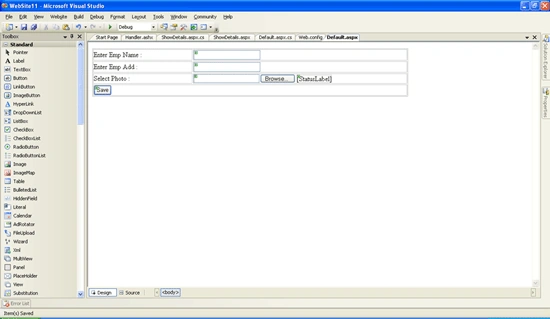
For the button click event type the following code:
using System;
using System.Data;
using System.Configuration;
using System.Web;
using System.Web.Security;
using System.Web.UI;
using System.Web.UI.WebControls;
using System.Web.UI.WebControls.WebParts;
using System.Web.UI.HtmlControls;
using System.Data.SqlClient;
using System.IO;
public partial class _Default : System.Web.UI.Page
{
string dbcon = ConfigurationManager.ConnectionStrings["AdvWorks"].ConnectionString;
SqlConnection con;
SqlDataAdapter da;
DataSet ds;
SqlCommand cmd;
byte[] raw;
protected void Page_Load(object sender, EventArgs e)
{
}
protected void Button1_Click(object sender, EventArgs e)
{
try
{
if ((FileUpload1.FileName != ""))
{
//to allow only jpg gif and png files to be uploaded.
string extension = Path.GetExtension(FileUpload1.PostedFile.FileName);
if (((extension == ".jpg") || ((extension == ".gif") || (extension == ".png"))))
{
FileStream fs = new FileStream(FileUpload1.PostedFile.FileName, FileMode.OpenOrCreate, FileAccess.ReadWrite);
raw = new byte[fs.Length];
fs.Read(raw, 0, Convert.ToInt32(fs.Length));
con = new SqlConnection(dbcon);
cmd = new SqlCommand("prcInsert", con);
cmd.CommandType = CommandType.StoredProcedure;
cmd.Parameters.AddWithValue("@name", TextBox1.Text);
cmd.Parameters.AddWithValue("@add", TextBox2.Text);
cmd.Parameters.AddWithValue("@photo", raw);
con.Open();
int rows = cmd.ExecuteNonQuery();
if (rows > 0)
{
string script = "<script>alert('Data Added Successfully')</script>";
Page.ClientScript.RegisterClientScriptBlock(this.GetType(), "Added", script);
TextBox1.Text = "";
TextBox2.Text = "";
}
else
{
string script = "<script>alert('Error Adding Data')</script>";
Page.ClientScript.RegisterClientScriptBlock(this.GetType(), "Error", script);
}
}
else
{
StatusLabel.Text = "Only Jpg,gif or Png files are permitted";
}
}
else
{
StatusLabel.Text = "Kindly Select a File.....";
}
con.Close();
}
catch (Exception e1)
{
}
}
}
You'll find that after running the application your image and other details are being inserted into the database.
After clicking the save button you'll get a message box stating that your data is saved.
Now In order to retrieve the image from the database and display it in the image control we need to create a handler (ashx) file. Right-click your solution explorer -> add new item - >Select Generic Handler from it. Following is the code for the same.
<%@ WebHandler Language="C#" Class="Handler" %>
using System;
using System.Data;
using System.Configuration;
using System.Collections;
using System.Web;
using System.Web.Security;
using System.Web.UI;
using System.Web.UI.WebControls;
using System.Web.UI.WebControls.WebParts;
using System.Web.UI.HtmlControls;
using System.IO;
using System.Data.SqlClient;
public class Handler : IHttpHandler {
public void ProcessRequest (HttpContext context)
{
if (context.Request.QueryString["id"] != null)
{
// context.Response.Write(context.Request.QueryString["id"]);
string dbcon = ConfigurationManager.ConnectionStrings["AdvWorks"].ConnectionString;
SqlConnection con = new SqlConnection(dbcon);
con.Open();
SqlCommand cmd = new SqlCommand("Select imPhoto from Emp where Empid=@empid", con);
cmd.Parameters.AddWithValue("@empid", context.Request.QueryString["id"].ToString());
SqlDataReader dr = cmd.ExecuteReader();
dr.Read();
context.Response.BinaryWrite((byte[])dr["imPhoto"]);
dr.Close();
con.Close();
}
else
{
context.Response.Write("No Image Found");
}
}
public bool IsReusable {
get {
return false;
}
}
}
Design a new web form…
<%@ Page Language="C#" AutoEventWireup="true" CodeFile="ShowDetails.aspx.cs" Inherits="ShowDetails" %>
<!DOCTYPE html PUBLIC "-//W3C//DTD XHTML 1.0 Transitional//EN" "http://www.w3.org/TR/xhtml1/DTD/xhtml1-transitional.dtd">
<html xmlns="http://www.w3.org/1999/xhtml" >
<head runat="server">
<title>Untitled Page</title>
</head>
<body>
<form id="form1" runat="server">
<div>
<table>
<tr>
<td style="height: 74px">
Enter a Employee ID To be Searched
</td>
<td style="height: 74px">
<asp:DropDownList ID="DropDownList1" runat="server" AutoPostBack="True" DataSourceID="SqlDataSource1"
DataTextField="EmpId" DataValueField="EmpId">
</asp:DropDownList><asp:SqlDataSource ID="SqlDataSource1" runat="server" ConnectionString="<%$ ConnectionStrings:AdvWorks %>"
SelectCommand="SELECT EmpId, EmpName, EmpAdd, imPhoto FROM Emp"></asp:SqlDataSource>
<asp:Button ID="Button1" runat="server" OnClick="Button1_Click" Text="Search" />
</td>
</tr>
<tr>
<td>
Employee Image :
</td>
<td valign="top">
<asp:Image ID="Image1" runat="server" ImageUrl='<%# "~/Handler.ashx?ID=" + Eval("EmpID")%>' /></td>
</tr>
<tr>
<td>
Employee Name :
</td>
<td>
<asp:Label ID="Label1" runat="server"></asp:Label></td>
</tr>
<tr>
<td>
Employee Address :
</td>
<td>
<asp:Label ID="Label2" runat="server"></asp:Label></td>
</tr>
</table>
</div>
</form>
</body>
</html>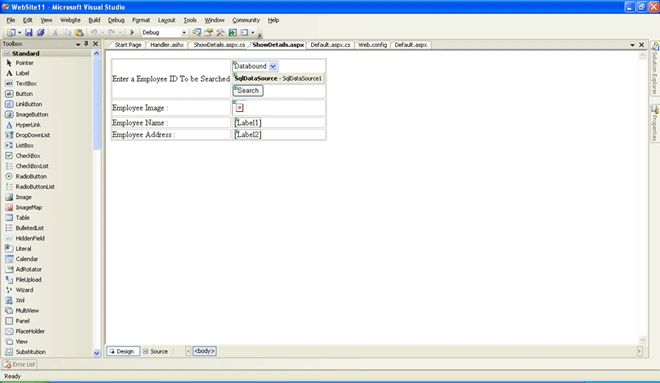
Following is the code behind for the same.
using System;
using System.Data;
using System.Configuration;
using System.Collections;
using System.Web;
using System.Web.Security;
using System.Web.UI;
using System.Web.UI.WebControls;
using System.Web.UI.WebControls.WebParts;
using System.Web.UI.HtmlControls;
using System.Data.SqlClient;
public partial class ShowDetails : System.Web.UI.Page
{
string dbcon = ConfigurationManager.ConnectionStrings["AdvWorks"].ConnectionString;
SqlConnection con;
SqlCommand cmd;
protected void Page_Load(object sender, EventArgs e)
{
}
protected void Button1_Click(object sender, EventArgs e)
{
con = new SqlConnection(dbcon);
con.Open();
cmd = new SqlCommand("Select * from Emp where Empid=@id", con);
cmd.Parameters.AddWithValue("@id", DropDownList1.Text);
SqlDataReader dr = cmd.ExecuteReader();
dr.Read();
if (dr.HasRows)
{
Label1.Text = dr[1].ToString();
Label2.Text = dr[2].ToString();|
Image1.ImageUrl = "~/Handler.ashx?id=" + DropDownList1.Text;
}
con.Close();
}
}
Now run the application and select an empid from it and click the search button.
Hope you might have liked the above application and it might will help you in your project. Kindly post your queries/reply.
Girish SharmaPosted Jan 2, 2018, 2:09 AM
FileStream fs = new FileStream(FileUpload1.PostedFile.FileName, FileMode.OpenOrCreate, FileAccess.ReadWrite); my image path is showing null in fs variable. and goes to catch () directly......give me some suggestion to solve it
Nilesh ManePosted May 22, 2016, 2:58 AM
errors - how to solve - Access to the path 'C:\Program Files (x86)\Common Files\Microsoft Shared\DevServer\11.0\download.jpg' is denied.
RawatPosted Feb 29, 2016, 6:29 AM
you are niit student
ehsan bPosted Jan 7, 2016, 6:55 AM
sorry I cant download the codes
ehsan bPosted Jan 7, 2016, 6:37 AM
thank you for helping
kamanzi ernestPosted Aug 14, 2015, 5:08 AM
all code is okay but when i trying to retrieve image,others displayed image not
Ashok KuamrPosted Jan 15, 2014, 8:24 AM
Inserting And Reading Image To/From Database in ASP.NET (Web Application) in Image Control in here when i retrive image then one error come from Handler.ashx page,error is "ArgumentOutOfRangeException was unhandledby user code" Specified argument was out of the range of valid values. Parameter name: offset ...........................................what is this?????????
ahmed hassanPosted Nov 10, 2013, 7:40 AM
using previous code
ahmed hassanPosted Nov 10, 2013, 7:39 AM
how can i add .swf file and retrieve it into web page
Vishal GilbilePosted Mar 7, 2013, 7:57 AM
Hello Rajesh, I've gone through your code the way of retrieving the image file from the database is perfect but with constraint to that your dropdownlist2.Text provides you the id(in your case cnumber) of the database table. What i can suggest you in this case is that the above code of inserting the image in the table is written in .Net 2.0 framework, try to google how to insert a image file in DB in higher version of .net framework. But the way of retrieving the image file would be same. Hope that helps you.
rajesh barnalaPosted Mar 7, 2013, 7:14 AM
see once my code i am not getting out put plssssssssssssssss <%@ WebHandler Language="C#" Class="Handler" %> using System; using System.Data; using System.Configuration; using System.Collections; using System.Web; using System.Web.Security; using System.Web.UI; using System.Web.UI.WebControls; using System.Web.UI.WebControls.WebParts; using System.Web.UI.HtmlControls; using System.IO; using System.Data.SqlClient; public class Handler : IHttpHandler { public void ProcessRequest(HttpContext context) { if (context.Request.QueryString["id"] != null) { // context.Response.Write(context.Request.QueryString["id"]); SqlConnection con = new SqlConnection("uid=sa;pwd=admin123;database=grpact;server=ADMIN-PC"); con.Open(); SqlCommand cmd = new SqlCommand("Select images from image where cnumber=@id", con); cmd.Parameters.AddWithValue("@id", context.Request.QueryString["id"].ToString()); SqlDataReader dr = cmd.ExecuteReader(); dr.Read(); context.Response.BinaryWrite((byte[])dr["images"]); dr.Close(); con.Close(); } else { context.Response.Write("No Image Found"); } } public bool IsReusable { get { return false; } } } at c# protected void Button1_Click(object sender, EventArgs e) { SqlConnection con = new SqlConnection("uid=sa;pwd=admin123;database=grpact;server=ADMIN-PC"); con.Open(); SqlCommand cmd = new SqlCommand("Select * from image where cnumber=@id", con); cmd.Parameters.AddWithValue("@id", DropDownList2.Text); SqlDataReader dr = cmd.ExecuteReader(); dr.Read(); if (dr.HasRows) { Image1.ImageUrl = "~/Handler.ashx?id=" + DropDownList2.Text; } con.Close(); }
preetpal kapoorPosted Feb 2, 2013, 6:11 AM
HI, I was trying the above given code .. its running fine but while retrieving the image from DB no image is shown .. Please help me in this
raghu gowdaPosted Jan 14, 2013, 2:56 PM
Specified argument was out of the range of valid values. Parameter name: offset Here when i retrive image then the above error occurs...
Rajeev kumarPosted Oct 11, 2012, 9:08 PM
thanks for this articles..
Milan DuttaPosted Aug 4, 2012, 10:04 PM
Inserting And Reading Image To/From Database in ASP.NET (Web Application) in Image Control in here when i retrive image then one error come from Handler.ashx page,error is "ArgumentOutOfRangeException was unhandledby user code" Specified argument was out of the range of valid values. Parameter name: offset ...........................................what is this?????????
Vishal GilbilePosted Jul 17, 2012, 6:18 AM
you might have made a mistake in Handler file. check your handler file.
Siraj kPosted Jun 24, 2012, 10:13 AM
hello sir, i used ur coding as it is but for me image saving successfully but while retrieving it not shows image and other fields are working fine,,where i would be made mistake..... thanks...
surender bhyanPosted Aug 9, 2011, 3:48 AM
Keep posting sir
Rohatash KumarPosted Jul 19, 2011, 8:11 AM
I just looking for same....thanks a lot vishal.