

In this article I will demonstrate in four simple steps from scratch - How to
create Custom Membership Provider in ASP.Net MVC Application for Form
Authentication.
It would serve as a replacement for the ASP.Net's built in membership provider
when you feel that built in membership provider are not appropriate for your
application.
- Start by Creating a new Visual Studio
Solution. Open a new instance of Visual Studio 2010.
Select File -> New -> Project and from the new project dialog select ASP.Net MVC 2 Web Application.
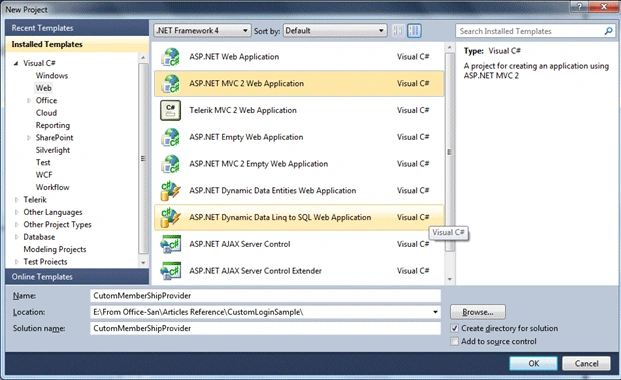
Click" Ok"- for this sample application – Select" No, do not create a unit test Project.
- From the Solution explorer – Go to
Global.asax.cs - Update RegisterRoutes() method to make Account Controller –
LogOn – the default one – so that when we run our application -LogOn View
gets called instead of redirecting it to Home – Index
Inside RegisterRoutes() replace
new { controller = "Home", action = "Index", id = UrlParameter.Optional } with
new { controller = "Account", action = "LogOn", id = UrlParameter.Optional }
- Next Create- Custom Membership Provider by
deriving a class from MembershipProvider
- Go to Solution Explorer – Models – Right Click – Add Class- CustomMembershipProvider.cs
- Add the following using statement to CustomMembershipProvider.cs
using System.Web.Security;
- Derive CustomMembershipProvider from class – MembershipProvider
public class CustomMembershipProvider:MembershipProvider
{
}
- Right-click MembershipProvider and choose Implement Abstract Class
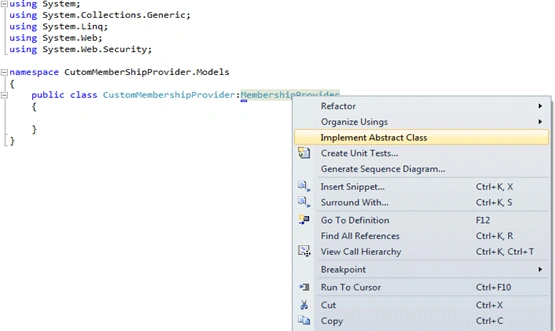
- You will find a lot of properties and methods - all throwing a NotImplementedException
- For Form Authentication only method we need to update is ValidateUser().
Add your logic here to validate the Usernames and password.
public override bool ValidateUser(string username, string password)
{
if (username == "saurabh" && password == "singh")
{
return true;
}else
{
return false;
}
}
For this sample I have hardcoded the username and password in the code.
In the actual scenario - fetch the username and password from the corresponding table in database.
- After creating the custom membership
provider , You need to register it in the Web.Config File
Replace the default membership with the following section
<configuration><system.web>
<membership defaultProvider="MyMembershipProvider">
<providers>
<clear/>
<add name="MyMembershipProvider" type=" CutomMemberShipProvider.Models.CustomMembershipProvider"/>
</providers>
</membership></system.web>
</configuration>
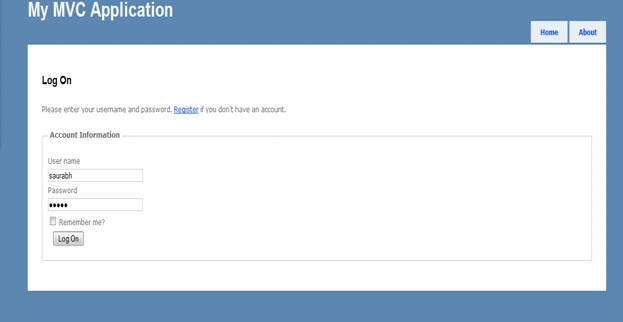
- Compile and run the Project (F5) and you
will get directed to Log On Page.
You can login with the logic provided in the ValidateUser() method.
For this sample application since we have hardcoded user name and password , So login using User name=saurabh and password=singh for successful Authentication.
In the above article we have seen how to
implement Custom Membership Provider. I have attached the Code for this sample
Application.
To keep the article simple I have used the ready made Account Controller, LogOn
View, and Account Model coming with the default MVC project template. All these
files can be modified to meet the project specific requirements.
anca marcuPosted May 27, 2012, 4:06 PM
thank you alot !
rune hansenPosted Mar 22, 2011, 12:35 PM
Great article! Nice clear, simple, and useful! It would be great if you would write a similar article about creating a custom RoleProvider!
SapnaPosted Feb 17, 2011, 11:15 PM
Useful and nice article. thanks..soon:)
Dinesh BeniwalPosted Feb 17, 2011, 6:07 AM
Good article, welcome on the C# Corner Community.