

Introduction
JSON (JavaScript Object Notation) is an open and text-based data exchange format. In other words, it is a text format for the serialization of structured data. It is derived from object literals of JavaScript.
JSON represents six data types
- String
- Number
- Boolean
- Null
2. Structure Type
- Object
- Array
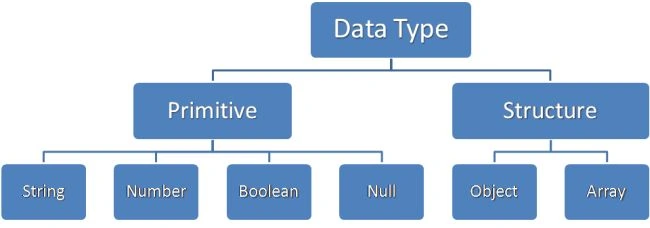
JSON Data Type
- String: It begins and ends with double-quote marks and contains Unicode characters in a sequence. Any character may be escaped.
- Number: A number can be an integer, real number, decimal point, with exponent part and prefix minus sign but it does not contain hex and octal forms.
- Boolean: It contains true or false.
- Null: empty
Array
- It represents an ordered sequence of values.
- It is enclosed in square bracts.
- Each value is separated by a comma.
- Array values can be any valid data type.
- Data is retrieved from the array by an index.
- An Array can contain an Object.
Object
- It is an unordered collection in name/value pairs.
- Each pair is enclosed in curly brackets.
- A Name/Value is separated by a colon (":").
- A Name is defined in double-quotes and can contain Unicode characters.
- A value can't be a function.
- Values can be any data type.
- Object values can be retrieved using the. an operator with the name.
- We use an eval() JavaScript function to convert JSON text into a JSON object.
Example
- <%@ Page Language="C#" AutoEventWireup="true" CodeBehind="JSONArray.aspx.cs" Inherits="JqueryValidation.JSONArray" %>
- <!DOCTYPE html PUBLIC "-//W3C//DTD XHTML 1.0 Transitional//EN" "http://www.w3.org/TR/xhtml1/DTD/xhtml1-transitional.dtd">
- <html xmlns="http://www.w3.org/1999/xhtml">
- <head runat="server">
- <title></title>
- <style type="text/css">
- .border
- {
- border:1px solid #000;
- }
- </style>
- <script type="text/javascript">
- //create an Array which contains type and phoneNumber
- var phoneNumber = [{
- "type": "Home",
- "number": 919461162949
- },
- {
- "type": "Office",
- "number": "123456789"
- }]
- function getPhoneInfo()
- {
- var displayDiv = document.getElementById("displayDiv");
- var detailTable = document.createElement("table");
- detailTable.setAttribute("class", "border");
- var thType = document.createElement("th");
- thType.setAttribute("class", "border");
- thType.appendChild(document.createTextNode("Type"));
- detailTable.appendChild(thType);
- var thNumber = document.createElement("th");
- thNumber.setAttribute("class", "border");
- thNumber.appendChild(document.createTextNode("Number"));
- detailTable.appendChild(thNumber);
- for (var i = 0; i < phoneNumber.length; i++)
- {
- var row = document.createElement("tr");
- var colType = document.createElement("td");
- colType.setAttribute("class", "border");
- var colNumber = document.createElement("td");
- colNumber.setAttribute("class", "border");
- //Read data from Array
- colType.appendChild(document.createTextNode(phoneNumber[i].type));
- colNumber.appendChild(document.createTextNode(phoneNumber[i].number));
- row.appendChild(colType);
- row.appendChild(colNumber);
- detailTable.appendChild(row);
- }
- displayDiv.appendChild(detailTable);
- }
- </script>
- </head>
- <body onload="getPhoneInfo()">
- <form id="form1" runat="server">
- <div id="displayDiv">
- </div>
- </form>
- </body>
- </html>
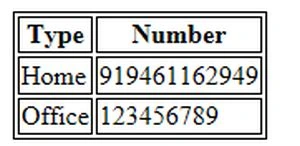
OUTPUT
Sandeep Singh ShekhawatPosted Dec 4, 2013, 11:01 PM
Thanks Kannips...
Kanniyappan KrishPosted Dec 4, 2013, 8:10 AM
Hi dude you did good job keep it up..tnx