

Threading is a concept we all understand and most of us would have implemented them in real world applications. I would like to explain one more inner level detail on threads - that is Foreground and Background threads.
Types of Threads
Basically, there are two types of threads which fall into:
- Foreground Thread
- Background Thread
Foreground threads are threads which will continue to run until the last foreground thread is terminated. In another way, the application is closed when all the foreground threads are stopped.
So the application won't wait until the background threads are completed, but it will wait until all the foreground threads are terminated.
By default, the threads are foreground threads. So when we create a thread the default value of IsBackground property would be false.
Background Thread
Background threads are threads which will get terminated when all foreground threads are closed. The application won't wait for them to be completed.
We can create a background thread like following:
- Thread backgroundThread = new Thread(threadStart);
- backgroundThread.IsBackground = true;
- backgroundThread.Start();
We can see the difference by using a windows or console application. In the attachment, I have provided such an application. The application is explained below:
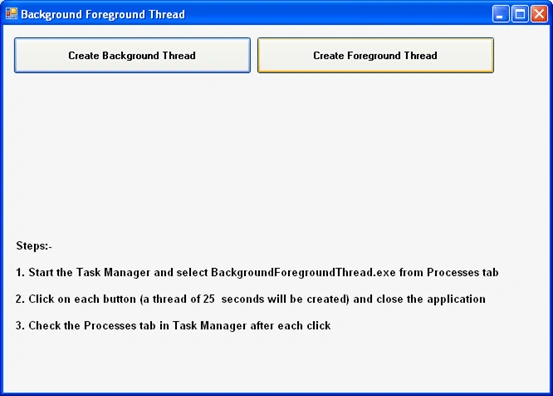
The application contains 2 buttons, on click of each it will create a thread.
Each thread will be executing a method which takes 25 seconds to execute through a mere Thread.Sleep() invoke.
- private void TenSecondsMethod()
- {
- // Method of 25 seconds delay
- Thread.Sleep(25000);
- }
After clicking each button, you can try closing the application.
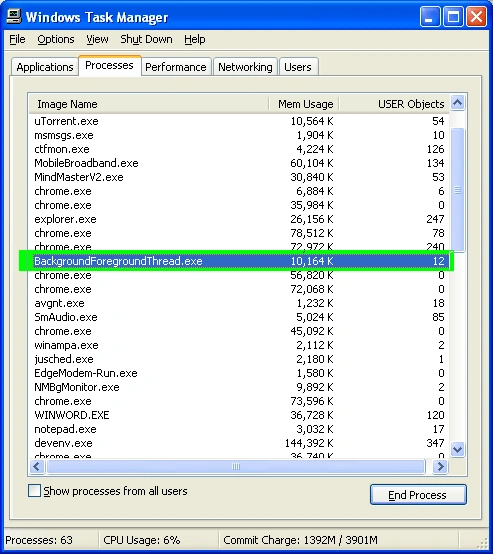
From the windows task manager we can see the application would not be listed in the case of Background thread created.
From the windows task manager we can see the application would be still running in the case of Foreground thread created.
The following image shows the snapshot of task manager just after closing the application after invoking a foreground thread. The application will continue to run until all the foreground threads are completed.
Recommended Usage
We can specify foreground threads for business critical tasks.
Meantime, the background threads can be useful for polling services or logging services which could be discontinued once the application is closed.
Vithal WadjePosted Nov 7, 2014, 8:20 AM
great comeback ,thanks for sharing
Gobi GPosted May 8, 2013, 8:39 AM
Nice terms
Jean PaulPosted Mar 8, 2013, 4:17 PM
Thank You Rameez for the good words!
Rameez Ahmed SayadPosted Mar 8, 2013, 4:16 PM
Nice crisp and clear article to explain the 2 terms. Thanks!!!