

Do you have a multiprocessor system? Then, Right-click on the taskbar open the task manager click the Performance Tab, and notice the performance. You will find something like shown below.
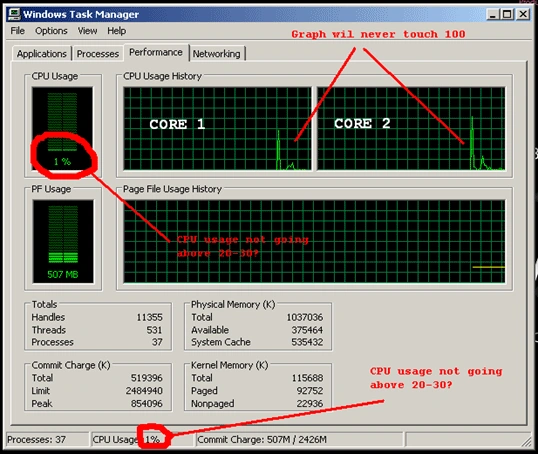
This means there are cores not fully utilized for best performance.
Sequential For loop
for (int i = 0; i < 100; i++)
{
    // Code within each iteration executes sequentially
    a[i] = a[i] * a[i];
}
Multicore-processor machines are now becoming standard. The key to performance improvements is therefore to run a program on multiple processors in parallel.
Introducing TPL
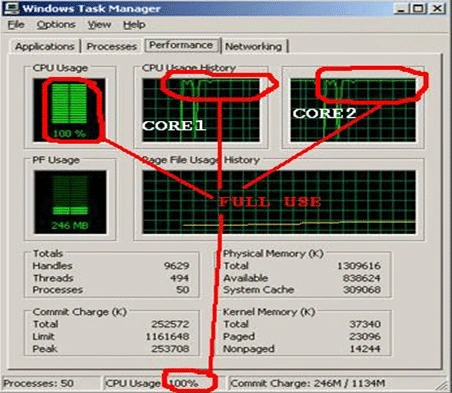
The Task Parallel Library (TPL) is designed to make it much easier for the developer to write code that can automatically use multiple processors. Using the library, you can conveniently express potential parallelism in existing sequential code, where the exposed parallel tasks will be run concurrently on all available processors. Usually, this results in significant speedups.
TPL is a major component of the Parallel FX library, the next generation of concurrency support for the Microsoft .NET Framework.
Since the iterations are independent of each other, that is, subsequent iterations do not read state updates made by prior iterations, you can use TPL to run each iteration in parallel on available cores, like this.
Parallel For loop
Parallel.For(0, 100, i =>
{
    // This block should contain independent code
    // It must not update/use the value of some variable from previous iteration
    // This block should contain code that takes a significant execution time in each iteration
    // Small complexity code here can result in poor performance
    a[i] = a[i] * a[i];
});
Happy Learning!
Suresh PaldiaPosted Nov 12, 2010, 6:00 AM
The namespace to use for using Parallel.For and Parallel.ForEach is : System.Threading.Tasks A similar Parallel.ForEach loop is: List<int> list = new List<int>(); //populate a list Parallel.ForEach(list, item => { DoSomeWork(); } );