

- Web Services Description Language.
- WSDL is an XML format for describing network services.
- In General, WSDL is an XML-based language for describing Web services and how to access them.
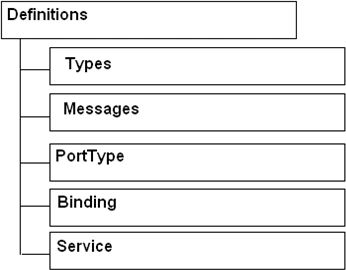
A WSDL document uses the following elements in the definition of network services
- Types- Used to describe the data types of messages that are exchanged.
- Message- Data being transmitted(input parameters, output result, etc).
- Operations- Methods supported by the service.
- PortType- Set of operations.
- Binding- a concrete protocol and data format specification for a particular port type.
- Port- a single endpoint for communicating with service.
- Service- a collection of related post.
WSDl XML contains :
Easy Example:
Note: Just go on reading the comments, and you will get everything in code
The example is taken from http://www.w3.org/TR/wsdl and is easily explained below...
//The first line says that it is an XML file
<?xml version="1.0"?>
//Root element is <definitions>, defining your web service till </definitions>
//This list the namespaces that you are following in webservice description
<definitions name="StockQuote" targetNamespace="http://example.com/stockquote.wsdl"
xmlns:tns="http://example.com/stockquote.wsdl"
xmlns:xsd1="http://example.com/stockquote.xsd"
xmlns:soap="http://schemas.xmlsoap.org/wsdl/soap/"
xmlns="http://schemas.xmlsoap.org/wsdl/">
//----------------------- TYPES
//Name the data items and their types that will
// be passed in request and response messages
<types>
<schema targetNamespace="http://example.com/stockquote.xsd"
xmlns="http://www.w3.org/2000/10/XMLSchema">
<element name="TradePriceRequest">
<complexType>
<all>
//Some tickerSymbol variable of type string
//named as TradePriceRequest
//Here, don't know, whether input parameter or return result
<element name="tickerSymbol" type="string"/>
</all>
</complexType>
</element>
<element name="TradePrice">
<complexType>
<all>
//Some price variable of type float named as TradePrice
//Here, don't know, whether input parameter or return result
<element name="price" type="float"/>
</all>
</complexType>
</element>
</schema>
</types>
//----------------------- MESSAGES
//Messages are all request parameters and response results
//Here the message holds TradePriceRequest element
//Now, what is TradePriceRequest element?
//See, the defination in <types><element></element></types> above
<message name="GetLastTradePriceInput">
<part name="body" element="xsd1:TradePriceRequest"/>
</message>
//Here the message holds some TradePrice element
//Now, what is TradePrice element?
//See, the defination in <types><element></element></types> above
<message name="GetLastTradePriceOutput">
<part name="body" element="xsd1:TradePrice"/>
</message>
//----------------------- PORTTYPE
//Mention the operations(methods) in webservice
//All operations are bind to a portType
<portType name="StockQuotePortType">
//Here, service supports only 1 operation - GetLastTradePrice
//Input: ticker symbol of type string
//Output: price as a float
<operation name="GetLastTradePrice">
<input message="tns:GetLastTradePriceInput"/>
<output message="tns:GetLastTradePriceOutput"/>
</operation>
//Here, you can mention second operation
<operation name="_______">
<input message="tns:_______"/>
<output message="tns:_______"/>
</operation>
//Here, third operation and so on
</portType>
//----------------------- BINDING
//Binding is a concrete protocol and
//data format specification for a particular port type
<binding name="StockQuoteSoapBinding" type="tns:StockQuotePortType">
//type of protocol used to call webservice
<soap:binding style="document" transport="http://schemas.xmlsoap.org/soap/http"/>
<operation name="GetLastTradePrice">
//Below lines defines the address of the operation
<soap:operation soapAction="http://example.com/GetLastTradePrice"/>
<input>
<soap:body use="literal"/> //Its input
</input>
<output>
<soap:body use="literal"/> //Its output
</output>
</operation>
</binding>
//----------------------- SERVICE
//A service groups a set of related ports together:
<service name="StockQuoteService"> //unique name of service
<documentation>My first service</documentation>
//port specifies onw and only one address/endpoint for binding
<port name="StockQuotePort" binding="tns:StockQuoteBinding">
//location defines the address of your service
<soap:address location="http://example.com/stockquote"/>
</port>
<port>
</port>
<port>
</port>
</service>
//-----------------------
</definitions>
//-----------------------
Happy learning....
Join the conversation! Your thoughts help the community grow.