

Introduction
Here we will discuss that how to pass a value of user control to the page. Now I am going to tell you how to pass the entered value from a user control and pass to it's calling page. Firstly I am going to create a user control(.ascx) and page(.aspx) which is shown in the figure given below.
Step 1: Take a Web Application and add a folder name as User Control.
Step 2: Right click on User Control folder and add a new item name as web user control.
Step 3: Open the .ascx file and take a
panel. Inside the panel we have to take a Label, Textbox and a Button.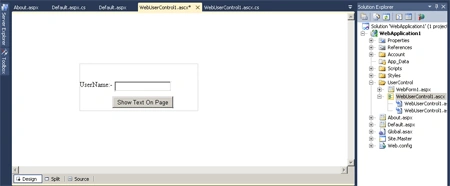
Step 4: Now open .ascx.cs file and write the code below.
Firstly we have to make a delegate, so create a delegate named SMTPH (string msg) just above the class because delegate always have to be declared above of the class. Create a variable name as msg for the delegate. Pass the TextBox value to the delegate. Write the code given below.
Code:
using
System;
using
System.Collections.Generic;
using
System.Linq;
using
System.Web;
using
System.Web.UI;
using
System.Web.UI.WebControls;
namespace
WebApplication1.NewFolder1
{
public delegate
void SMTPH(string
msg);
public partial
class
WebUserControl1 : System.Web.UI.UserControl
{
public event
SMTPH sendMsg;
protected void
Page_Load(object sender,
EventArgs e)
{
}
protected void
Button1_Click(object sender,
EventArgs e)
{
if (sendMsg !=
null)
{
sendMsg(TextBox1.Text);
}
}
}
}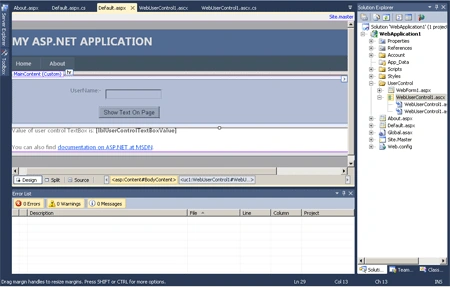
Step 5: Open the default.aspx file and drag and drop the WebUserControl.ascx file.
Step 6: In this step you have to open the default.aspx.cs file and write the code given below.
Code:
using System;
using
System.Collections.Generic;
using
System.Linq;
using
System.Web;
using
System.Web.UI;
using
System.Web.UI.WebControls;
using
WebApplication1.NewFolder1;
namespace
WebApplication1
{
public partial
class _Default
: System.Web.UI.Page
{
protected void
Page_Load(object sender,
EventArgs e)
{
WebUserControl13.sendMsg += delegate(string
message)
{
lblUserControlTextBoxValue.Text = message;
};
}
}
}
Step 7: Now press F5 to run the application and enter any value to the TextBox.
Output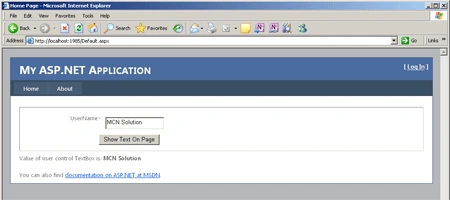
Pradip PandeyPosted Oct 14, 2011, 12:55 AM
Good to understand about delegate & events in ASP.Net.
Hassan HumayunPosted Oct 13, 2011, 10:33 PM
Thanks for sharing this information.