

Original image looks like below & here this article shows you that how you can rotate a given image in different-different angle...

using System;
using System.Collections.Generic;
using System.ComponentModel;
using System.Data;
using System.Drawing;
using System.Text;
using System.Windows.Forms;
namespace RotateImageInDifferentAngles
{
public partial class Form1 : Form
{
public Form1()
{
InitializeComponent();
}
private void button1_Click(object sender, EventArgs e)
{
try
{
Image myImage;
myImage = Image.FromFile("C:\\img\\Aqua6.jpeg");
myImage.RotateFlip(RotateFlipType.RotateNoneFlipX);
pictureBox1.Image = myImage;
}
catch (Exception ex)
{
MessageBox.Show(ex.ToString());
}
}
}
}
Display image as mirror....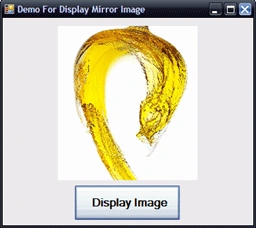
using System;
using System.Collections.Generic;
using System.ComponentModel;
using System.Data;
using System.Drawing;
using System.Text;
using System.Windows.Forms;
namespace RotateImageInDifferentAngles
{
public partial class Form1 : Form
{
public Form1()
{
InitializeComponent();
}
private void button1_Click(object sender, EventArgs e)
{
try
{
Image myImage;
myImage = Image.FromFile("C:\\img\\Aqua6.jpeg");
myImage.RotateFlip(RotateFlipType.Rotate180FlipNone);
pictureBox1.Image = myImage;
}
catch (Exception ex)
{
MessageBox.Show(ex.ToString());
}
}
}
}
Display image as 180 Rotation....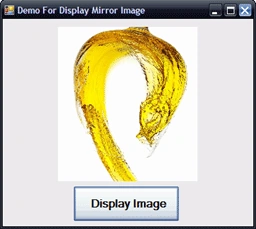
using System;
using System.Collections.Generic;
using System.ComponentModel;
using System.Data;
using System.Drawing;
using System.Text;
using System.Windows.Forms;
namespace RotateImageInDifferentAngles
{
public partial class Form1 : Form
{
public Form1()
{
InitializeComponent();
}
private void button1_Click(object sender, EventArgs e)
{
try
{
Image myImage;
myImage = Image.FromFile("C:\\img\\Aqua6.jpeg");
myImage.RotateFlip(RotateFlipType.Rotate270FlipNone);
pictureBox1.Image = myImage;
}
catch (Exception ex)
{
MessageBox.Show(ex.ToString());
}
}
}
}
Display image as 270 Rotation...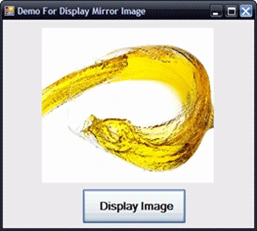
using System;
using System.Collections.Generic;
using System.ComponentModel;
using System.Data;
using System.Drawing;
using System.Text;
using System.Windows.Forms;
namespace RotateImageInDifferentAngles
{
public partial class Form1 : Form
{
public Form1()
{
InitializeComponent();
}
private void button1_Click(object sender, EventArgs e)
{
try
{
Image myImage;
myImage = Image.FromFile("C:\\img\\Aqua6.jpeg");
myImage.RotateFlip(RotateFlipType.Rotate90FlipNone);
pictureBox1.Image = myImage;
}
catch (Exception ex)
{
MessageBox.Show(ex.ToString());
}
}
}
}
Display image as 90 Rotation...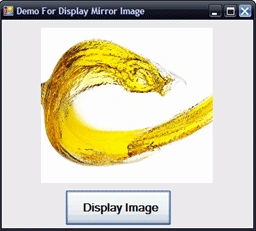
o RotateFlipType. Rotate180FlipX
o RotateFlipType. Rotate180FlipY
o RotateFlipType. Rotate180FlipXY
o RotateFlipType. Rotate270FlipX
o RotateFlipType. Rotate270FlipY
o RotateFlipType. Rotate270FlipXY
o RotateFlipType. Rotate90FlipX
o RotateFlipType. Rotate90FlipY
o RotateFlipType. Rotate90FlipXY
o RotateFlipType. RotateNoneFlipX
o RotateFlipType. RotateNoneFlipY
o RotateFlipType. RotateNoneFlipXY
Using another "RotateFlipType" and the code above you can also rotate an image as your need.
Anurag SarkarPosted Apr 15, 2013, 5:00 AM
Nice ONe.