

Note: Before start reading this article please hold a clear concept on delegates. Follow the link to read the previous article on Delegates.
What is Event?
- Event is a way to communicate in-between objects, which send notification to its subscribers (who register for that Event).
- Events are declared with an associated delegate.
- We know previously that delegate hold a reference to a method.
- Events sender send notification that’s how event raised and receiver receive the notifications.
- We can extends application by adding new methods without changing existing code.
- To build loosely coupled applications.
- The class containing the event is used to publish the event, called Publisher/Sender.
- Containing information’s about the event known as event arguments.
- The class accepts this event is called the Subscriber/Receiver.
- The method that execute by publisher call is known as event handlers.
Diagram of Event Sender and Receiver
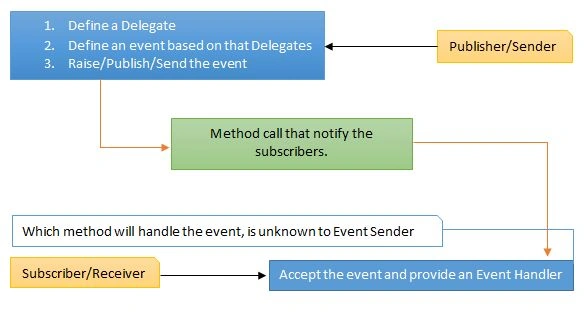
Let’s demonstrate with a sample example:
- namespace Events
- {
- class Program
- {
- static void Main(string[] args)
- {
- IQTest objTest = new IQTest(); //Publisher
- NotificationService objNotify = new NotificationService(); //Subscriber
- // += Register a Handler for that Event
- objTest.ExamStarted += objNotify.OnExamStarted;
- objTest.myExam();
- Console.Read();
- }
- }
- //Publisher or Sender
- class IQTest
- {
- //Delegate
- public delegate void ExamEventHandler(object source, EventArgs args);
- //Event
- public event ExamEventHandler ExamStarted;
- public void myExam()
- {
- Console.WriteLine("Exam is Starting..");
- Thread.Sleep(2000);
- OnExamStarted();
- }
- //This method will notify the subscriber
- protected virtual void OnExamStarted()
- {
- // Invoke the event
- if (ExamStarted != null)
- {
- ExamStarted(this, EventArgs.Empty);
- }
- }
- }
- //Subscriber or Receiver
- class NotificationService
- {
- //Handler : That Match Delegate Signature
- public void OnExamStarted(object source, EventArgs args)
- {
- Console.WriteLine("Your time starts now | start answering..");
- }
- }
- }
Output:
Exam is Starting..
Your Time starts now | start answering..
Let’s consider the code step by step:
In this code the publisher is IQTest class, there is a method named OnExamStarted that notifies the attended exam students that the exam is started.
Steps of an Event Sender:
- Define a Delegate
- Define an event based on that Delegate.
- Raise/Publish the event
Point 1: Define a Delegates
As we can see here to define a delegate is similar as method declaration as we saw in the previous article on Delegates.
- //Delegate
- public delegate void ExamEventHandler(object source, EventArgs args);
Point 2: Define an event
- //Event
- public event ExamEventHandler ExamStarted;
An event is declared based on the associated Delegates.
Point 3: Publish the event
To publish an event we need to check that event is null or not. This method is responsible for notifying all the subscribers.
- protected virtual void OnExamStarted()
- {
- // Invoke the event
- if (ExamStarted != null)
- {
- ExamStarted(this, EventArgs.Empty);
- }
- }
Register a Handler for that Event:
This is done with += operators. We can also have multiple functions registering for the same event; all registered functions are called one by one.
- objTest.ExamStarted += objNotify.OnExamStarted;
If we want to remove any function, the -= operator is used.
- objTest.ExamStarted -= objNotify.OnExamStarted;
Let’s modify the previous example, this time we will add a new class called ExamEventArgs which has a property named examTime.
The class ExamEventArgs is inheriting from EventArgs.
- public class ExamEventArgs : EventArgs
- {
- public int examTime { get; set; }
- }
And instead of Empty arguments
- ExamStarted(this, EventArgs.Empty);
We are using a new instance of ExamEventArgs with initializing time to 10.
- ExamStarted(this, new ExamEventArgs
- {
- examTime = 10
- });
Finally Merged sample Example:
- namespace Events
- {
- public class ExamEventArgs : EventArgs
- {
- public int examTime { get; set; }
- }
- class Program
- {
- static void Main(string[] args)
- {
- IQTest objTest = new IQTest(); //Publisher
- NotificationService objNotify = new NotificationService(); //Subscriber
- // += Register a Handler for that Event
- objTest.ExamStarted += objNotify.OnExamStarted;
- objTest.myExam();
- Console.Read();
- }
- }
- //Publisher or Sender
- class IQTest
- {
- //Delegate
- public delegate void ExamEventHandler(object source, ExamEventArgs args);
- //Event
- public event ExamEventHandler ExamStarted;
- public void myExam()
- {
- Console.WriteLine("Exam is Starting..");
- Thread.Sleep(2000);
- OnExamStarted();
- }
- //This method will notify the subscriber
- protected virtual void OnExamStarted()
- {
- // Invoke the event
- if (ExamStarted != null)
- {
- ExamStarted(this, new ExamEventArgs
- {
- examTime = 10
- });
- }
- }
- }
- //Subscriber or Receiver
- class NotificationService
- {
- //Handler : That Match Delegate Signature
- public void OnExamStarted(object source, ExamEventArgs e)
- {
- Console.WriteLine("Your Time starts now | start answering..");
- Console.WriteLine("Exam Start Time: " + e.examTime);
- }
- }
- }
Exam is Starting..
Your Time starts now | start answering..
Exam Start Time: 10
Types of Event Handler:
There are two forms of event handler one is Normal form and one is Generic form. Here they are:
- Normal Form. - EventHandler
- Generic Form. - EventHandler<T>
Our previous example was with normal form of EventHandler.
Instead of creating our own we can use this Generic form. Let’s modify the previous example instead of using our own custom delegate
- //Delegate
- public delegate void ExamEventHandler(object source, ExamEventArgs args);
- //Event
- public event ExamEventHandler ExamStarted;
We can use a single line of code, and the output will be the same as previous.
- //EventHandler<TEventArgs>
- public event EventHandler<ExamEventArgs> ExamStarted;
- namespace Events
- {
- public class ExamEventArgs : EventArgs
- {
- public int examTime { get; set; }
- }
- class Program
- {
- static void Main(string[] args)
- {
- IQTest objTest = new IQTest(); //Publisher
- NotificationService objNotify = new NotificationService(); //Subscriber
- // += Register a Handler for that Event
- objTest.ExamStarted += objNotify.OnExamStarted;
- objTest.myExam();
- Console.Read();
- }
- }
- //Publisher or Sender
- class IQTest
- {
- //EventHandler<TEventArgs>
- public event EventHandler<ExamEventArgs> ExamStarted;
- public void myExam()
- {
- Console.WriteLine("Exam is Starting..");
- Thread.Sleep(2000);
- OnExamStarted();
- }
- //This method will notify the subscriber
- protected virtual void OnExamStarted()
- {
- // Invoke the event
- if (ExamStarted != null)
- {
- ExamStarted(this, new ExamEventArgs
- {
- examTime = 10
- });
- }
- }
- }
- //Subscriber or Receiver
- class NotificationService
- {
- //Handler : That Match Delegate Signature
- public void OnExamStarted(object source, ExamEventArgs e)
- {
- Console.WriteLine("Your Time starts now | start answering..");
- Console.WriteLine("Exam Start Time: " + e.examTime);
- }
- }
- }
Output:
Exam is Starting..
Your Time starts now | start answering..
Exam Start Time: 10
- Events are implemented with delegates.
- Events communicate in-between of objects.
- A method that handles an event is called an event handler.
- To build loosely coupled applications events are helpful.
- We can extend application by adding new methods without changing other parts of the code.
Shamim UddinPosted Oct 2, 2016, 1:24 AM
Nice
Santhakumar MunuswamyPosted Oct 5, 2015, 11:58 PM
Nice Share
Sujeet SumanPosted Oct 4, 2015, 1:25 PM
Nice Article..............
Priyaranjan K SPosted Oct 4, 2015, 7:31 AM
Great Article...
Abhay ShankerPosted Oct 4, 2015, 4:04 AM
Nice Work
RakeshPosted Oct 4, 2015, 2:14 AM
Good Explain
Nilesh JadavPosted Oct 3, 2015, 9:29 PM
Great work
Pankaj Kumar ChoudharyPosted Oct 3, 2015, 8:35 PM
Nice Explain Sir.......
Neeraj KumarPosted Oct 3, 2015, 3:18 PM
Good One
Sumit JoshiPosted Oct 3, 2015, 2:58 PM
Nice Article.
Govind KhandelwalPosted Oct 3, 2015, 1:46 PM
Nice one