

In this little tutorial, you will learn to make a tab system like notepad++, Charny NotePad, firefox, etc.
First of all, I'll explain you what we will do. We will make a notepad application with a tab system.
1) Open your IDE and start a new windows forms application project.
2) Add these controls to the form :
| Control | Name | Properties |
| TabControl | tabControl | Set 'Dock' to 'Fill' |
| MenuStrip | menuStrip | Don't change anything |
Now, you will add two ToolStripMenuItem to menuStrip, 'File' and 'Edit'.
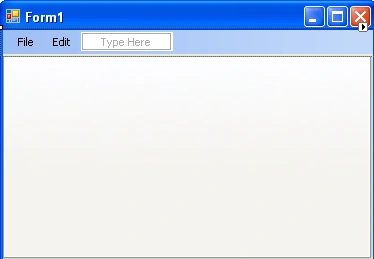
After, add one ToolStripMenuItem in 'File', his text will be 'New' and his name will be menuNew.

Add four ToolStripMenuItem and a ToolStripSeparator to the 'Edit' menu :
| Text | Name |
| Cut | menuCut |
| Copy | menuCopy |
| Paste | menuPaste |
| toolStripSeparator1 | |
| Select All | menuSelectAll |
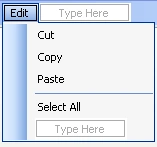
3) Add a Click event handler to menuNew :
private void
menuNew_Click(object sender, EventArgs e)
{
TabPage
tp = new TabPage("New
Document");
RichTextBox rtb = new RichTextBox();
rtb.Dock
= DockStyle.Fill;
tp.Controls.Add(rtb);
tabControl.TabPages.Add(tp);
}
You can try the program now. When you press on 'New' it creates a new TabPage with a RichTextBox in tabControl. It works, but if you have many tab pages, how could you execute actions to the selected RichTextBox?
4) Add this method in your code :
private RichTextBox
GetActiveEditor()
{
TabPage
tp = tabControl.SelectedTab;
RichTextBox
rtb = null;
if (tp != null)
{
rtb = tp.Controls[0] as
RichTextBox;
}
return rtb;
}
So, this method retreives the first control of the selected tab. The first control is the RichTextBox.
5) Now, we will add a Click event handler on each ToolStripMenuItem of the 'Edit' menu.
menuCut:
private void
menuCut_Click(object sender, EventArgs e)
{
GetActiveEditor().Cut();
}
menuCopy:
private void
menuCopy_Click(object sender, EventArgs e)
{
GetActiveEditor().Copy();
}
menuPaste:
private void
menuPaste_Click(object sender, EventArgs e)
{
GetActiveEditor().Paste();
}
menuSelectAll:
private void
menuSelectAll_Click(object sender, EventArgs e)
{
GetActiveEditor().SelectAll();
}
pankaj singhPosted Apr 1, 2011, 4:05 PM
very good article