
Assume we have some basis user control inherited from the System.Windows.Forms.UserControl class and named UCBase, for example. Also assume that all of our own user controls, regardless of the quantity, inherit from this control. The more logical way to add an OnChanged event (let's name this event "DataChanged") to all of our user controls is to add this event to the UCBase control (this is the FIRST STEP). Something like this:
public partial class UCBase : UserControl
{
#region ForClass
//some code.........
public event EventHandler DataChanged;
#endregion
public UCBase()
{
InitializeComponent();
}
protected virtual void UC_DataChanged(object sender, EventArgs e)
{
if (DataChanged != null)
{
DataChanged(this, e);
}
}
//some code .........
}
We use the virtual keywords for the UC_DataChanged method to allow it to be overridden in a derived class.
Now, in some user control we add the method (this is the SECOND STEP)
protected override void UC_DataChanged(object sender, EventArgs e)
{
base.UC_DataChanged(sender, e);
}
and then add this method to all the OnChanged events of the controls of our composite user control. Of course, if we do not want some control to take part in our change game, we simply do not include the method UC_DataChanged into the change event of this control. For example, let's suppose that our control, named UC_Test, includes three TexBoxes. We want any text property changes of the TextBox1 and TextBox2 would be caught by the parent of the control, but changes of the TextBox3 - do not matter for us. In this case we have the following code:
public partial class UC_Test : UCBase
{
public UC_Test()
{
InitializeComponent();
}
protected override void UC_DataChanged(object sender, EventArgs e)
{
base.UC_DataChanged(sender, e);
}
private void ctlTextBox1_TextChanged(object sender, EventArgs e)
{
this.UC_DataChanged(sender, e);
}
private void ctlTextBox2_TextChanged(object sender, EventArgs e)
{
this.UC_DataChanged(sender, e);
}
private void ctlTextBox3_TextChanged(object sender, EventArgs e)
{
//not include the UC_DataChanged method
}
}
Of course, we can add our own logic to the method UC_DataChanged.
For our THIRD STEP, we should add DataChanged event to the form (the parent of the UC_Test control)
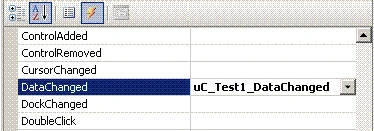
Fig. 1.
Also add some logic to the method uC_Test1_DataChanged. Let's suppose, that we want our control to change the BackColor property for every its data changes. In this case we will have code like that
private void uC_Test1_DataChanged(object sender, EventArgs e)
{
if (((UC.UC_Test)(sender)).BackColor == Color.Green)
{
((UC.UC_Test)(sender)).BackColor = Color.Yellow;
}
else
{
((UC.UC_Test)(sender)).BackColor = Color.Green;
}
}
As example, you can create a project with only one form, which has the UC_Test control, and inherits from the UCBasis control (see above).
Now, if we run the project, we will see that changes of the TextBox3, indeed, do not change color of our control (see fig 2)
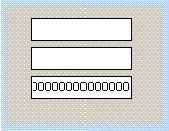
Fig. 2
but every data change of the others does work according to our logic (see fig. 3, fig. 4)
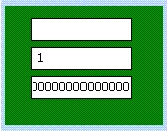
Fig. 3.
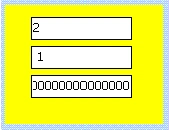
Fig. 4.
CONCLUSION
I hope that this tip will be useful to those who use composite user controls that inherit from some basis control.
sangram desaiPosted Mar 10, 2012, 3:21 AM
also check this link has some useful stuff on subject http://msdotnetbuddy.blogspot.in/2010/01/ccreation-of-composite-user.html