SIGN UP MEMBER LOGIN:    
ARTICLE

Generic Data Access Layer: Part 1

Posted by Mahadesh Mahalingappa Articles | ADO.NET in C# September 08, 2011
In this article we wwill be discussing how we can create a Generic Data Acess Layer which we could use in developing our Business Applications.
Reader Level:

In this article we will be discussing how we can create a Generic Data Access Layer which we could use in developing our Business Applications.

Lets start by creating a Data Model.

Create a ADO.NET Entity Data Model as shown below :
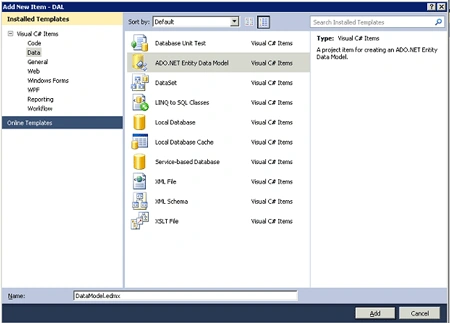
GDAccLyr1.gif

Once the Data Model is added to my project, I can then move to the next step, Creating a Repository.

Creating a Repository Class

public class Repository<T> where T : EntityObject
    {
        IObjectSet<T> _objectSet;

        /// <summary>
        /// This method is used to pass the Context object as a parameter to the Respository
        /// </summary>
        /// <param name="objectContext"></param>
        public Repository(ObjectContext objectContext)
        {
                _objectSet = objectContext.CreateObjectSet<T>();
        }

        /// <summary>
        /// This method we manually pass the Context Object
        ///
        /// </summary>
        public Repository()
        {
            DataEntities context = new DataEntities ();
            _objectSet =  context.CreateObjectSet<T>();
        }

        public IQueryable<T> AsQueryable()
        {
            return _objectSet;
        }

        public IEnumerable<T> GetAll()
        {
            return _objectSet.ToList();
        }

        public IEnumerable<T> Find(Expression<Func<T, bool>> where)
        {
            return _objectSet.Where(where);
        }

        public T Single(Expression<Func<T, bool>> where)
        {
            return _objectSet.Single(where);
        }

        public T First(Expression<Func<T, bool>> where)
        {
            return _objectSet.First(where);
        }

        public void Delete(T entity)
        {
            _objectSet.DeleteObject(entity);
        }

        public void Add(T entity)
        {
            _objectSet.AddObject(entity);
        }

        public void Attach(T entity)
        {
            _objectSet.Attach(entity);
        }
    }


I can now use this Repository Class in a Client Project and easily access or modify the Entities using the Above methods.

The client code would look like below :

Repository<Company> company = new Repository<Company>();

            foreach (Company comp in company.GetAll())
            {
                Console.WriteLine(comp.Name);
            }
            Console.ReadLine();


Note that here I am not using the context object at all to get the entities as I have already taken care of that in the below code in Repository Class .

/// <summary>
///
This method we manually pass the Context Object
///
/// </summary>
public Repository()
{
    DataEntities context = new DataEntities ();
    _objectSet =  context.CreateObjectSet<T>();
}


Thanks . In my next post we will look into how we can improve on this Data access Layer which we have just created.
 

Login to add your contents and source code to this article
share this article :
post comment
 
Team Foundation Server Hosting
Become a Sponsor
PREMIUM SPONSORS
  • Finally – a virtual platform that delivers next-generation Windows Server 2008 Hyper-V virtualization technology from a managed hosting partner you can truly depend on. Visit www.maximumasp.com/max for a FREE 30 day trial. Hurry offer ends soon. Climb aboard the MaxV platform and take advantage of High Availability, Intelligent Monitoring, Recurrent Backups, and Scalability – with no hassle or hidden fees. As a managed hosting partner focused solely on Microsoft technologies since 2000, MaximumASP is uniquely qualified to provide the superior support that our business is built on. Unparalleled expertise with Microsoft technologies lead to working directly with Microsoft as first to offer IIS 7 and SQL 2008 betas in a hosted environment; partnering in the Go Live Program for Hyper-V; and product co-launches built on WS 2008 with Hyper-V technology.
    Finally – a virtual platform that delivers next-generation Windows Server 2008 Hyper-V virtualization technology from a managed hosting partner you can truly depend on. Visit www.maximumasp.com/max for a FREE 30 day trial. Hurry offer ends soon. Climb aboard the MaxV platform and take advantage of High Availability, Intelligent Monitoring, Recurrent Backups, and Scalability – with no hassle or hidden fees. As a managed hosting partner focused solely on Microsoft technologies since 2000, MaximumASP is uniquely qualified to provide the superior support that our business is built on. Unparalleled expertise with Microsoft technologies lead to working directly with Microsoft as first to offer IIS 7 and SQL 2008 betas in a hosted environment; partnering in the Go Live Program for Hyper-V; and product co-launches built on WS 2008 with Hyper-V technology.
Nevron Gauge for SharePoint
Become a Sponsor