

Introduction
The ASP.Net data bound DataList and Repeater controls give us the ability to create flexible HTML layouts for tabular and XML hierarchal data. However, when you throw in a need for conditional logic or some string formatting or perhaps the need to edit/update the data, things get complicated fast.
This complexity is reduced significantly if encapsulated within a custom web user control. We then call this control within the Repeater or DataList.
This article will walk through a simple example of displaying some products by product category. The custom web user control will be used to format the product information and to format the product's price (see figure 1).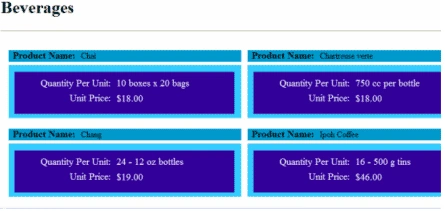
Figure 1 - Formatted Output
Solution Overview
The data that we will use is stored in an XML file. The main web page will use a DataList control nested inside of a DataRepeater control. The Repeater is used to grab the category names, e.g. "Beverages" and the DataList control is used to the grab the product information. This product information is then passed to a web user control for formatting.
Code Walk Through
A sample of the data in XML file is shown in figure 2.
<?xml version="1.0" standalone="yes"?>
<DataSetNorthwind>
<Categories>
<CategoryID>1</CategoryID>
<CategoryName>Beverages</CategoryName>
<Description>Soft drinks, coffees, teas, beers, and ales</Description>
<Products>
<ProductID>1</ProductID>
<ProductName>Chai</ProductName>
<SupplierID>1</SupplierID>
<CategoryID>1</CategoryID>
<QuantityPerUnit>
<UnitPrice>18</UnitPrice>
<UnitsInStock>39</UnitsInStock>
<UnitsOnOrder>0</UnitsOnOrder>
<ReorderLevel>10</ReorderLevel>
<Discontinued>false</Discontinued>
</Products>
<Products>
<ProductID>2</ProductID>
<ProductName>Chang</ProductName>
<SupplierID>1</SupplierID>
<CategoryID>1</CategoryID>
<QuantityPerUnit>24 - 12 oz bottles</QuantityPerUnit>
<UnitPrice>19</UnitPrice>
<UnitsInStock>17</UnitsInStock>
<UnitsOnOrder>40</UnitsOnOrder>
<ReorderLevel>25</ReorderLevel>
<Discontinued>false</Discontinued>
</Products>
Figure 2 - Sample of the XML Data
Figure 3 show all of the code used for the main page; there is no code behind used.
<%@ Page Language="C#" %>
<%@ Register Src="Product.ascx" TagName="Product" TagPrefix="uc1" %>
<!DOCTYPE html PUBLIC "-//W3C//DTD XHTML 1.0 Transitional//EN" "http://www.w3.org/TR/xhtml1/DTD/xhtml1-transitional.dtd">
<html xmlns="http://www.w3.org/1999/xhtml" >
<head runat="server">
<title>Product Information</title>
</head>
<body>
<form id="form1" runat="server">
<div>
<asp:Repeater ID="Repeater1" runat="server" DataSourceID="XmlDataSource1">
<ItemTemplate><br />
<H1><%# XPath("CategoryName")%></H1>
<hr />
<asp:DataList ID="DataList1" runat="server" RepeatColumns=2
DataSource='<%# XPathSelect("Products") %>' >
<ItemTemplate>
<uc1:Product ID="Product1" runat="server" ProductName=<%# XPath("ProductName")%>
Quantity=<%# XPath("QuantityPerUnit")%> Price=<%# XPath("UnitPrice")%> />
</ItemTemplate>
</asp:DataList>
</ItemTemplate>
</asp:Repeater>
<asp:XmlDataSource ID="XmlDataSource1" runat="server" DataFile="~/Products.xml"
XPath="DataSetNorthwind/Categories">
</asp:XmlDataSource>
</div>
</form>
</body>
</html>
Figure 3 - Code For Main Page
Note that no code behind was used for the example. The XML file is loaded by the "XmlDataSource" control.
To use a web user control one first registers it with the statement:
<%@ Register Src="Product.ascx" TagName="Product" TagPrefix="uc1" %>
Next we use the web user control in this statement:
<uc1:Product ID="Product1" runat="server" ProductName=<%# XPath("ProductName")%> Quantity=<%# XPath("QuantityPerUnit")%> Price=<%# XPath("UnitPrice")%> />
The control's attributes are the public properties that are implemented in the customized web user control.
As you can see the code above is not cluttered up with alot of html formatting. The web user control will handle this part.
Figure 4 shows the html of the web user control. Note the use of div to format it and the server side label control to display the data.
<%@ Control Language="C#" AutoEventWireup="true" CodeFile="Product.ascx.cs" Inherits="Product" %>
<br />
<div style="padding:5px 0px 0px 10px">
<div style="z-index: 101; left: 4px; width: 438px; position: relative; top: 3px;
height: 22px; background-color: #0099cc;">
<asp:Label ID="Label1" runat="server" Font-Bold="True" Font-Size="Larger" Text="Product Name: "
Width="128px"></asp:Label>
<asp:Label ID="LabelProductName" runat="server" Text="Label" Width="225px"></asp:Label></div>
<div style="z-index: 102; left: 4px; width: 438px; position: relative; top: 9px;
height: 100px; background-color: #33ccff">
<div style="z-index: 101; left: 11px; width: 414px; position: relative; top: 13px;
height: 79px; background-color: #330099">
<asp:Label ID="Label2" runat="server" Font-Size="Larger" ForeColor="White" Style="text-align:right; left: 24px;
position: relative; top: 11px" Text="Quantity Per Unit:" Width="157px"></asp:Label>
<asp:Label ID="Label4" runat="server" Font-Size="Larger" ForeColor="White" Style="text-align:right;left: -137px;
position: relative; top: 39px" Text="Unit Price:" Width="157px"></asp:Label>
<asp:Label ID="LabelQuantity" runat="server" Font-Size="Larger" ForeColor="White" Style="left: 192px;
position: relative; top: -9px" Text="Label" Width="214px"></asp:Label>
<asp:Label ID="LabelUnitPrice" runat="server" Font-Size="Larger" ForeColor="White" Style="left: -26px;
position: relative; top: 20px" Text="Label" Width="75px"></asp:Label></div>
</div>
</div>
Figure 4 - HTML For Web User Control
Any conditional logic or formatting the data is normally performed by the code behind. Figure 5 shows the code behind of the user web control:
using System;
using System.Data;
using System.Configuration;
using System.Collections;
using System.Web;
using System.Web.Security;
using System.Web.UI;
using System.Web.UI.WebControls;
using System.Web.UI.WebControls.WebParts;
using System.Web.UI.HtmlControls;
public partial class Product : System.Web.UI.UserControl
{
private string _productName;
public string ProductName
{
get { return _productName; }
set { _productName = value; }
}
private string _quantity;
public string Quantity
{
get { return _quantity; }
set { _quantity = value; }
}
private string _price;
public string Price
{
get { return string.Format("{0:C}",decimal.Parse(_price)); }
set { _price = value; }
}
protected void Page_Load(object sender, EventArgs e)
{
this.PreRender += new EventHandler(Product_PreRender);
}
void Product_PreRender(object sender, EventArgs e)
{
LabelProductName.Text = ProductName;
LabelQuantity.Text = Quantity;
LabelUnitPrice.Text = Price;
}
}
Figure 5 - Code Behind For User Web Control
It's worth noting again that the public properties are available as html attributes when using the control from the main web form. You can see we format the price before we display it. We could have also place conditional logic here as well. As a more complex case, we could have supported editing of this data. This wouldn't make sense for our static XML data file but might for a SQL database source, depending on its application.
Conclusion
This article shows a simple example of how to encapsulate the complexity when using the ASP.Net Repeater and DataList control using a custom web user control.
Join the conversation! Your thoughts help the community grow.