As any ASP.NET application silverlight can connect to any of the web or data services like
In this section we'll find how to create a WebClient in silverlight. Step 2: XML Service XmlSerializer ser = new XmlSerializer(typeof(List<Employee>)); You may notice that the ArrayOfEmployee node has been generated for you by the XmlWriter. It has also been given a default namespace and XSD. <ItemsControl x:Name="_employees"> Now the URI for the handler that returns XML for you can be determined to be at: {
InitializeComponent();
WebClient wc = new WebClient();
wc.DownloadStringAsync(new Uri("http://localhost:8001/WebClientAccessApp/EmployeeDataHandler.ashx
"));
wc.DownloadStringCompleted += new
DownloadStringCompletedEventHandler(wc_DownloadStringCompleted);
}
Binding the Data on the Callback The string data will be stored in DownloadStringCompletedEventArgs Result property, so you can load it into an XDocument using One of the new language features in .NET, and in Silverlight is LINQ, which brings some functional programming to Silverlight. To bind to ItemsControl set the ItemSource For more complex HttpRequest, we'll find how in my following articles
In this article explain the step by step creation of a Web client application in Silverlight 2.0.
Create simple POX (Plain Old XML) Service
Step 1: Silverlight Application
In this task you'll add a generic handler and have it return XML data back to the caller.
using (XmlWriter writer = XmlWriter.Create(context.Response.OutputStream))
{
context.Response.ContentType = "text/xml";
ser.Serialize(writer, empList);
}
Step3: XAML to bind
The XAML (Page.xaml)
<ItemsControl.ItemTemplate>
<DataTemplate>
<TextBlock FontSize="14" Height="30" Text="{Binding EmployeeName}" />
<TextBlock FontSize="14" Height="30" Text="{Binding EmpID}" />
<TextBlock FontSize="14" Height="30" Text="{Binding Salary}" />
</DataTemplate>
</ItemsControl.ItemTemplate>
</ItemsControl>
Step 4: WebClient
To set a static port for your Web project to run on,
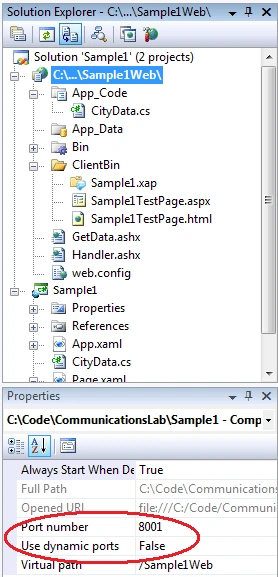
http://localhost:8001/WebClientAccessApp/EmployeeDataHandler.ashx
Step 5: In the client
In Page.xaml.cs
Call a POX Service
Add new code in Page() (constructor) that creates a new instance of the WebClient class, and then instructs it to download a string from the above URI, as well as wiring up a completed event handler callback.
public Page()
When you specified the DownloadStringCompleted callback Visual Studio should have created a boiler plate event handler for you.
void wc_DownloadStringCompleted(object sender, DownloadStringCompletedEventArgs e)
{
}
XDocument xReturn = XDocument.Parse(e.Result);
So here's how you can use it to create an IEnumerable of Employee from the returned XML. As ItemsControl requires an IEnumerable to bind data
IEnumerable<Employee> employees = from employee in xReturn.Descendants("Employee")
select new Employee
{
EmployeeName = employee.Element("EmployeeName").Value,
EmpID = Convert.ToDouble(employee.Element("EmpID").Value),
Salary = Convert.ToDouble(employee.Element("Salary").Value)
};
_employees.ItemsSource = employees;
Here you are. After a long runyou have a result
You have seen some of these,
Happy Coding.

Join the conversation! Your thoughts help the community grow.