
No doubt, Microsoft Dynamics CRM is one of the world's most popular CRM systems. It's unique because of its customization capabilities allowing enterprises to adjust it to their specific needs whether their main focus is selling goods, providing services, or something completely different.
In the current world where mobility plays a significant role and the penetration of internet-capable smartphone devices keeps growing at an incredible rate, it's only natural that the demand for mobile access to enterprise data is increasing. And this equally relates to Dynamics CRM implementations.
Web based vs. rich client app
There are two basic ways to achieve mobile data access using Dynamics CRM.
The first scenario is to create a web based CRM client. However, this solution has significant downsides, such as slow performance, or the need of permanent network connectivity.
Another scenario is to create a rich client application that can work in offline mode and only requires occasional synchronization with the Dynamics CRM server database. This solution seems more convenient, since mobile workers often work in locations with no Internet access, and the mobile app should provide customer related data in a rich UI, allowing fast collection of new data using hardware extensions such as barcode readers and similar.
The development of such an application from the scratch can be a challenging and time-consuming task. Besides that, CRM integrators (or end users who have their own developers) usually have only limited experience with mobile app development. It is thus recommended to use a specialized developer platform which significantly simplifies development and customization of the client application.
Resco MobileCRM Studio
Resco MobileCRM Studio is a developer platform that assists in the development of mobile applications which are used as extensions to Microsoft Dynamics CRM. It is fully integrated with the Microsoft Visual Studio environment and allows development of mobile applications working in offline mode and capable of synchronizing local data with Microsoft Dynamics CRM on-demand.
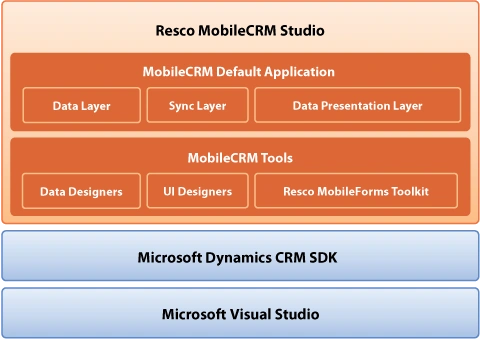

The Studio consists of MobileCRM Tools such as Data Designers allowing use of custom CRM entities in the mobile app project and UI Designers that simplify the design or customization of related mobile forms. If very specific customizations are required a suite of mobile controls optimized specifically for mobile devices can be used.
Another important and useful feature of the Resco MobileCRM Studio is the Default Application, which serves as the basis of customized mobile CRM projects. It includes the most important Dynamics CRM modules in three layers - Data, Synchronization and Presentation (UI). All layers are provided with C# source code.
Mobile applications developed using Resco MobileCRM Studio meet all modern UI standards required by the current mobile technologies. The attractive appearance of the application is achieved through outstanding graphic design. All forms are easy to control using a finger thanks to advanced finger-touch support. The product supports the following mobile platforms: Windows Mobile, Tablet PC, iPhone. Android support is also planned. The iPhone and Android apps are realized with MonoTouch and MonoDroid.
- Watch the video of the Default Application on Windows Mobile.
- Watch the video of the Default Application on iPhone.
MobileCRM Studio is fully integrated with Microsoft Visual Studio. Back-office integration is achieved though Microsoft Dynamics CRM SDK, which means any customizations are performed in a familiar development environment using well-known programming language - C#.
- Watch the video about how to customize the mobile app (Part 1)
- Watch the video about how to customize the mobile app (Part 2)
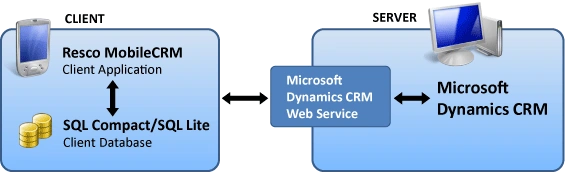
Client applications developed using Resco MobileCRM Studio work in offline mode and store data in a local database. Back-office integration is implemented through Microsoft Dynamics CRM Web Services.
Licensing
The main advantage of the solution is the licensing policy. It is based on developer seats and includes royalty-free distribution. Distribution of mobile applications developed using the Studio is free regardless of the number of mobile devices. The re-branding capabilities allow the mobile applications to be branded with the client's company name.
Join the conversation! Your thoughts help the community grow.