In Focus
Kolkata Chapter Developer Day: May 25
C# Corner Delhi Chapter Meet, May-18, 2013 Official Recap
MOBILE: HTML 5 vs. Native Apps
Istanbul Chapter May 2013 2nd Seminar Announced : Learn WinJS, Windows Store, MVC
ANNOUNCEMENT: April 2013 Month Winners
Email :
Password :
Remember me?
Forgot password
Contribute
An Article
A Blog
A News
A Video
A Link
An Interview Question
Ask a Question
TECHNOLOGIES
.NET 4.5
Current Affairs
Learn .NET
SharePoint 2010
Web Development
.NET Assemblies
Databases & DBA
LightSwitch 2012
SharePoint 2013
Web Services in C#
ADO.NET in C#
Design & Architecture
LINQ
Silverlight with C#
Windows 8
AJAX in C#
Exception Handling C#
Mobile & Embedded
Smart Devices
Windows Azure
Android Programming
Graphics Design
Office 2013
SQL
Windows Controls C#
Articles C#
Hardware
OOP/OOD
SQL Server 2012
Windows Forms C#
ASP.NET Controls in C#
How do I
Operating Systems
Testing
Windows Phone 8
ASP.NET MVC with C#
HTML 5
PHP
TypeScript
Windows Server 2012
ASP.NET Programming
Internet & Web
Products
Visual C#
Windows Store Apps
C# Language
iPhone/iPad
Project Management
Visual Studio .NET
Workflow Foundation in C#
C# Tutorials
Java
Reports using C#
Visual Studio 2010
WPF
C, C++, MFC
Java and .NET
Robotics & Hardware
Visual Studio 2012
XAML
Career Advice
JavaScript, CSS
Security in .NET
WCF with C#
XML
Chapters
JQuery
Request a new Category
|
View All
ANSWERS
BLOGS
VIDEOS
INTERVIEWS
BOOKS
LINKS
NEWS
CHAPTERS
CAREER ADVICE
Create Outlook Add-in by MAPI Functionality ...
Debugging jQuery in ASP.NET
How to Enable Sign in as Different User Opti ...
Top 10 HTML5 Interview Questions
Find and Delete Duplicate Records From SQL Table
Custom Paging With GridView in ASP.NET 4.5
Encrypt and Decrypt in SQL Server: Part 2
Panel Default Button is Not Working For Rad ...
Working With Database in HTML5
Extending WinJS ListView With Custom Item Events
ARTICLE
Seven Steps For Development of Mobile Enterprise Applications
Posted by
Resco
in
Articles
|
Windows Forms C#
on
June 17, 2011
Tags:
.net
,
C#
,
development of mobile enterprise app
,
how to use development of mobile enterprise app
,
Mobile enterprise applications
,
mobile phones
,
windows phones
In this article you will see 7 steps for development of mobile enterprise applications.
Tweet
2552
0
0
Reader Level:
Mobile trends
Some of you might still remember the days when e-mail communication was in it's infancy. Suddenly the use of e-mails began to boom and many industry experts predicted the end of standard posts and letters ("snail mail"), saying: "Why would anybody need to use letters anymore? E-mails are better, faster and cheaper than the post."
A little bit later, mobile phones begun to seize their market share and again rumors about the end of the e-mails began to spread. "Why would you need to use your PC to contact somebody when you have a cell phone everywhere with you and you can call him or send a SMS instantly?"
In the recent past, we saw many new technologies flourish in an IT industry such as VOIP, Skype, Webex, social networks and many more. But what happened to the old methods of communication?
Posts and standard letters still exist
People sent over 100 trillion e-mails in 2010
reference
The sales of smartphones grew by 96% during 2010
reference
More and more people use Skype, social networking and other means of modern communication
Mobile phones are certainly not dead and they won't be in a near future. For instance, Gartner forecasts that mobile web access will surpass PCs by 2013 (
reference
). Companies are increasingly demanding mobile applications which can help all stakeholders to make their business decisions on-the go. Business people need to access the data and relevant information not only in their offices but also on their business trips or while they are out of their offices.
Mobile enterprise applications
Developing mobile business applications is not as easy as it might look like at the first glance. The standard controls and libraries for Windows Mobile, .NET Compact Framework, offers only a very basic set of tools that can help mobile developers to create their applications. Business applications often need to present data in lists, tables, charts, details or grids.
7 steps to create your own mobile enterprise app
MobileApp Studio was designed to rapidly simplify the development of mobile business applications from scratch. You can download the trial version
here
. And try to create your first Windows Mobile, Windows Phone 7, Android or iOS application in a very easy way. In the following tutorial I will explain how to create a Windows Mobile application in 8 steps:
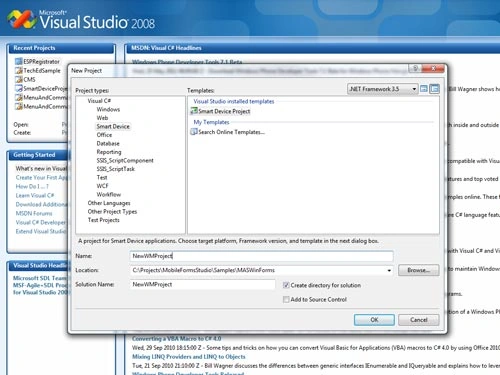
Create a new Smart Device project in Microsoft Visual Studio 2008
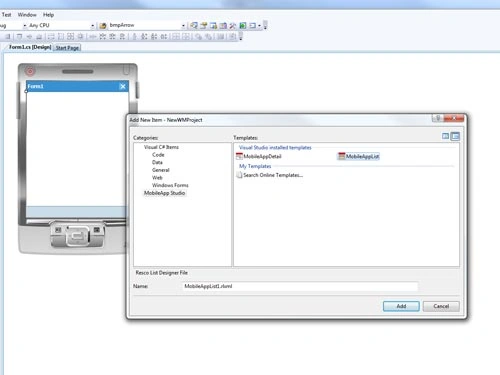
Add new MobileApp Studio control to your project
In the Wizard, choose a graphics theme and other attributes
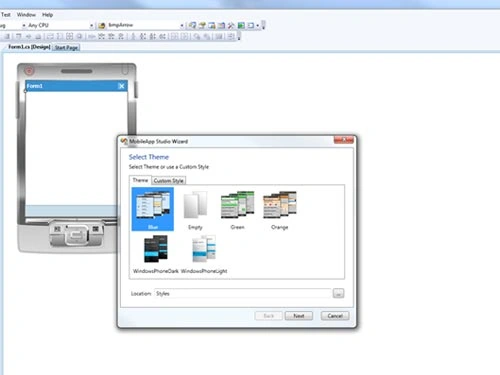
Design the UI in an advanced designer embedded in Visual Studio
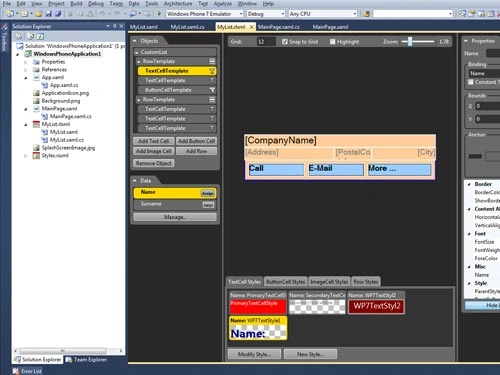
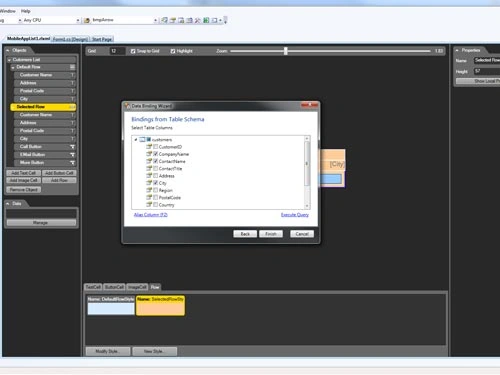
Bind to your data source
Add further functionality in C# or Visual Basic
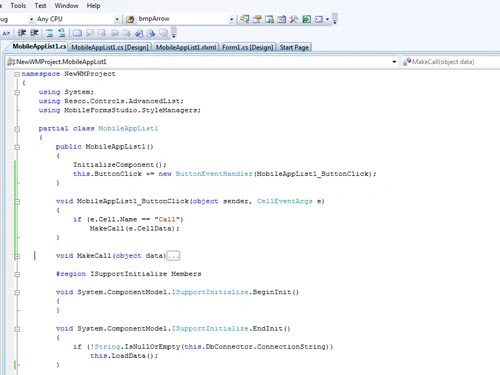
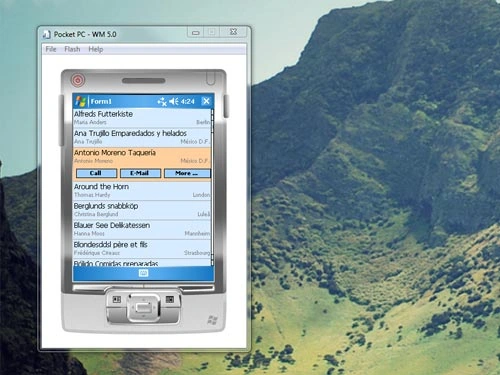
Run in Emulator
Well done! It is as simple as you can see. The application looks great and already has basic functionality.
You can check out the more detailed video of how you can create mobile application under 4 minutes
here
.
MobileApp Studio features
MobileApp Studio consists of:
Controls, components and libraries for all supported platforms
Windows Mobile (40 controls)
Windows Phone (20 controls)
Android (5 controls)
iOS (4 controls)
Wizards and designers for lists and details
Multiplatform support
Development of applications for other operating systems is as easy as for Windows Mobile shown in the example above. However, the main advantage of MobileApp Studio is its multiplatform support and development. Once your Windows Mobile or Windows Phone application is ready, you will be able to reuse your code and simply export the code and rebuild it in:
Visual Studio 2008 for Windows Mobile
Visual Studio 2010 for Windows Phone
Mono for Android for Android
MonoTouch for iOS (iPhone, iPad). You will need Mac computer.
It is as simple and easy as that! You don't have to learn Java or objective C to develop applications Android and iOS. With MobileApp Studio you can make use of your existing knowledge and experience with .NET.
MobileApp Studio homepage:
http://www.resco.net/developer/mobileappstudio/overview.aspx
Login
to add your contents and source code to this article
This Feature is Sponsored By
DynamicPDF Merger is a developers dream for interacting with any existing PDF documents. Merge, append, split, form fill, flatten stamp and so much more.
Disable or Enable Context Menu Items For a TreeView
Tags:
asp.net
,
C#
,
context menu items on Tree View
,
Disable the context menu items on Tree View
,
Enable the context menu items on Tree View
,
how to Enable the context menu items on Tree View
,
VS 2010
ListBox With Data From Many Tables
Tags:
.net
,
C#
,
C# articles
,
Data from Many Tables
,
ListBox
,
ListBox with Data from Many Tables
,
tutorials
Related Articles
Media player for Windows 7 Mobile
Enterprise Library 1.0
Develop Mobile Applications Using PhoneGap and Kendo UI: Part 1
4 steps to use readymade DAL component (Data application blocks)
Build Dynamics CRM mobile Apps That Work on WM, TabletPC, iPhone or iPad
User interface on a mobile device
Image Viewer for Windows Phone 7
Mini Browser for Windows 7 Mobile
Building .NET Enterprise Applications with Patterns: Part I - Introducing Enterprise Development
New data input controls for mobile development
post comment
COMMENT USING
PREMIUM SPONSORS
iPhone, Android & Web Development Services
Over-C is a holistic consortium of communications and technology specialists. We build, deploy and market both business as well as consumer products and solutions.
TRENDING UP
Create Outlook Add-in by MAPI Functionality by Using Visual Studio 2010 Outlook Project
Debugging jQuery in ASP.NET
How to Enable Sign in as Different User Option in SharePoint 2013
Top 10 HTML5 Interview Questions
Find and Delete Duplicate Records From SQL Table
Custom Paging With GridView in ASP.NET 4.5
Encrypt and Decrypt in SQL Server: Part 2
Panel Default Button is Not Working For Rad Combobox
Working With Database in HTML5
Extending WinJS ListView With Custom Item Events
View All
MOST LIKED ARTICLE
WCF Introduction and Contracts - Day 1
Create SSRS Report Using Report Wizard
CREATE READ UPDATE and DELETE - CRUD Operation Using LINQ to SQL
WCF - Data Contract - Day 4
WCF - Difference Between Service Application and Service Library: Day 5
Follow @twitterapi
HOT KEYWORDS
binary formatters
clock
Delegates
Drag and Drop
Event Handlers
FTP
FTP Server
GAC
ListView
MDI
MenuItem
Panel
PrintDocument
Printing
progress bar
Reporting Services
Reports
Smart Client
StringReader
timer
WebBrowser
Windows Application
windows form
WinForms
WinGhost
SPONSORED BY
DynamicPDF ReportWriter Suite
PDF reports have never been easier to create. With our included WYSIWYG Designer, you can layout your reports, set up your data source and let DynamicPDF ReportWriter do the rest.
My Facebook Friends
WHITEPAPERS AND BOOKS
Interview Questions on SharePoint 2013
SharePoint 2010 Administration & Development
Getting Started with Managed Metadata Service in SharePoint 2010
Windows Phone 7 Hileleri
Windows Phone Development Step by Step Tutorial
Essentials of SharePoint 2010: Business Intelligence Capabilities
Working with Directories in C#
FileInfo in C#
Programming List with C#
Source Code: Graphics Programming with GDI+
View All
Poll
Result
All Polls
Favorite Computer Manufacturer
Who is your favorite Computer manufacturer?
Lenovo
HP
Dell
Toshiba
Acer
Sony
Who is your favorite Computer manufacturer?
Options
Votes
%
Lenovo
33
8.82
HP
17
4.55
Dell
209
55.88
Toshiba
54
14.44
Acer
47
12.57
Sony
14
3.74
Total
374
100%