

In this article, I am describing how to create a custom field type for SharePoint 2010. I have searched the internet but didn't find any relevant documentation for this. Here I am creating a simple field type for Email validation; it will accept only valid email addresses.
First, we start with the project
Creating Visual Studio Project
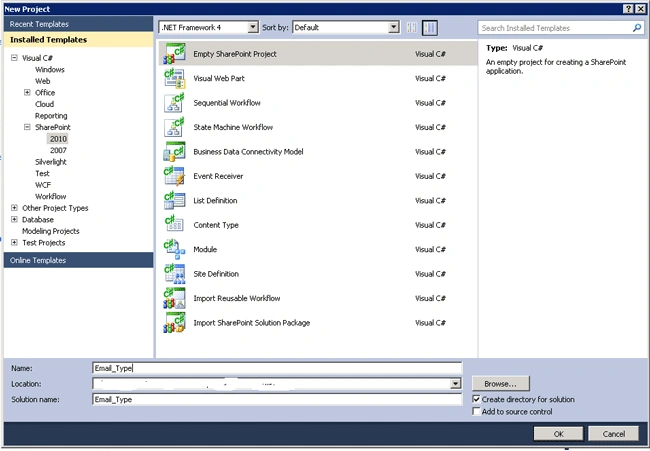
- In Visual Studio, create an Empty SharePoint Project. Give a suitable name for your project
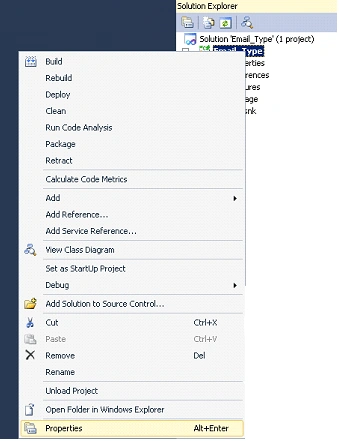
- Right-click the project name in Solution Explorer and select Properties.
- On the Application tab of the Properties dialog, enter Email.SharePoint.ISBN_Field_Type as the Assembly name and Email. SharePoint as the Default namespace. Leave the Target framework set to .NET Framework 3.5.
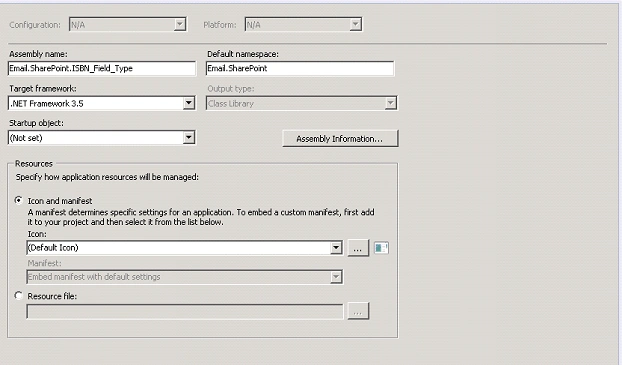
- Click Save
- Right-click the project name in Solution Explorer and select Add | New Item
- In the Add New Item dialog box, select Visual C#
- Select Class from the template and give name as Email.Field.cs
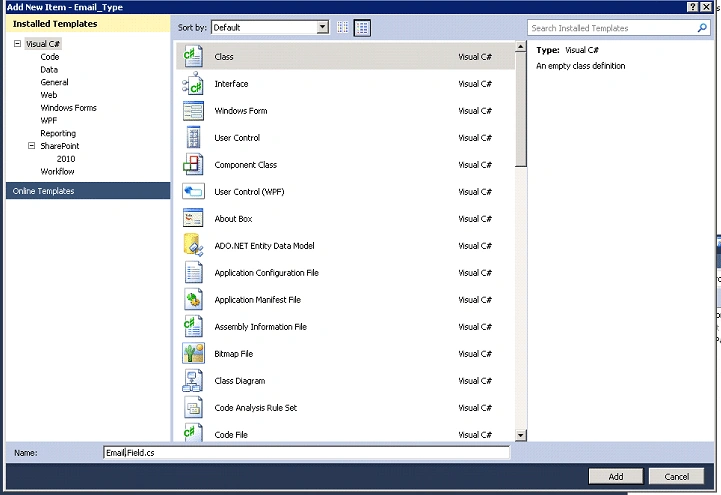
- Create two classes (in the same way as described) named Email.FieldControl.cs and EmailValidationRule.cs
- In Solution Explorer, right-click the project name and select Add, then SharePoint Mapped Folder
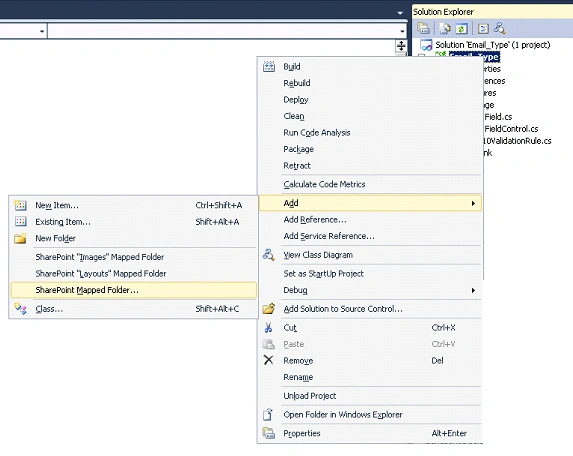
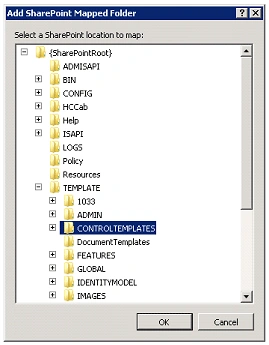
- Use the tree control that opens to map the folder to TEMPLATE\ControlTemplates and click OK.
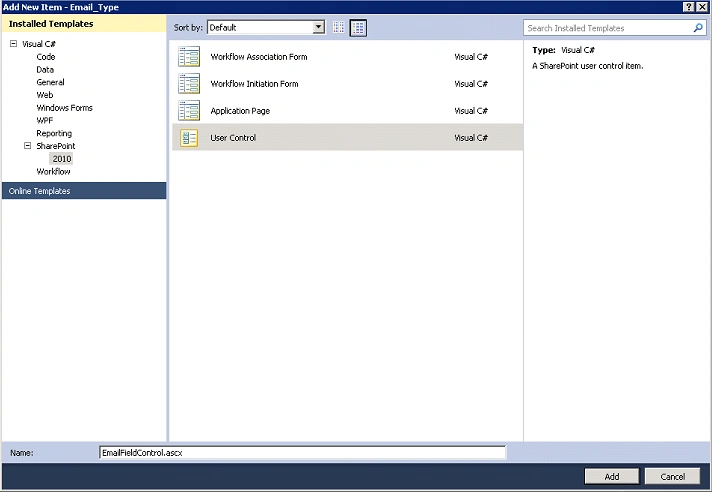
- Right-click the new ControlTemplates folder (not the project name) in Solution Explorer and select Add | New Item
- In the Add New Item dialog box, select SharePoint | 2010 in the Installed Templates tree
- Select a SharePoint User Control in the Templates box, and give the ascx file the name EmailControl.ascx. Click Add. Visual Studio automatically adds the file to the SharePoint Solution manifest and sets it to be deployed to ProgramFiles\Common Files\Microsoft Shared\web server extensions\14\TEMPLATE\ControlTemplates. It also at this time adds the assembly to the manifest and sets it to be deployed to the Global Assembly Cache (GAC).
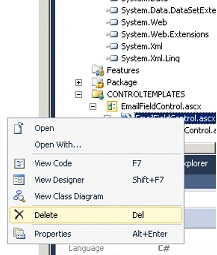
- Delete the EmailFieldControl.ascx.cs and ISBNFieldControl.ascx.designer.cs files that are created automatically under the EmailFieldControl.ascx file. They are not needed for this project. The default content of EmailFieldControl.ascx refers to the EmailFieldControl.ascx.cs file you just deleted and, if you build the project at this point, the compiler will give you a warning about the missing file. Ignore it; no need to worry about it.
- In Solution Explorer, right-click the project name and select Add, then SharePoint Mapped Folder.
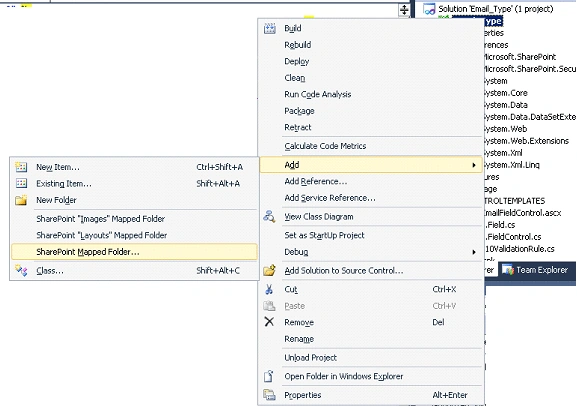
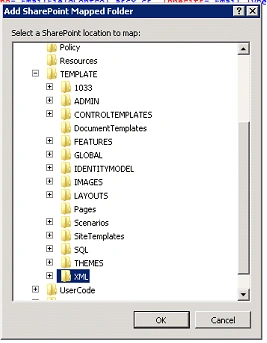
- Use the tree control that opens to map the folder to TEMPLATE\XML and click OK.
- Right-click the new XML folder (not the project name) in Solution Explorer and select Add | New Item.
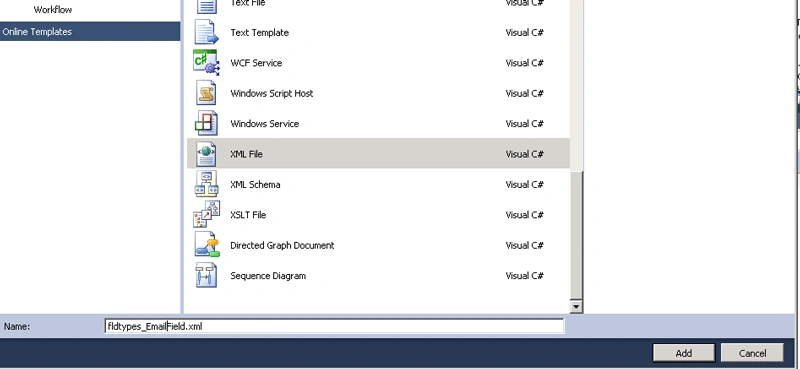
- In the Add New Item dialog box, select Visual C# and select an XML file; give the name as Fldtypes_EmailField.xml.
- In Solution Explorer, right-click the project name and select Add, then SharePoint Mapped Folder.
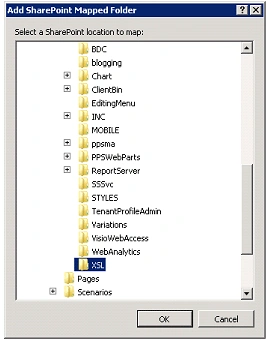
- Use the tree control that opens to map the folder to TEMPLATE\LAYOUTS\XSL and click OK.
- Right-click the new XSL folder (not the project name) in Solution Explorer and select Add | New Item.
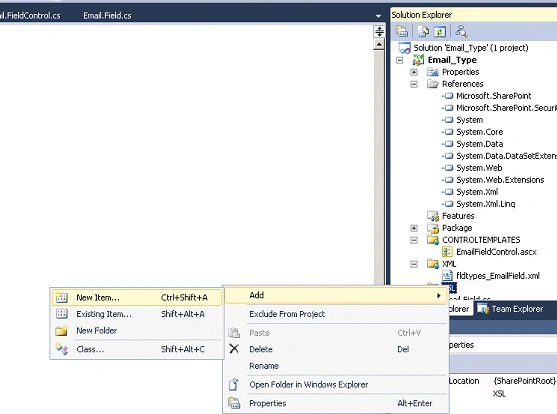
- In the Add New Item dialog box, select Visual C# then select XSLT File in the Templates window.
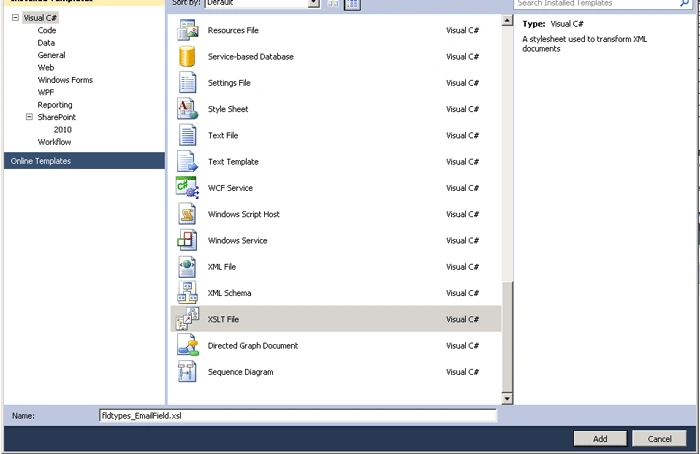
- In the Name box, type fldtypes_EmailField.xsl and click Add. Note this is very similar to the name of the previous file you created. The two files have different purposes and are deployed to different folders.
- Right-click the References node in Solution Explorer, click Add Reference, and select PresentationFramework.dll on the .NET tab in the Add Reference dialog box. Click OK.
Creating the Validation Rule Class
- Open the EmailValidationRule.cs file and add the following statements.
using System.Text.RegularExpressions; using System.Windows.Controls; using System.Globalization; - Replace the class declaration with the following code.
using System;
using System.Collections.Generic;
using System.Linq;
using System.Text;
using System.Drawing;
using System.IO;
using System.Web;
using System.Web.UI;
using Microsoft.SharePoint;
using System.Text.RegularExpressions;
using System.Windows.Controls;
using System.Globalization;
using System.Web.UI.WebControls;
using System.Web.SessionState;
namespace Email.System.Windows.Controls
{
    public class Email10ValidationRule : ValidationRule
    {
         public override ValidationResult Validate(object value, CultureInfo cultureInfo)
         {
                String Email = (String)value;
                bool result = isEmailID(Email);
                if (result != true)
                {
                    return new ValidationResult(false, "Enter valid Email.");
                }
                else
                {
                    return new ValidationResult(true, "Email Entered is correct.");
                }
        }
         public static bool isEmailID(string inputEmail)
        {
            string strRegex = @"^([a-zA-Z0-9_\-\.]+)@((\[[0-9]{1,3}" +
                  @"\.[0-9]{1,3}\.[0-9]{1,3}\.)|(([a-zA-Z0-9\-]+\" +
                  @".)+))([a-zA-Z]{2,4}|[0-9]{1,3})(\]?)$";
            Regex re = new Regex(strRegex);
            if (re.IsMatch(inputEmail))
                return (true);
            else
                return (false);
        }
    }
}
Creating the Custom Field Class
- Open the Email.Field.cs file.
- Add the following name spaces.
using Microsoft.SharePoint; using Microsoft.SharePoint.WebControls; using Microsoft.SharePoint.Security; using System.Windows.Controls; using System.Globalization; using System.Runtime.InteropServices; using System.Security.Permissions; - Add the following statements. These enables our class implementation to reference other classes you create in later steps. Until you create those classes you may see compiler warnings about these statements. Don't worry about that; we are moving to that in a following step.
using Control.Validation.WebControls; using Control.System.Windows.Controls; - Please find the following updated code.
using System;
using System.Collections.Generic;
using System.Linq;
using System.Text;
using Microsoft.SharePoint;
using Microsoft.SharePoint.WebControls;
using Microsoft.SharePoint.Security;
using System.Windows.Controls;
using System.Globalization;
using System.Runtime.InteropServices;
using System.Security.Permissions;
using Email.SharePoint.WebControls;
using Email.System.Windows.Controls;
using System.IO;
using System.Web;
using System.Web.UI;
namespace Email.SharePoint
{
    public class EmailField : SPFieldText
    {
        public EmailField(SPFieldCollection fields, string fieldName)
            : base(fields, fieldName)
        {
        }
        public EmailField(SPFieldCollection fields, string typeName, string displayName)
            : base(fields, typeName, displayName)
        {
        }
        public override BaseFieldControl FieldRenderingControl
        {
            [SharePointPermission(SecurityAction.LinkDemand, ObjectModel = true)]
            get
            {
                BaseFieldControl fieldControl = new EmailFieldControl();
                fieldControl.FieldName = this.InternalName;
                return fieldControl;
            }
        }
        public override string GetValidatedString(object value)
        {
            if ((this.Required == true) && ((value == null)|| ((String)value == "")))
            {
                throw new SPFieldValidationException(this.Title + " must have a value.");
            }
            else
            {
                Email10ValidationRule rule = new Email10ValidationRule();
                ValidationResult result = rule.Validate(value, CultureInfo.InvariantCulture);
                if (!result.IsValid)
                {
                    throw new SPFieldValidationException((String)result.ErrorContent);
                }
                else
                {
                    return base.GetValidatedString(value);
                }
            }
        }
    }
}
Creating the Field Rendering Control
Please replace the code in EmailFieldControl.ascx.cs we created in step 20 with the following.
using System.Web;
using System.Web.UI;
using System.Web.UI.WebControls;
using System.Runtime.InteropServices;
using Microsoft.SharePoint;
using Microsoft.SharePoint.WebControls;
namespace Email.SharePoint.WebControls
{
    public class EmailFieldControl : TextField
    {
        protected Label EmailPrefix;
        protected Label EmailValueForDisplay;
        protected override string DefaultTemplateName
        {
            get
            {
                if (this.ControlMode == SPControlMode.Display)
                {
                    return this.DisplayTemplateName;
                }
                else
                {
                    return "EmailFieldControl";
                }
            }
        }
        public override string DisplayTemplateName
        {
            get
            {
                return "EmailFieldControlForDisplay";
            }
            set
            {
                base.DisplayTemplateName = value;
            }
        }
        protected override void CreateChildControls()
        {
            if (this.Field != null)
            {
                base.CreateChildControls();
                //   this.EmailPrefix = (Label)TemplateContainer.FindControl("EmailPrefix");
                this.textBox = (TextBox)TemplateContainer.FindControl("TextField");
                this.EmailValueForDisplay = (Label)TemplateContainer.FindControl("EmailValueForDisplay");
            }
            if (this.ControlMode != SPControlMode.Display)
            {
                if (!this.Page.IsPostBack)
                {
                    if (this.ControlMode == SPControlMode.New)
                    {
                        textBox.Text = "";
                    }
                }
            }
            else
            {
                EmailValueForDisplay.Text = (String)this.ItemFieldValue;
            }
        }
        public override object Value
        {
            get
            {
                EnsureChildControls();
                return base.Value;
            }
            set
            {
                EnsureChildControls();
                base.Value = (String)value;
            }
        }
    }
}
Creating the Field Rendering Template
- Open the EmailControl.ascx file.
- The following directives are already in the file.
<%@ Assembly Name="$SharePoint.Project.AssemblyFullName$" %> <%@ Assembly Name="Microsoft.Web.CommandUI, Version=14.0.0.0, Culture=neutral, PublicKeyToken=71e9bce111e9429c" %> <%@ Register Tagprefix="SharePoint" Namespace="Microsoft.SharePoint.WebControls" Assembly="Microsoft.SharePoint, Version=14.0.0.0, Culture=neutral, PublicKeyToken=71e9bce111e9429c" %> <%@ Register Tagprefix="Utilities" Namespace="Microsoft.SharePoint.Utilities" Assembly="Microsoft.SharePoint, Version=14.0.0.0, Culture=neutral, PublicKeyToken=71e9bce111e9429c" %> <%@ Register Tagprefix="asp" Namespace="System.Web.UI" Assembly="System.Web.Extensions, Version=3.5.0.0, Culture=neutral, PublicKeyToken=31bf3856ad364e35" %> <%@ Import Namespace="Microsoft.SharePoint" %> <%@ Register Tagprefix="WebPartPages" Namespace="Microsoft.SharePoint.WebPartPages" Assembly="Microsoft.SharePoint, Version=14.0.0.0, Culture=neutral, PublicKeyToken=71e9bce111e9429c" %> <%@ Control Language="C#" %> <SharePoint:RenderingTemplate ID="EmailFieldControl" runat="server"> <Template> <table> <tr> <td > <asp:Label ID="EmailPrefix" runat="server" /> </td> <td> <asp:TextBox id="TextField" runat="server" Width="50%" ></asp:TextBox> </td> </tr> <tr> </tr> </table> </Template> </SharePoint:RenderingTemplate> <SharePoint:RenderingTemplate ID="EmailFieldControlForDisplay" runat="server"> <Template> <asp:Label ID="EmailValueForDisplay" runat="server" /> </Template> </SharePoint:RenderingTemplate> - Below this markup is a <%@ Control directive that makes reference to files that you deleted in an earlier step and contains other attributes that are not used in this project. Replace it with the following simplified directive. I have already done this change in the above code.
<%@ Control Language="C#" %>
Creating the Field Type Definition
- In Visual Studio, build the project. The project is not finished, but you need to do a build at this time to generate a GUID and a Public Key Token for the assembly.
- Open the fldtypes_EmailField.xml file and replace it's contents with the following markup
<?xml version="1.0" encoding="utf-8" ?>
<FieldTypes>
 <FieldType>
<Field Name="TypeName">Email</Field>
 <Field Name="ParentType">Text</Field>
 <Field Name="TypeDisplayName">Email</Field>
 <Field Name="TypeShortDescription">Email Validation Text</Field>
 <Field Name="UserCreatable">TRUE</Field>
 <Field Name="ShowOnListCreate">TRUE</Field>
<Field Name="ShowOnSurveyCreate">TRUE</Field>
 <Field Name="ShowOnDocumentLibraryCreate">TRUE</Field>
<Field Name="ShowOnColumnTemplateCreate">TRUE</Field>
<Field Name="FieldTypeClass">Email.SharePoint.EmailField,$SharePoint.Project.AssemblyFullName$</Field>
</FieldType>
</FieldTypes>
Creating the XSLT Style sheet
Open the fldtypes_EmailField.xsl file and replace the code.
<xsl:stylesheet xmlns:x="http://www.w3.org/2001/XMLSchema"
                xmlns:d="http://schemas.microsoft.com/sharepoint/dsp"
                version="1.0"
                exclude-result-prefixes="xsl msxsl ddwrt"
                xmlns:ddwrt="http://schemas.microsoft.com/WebParts/v2/DataView/runtime"
                xmlns:asp="http://schemas.microsoft.com/ASPNET/20"
                xmlns:__designer="http://schemas.microsoft.com/WebParts/v2/DataView/designer"
                xmlns:xsl="http://www.w3.org/1999/XSL/Transform"
                xmlns:msxsl="urn:schemas-microsoft-com:xslt"
                xmlns:SharePoint="Microsoft.SharePoint.WebControls"
                xmlns:ddwrt2="urn:frontpage:internal">
  <xsl:template match="FieldRef[@Name = 'Email']" mode="Text_body">
    <xsl:param name="thisNode" select="." />
    <span style="background-color:lightgreen;font-weight:bold">
      <xsl:value-of select="$thisNode/@*[name()=current()/@Name]" />
    </span>
  </xsl:template >
</xsl:stylesheet>
Build and Test the Custom Field Type
- Select Deploy on the Build menu. This automatically rebuilds the assembly, deploys the assembly to the GAC, deploys the ascx file to %ProgramFiles%\Common Files\Microsoft Shared\web server extensions\14\TEMPLATE\ControlTemplates, deploys the fldtypes*.xml file to %ProgramFiles%\Common Files\Microsoft Shared\web server extensions\14\TEMPLATE\XML, deploys the fldtypes*.xsl file to %ProgramFiles%\Common Files\Microsoft Shared\web server extensions\14\TEMPLATE\LAYOUTS\XSL, and recycles the Web application.
- Go to site actions -->Site Settings
- Click on site libraries and list

- Click on Create new Content
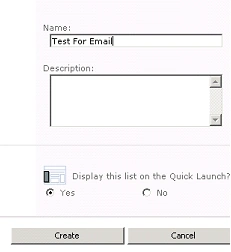
- Create a custom list named Test For Email
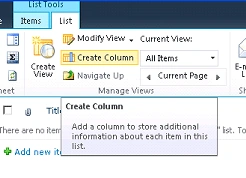
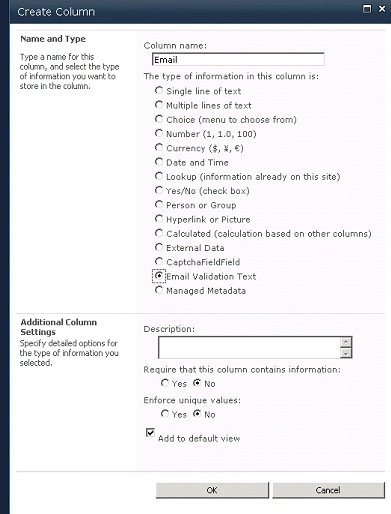
- From the ribbon click on create column
- You will see that our custom field is added there successfully. Give the details as shown below to add a custom column to your list.
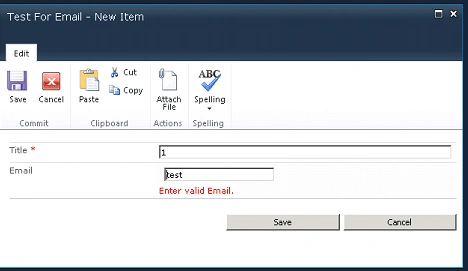
- From the screen shot shown below you can see our custom email field in action.
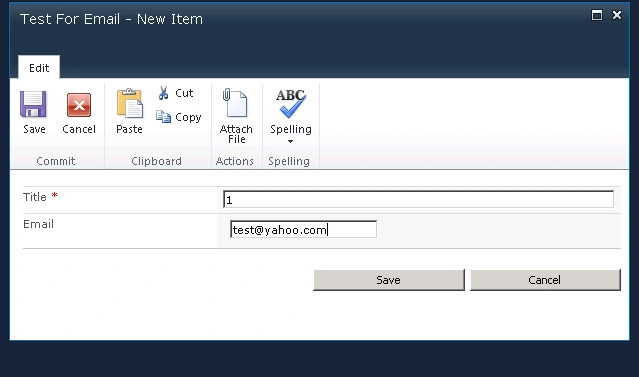
The data is added as shown below.

For more details, you can refer to the article of creating custom field for SharePoint 2010 in MSDN.
hojo clementPosted Jan 11, 2016, 6:51 AM
Nice Post... It is very easy to follow and work like a charm :)
Sajith G HPosted Nov 17, 2014, 7:21 AM
I get this error when I try to create a column - Field type Email is not installed properly. Go to the list settings page to delete this field
sannadi sarathPosted Jun 12, 2014, 7:11 AM
great!! its working for mee too :)
Destin JoyPosted Mar 22, 2013, 2:20 AM
Thank you all...for the comments..
Vijay ChavanPosted Mar 21, 2013, 3:28 AM
Very Nice , It's Working
vishal agarwalPosted Oct 21, 2011, 5:24 AM
hi This is giving error for using Control.Validation.WebControls; using Control.System.Windows.Controls; and using Email.sharepoint.WebControls; using Email.System.Windows.Controls; what will be the assembly for these. and post new modified one article about this Thanks vishal agarwal
P VPosted Aug 30, 2011, 5:23 PM
Thank you for this article. I have a question. I wasn't able to get my custom field type up. I wanted to create a new title field that had the ECB menu on it. I went through your steps and just eliminated the ascx file portion so I just created the xsl and the xml file. I used the content from this post. http://blogs.msdn.com/b/chunliu/archive/2010/09/29/enabling-ecb-menu-on-a-custom-column-in-sharepoint-2010-part-2.aspx and deployed the solution on Sharepoint. I can't find my custom column type or anything. Have you ever succesfully implemented the ECB menu on a document library column?
James XingPosted Aug 21, 2011, 10:55 AM
Can you make a custom field type of dropdown type with hard code of some of list values, there is not sample in the internet so far.
parameswari krishnanPosted Jun 2, 2011, 4:48 AM
Very Useful..
Joel PalmerPosted Feb 16, 2011, 4:23 PM
You clearly were leveraging a previous phone number example and haven't fully edited the article for email. Very good information overall. I was able to figure out what you intended. :-)