
SIGN UP MEMBER LOGIN:    
ARTICLE

Event Handler in SharePoint 2010

Posted by Destin joy Articles | SharePoint November 01, 2010
In this article I am showing you how to create a Custom event handler in SharePoint 2010 using Visual Studio 2010.
Reader Level:

In this article I am showing you how to create a Custom event handler in SharePoint 2010 using Visual Studio 2010. An event handler is a business logic that needs to be run when a event (eg. deleting site, uploading a new document etc) happens in SharePoint. A event handler is built into a .net assembly and deployed in the SharePoint server

In the below example I am showing you an example of restricting a user from deleting a site from a web application

1. Open your VS 2010 select SharePoint project(2010) and select Event Receiver.
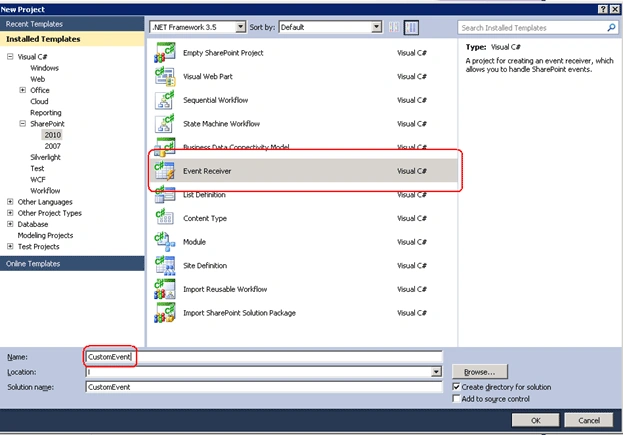
image1.gif

2. Give the URL of the web application where you want to attach this event.
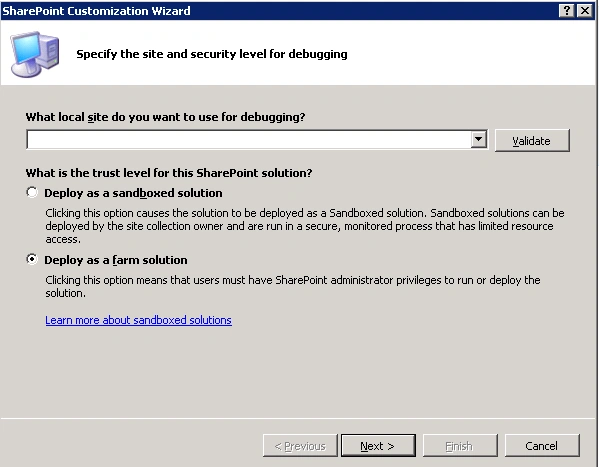
image2.gif

3. From the next screen you have to select what type of Event Receiver settings you want. I have selected a Web Events to handle A Site being Deleted event as shown below.
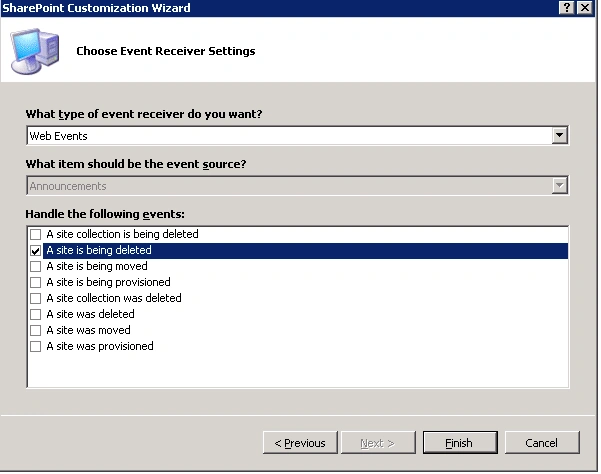
image3.gif

4. Click Finish.

properties.Cancel = true;
properties.ErrorMessage = "You cant delete a SIte";


5. In this example, the Site Deletion is terminated whenever a user tries to delete the site
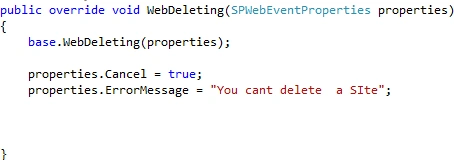
image4.gif

6. Now right click on the solution and select deploy.

7. Now you go to your site settings and select Manage Site Features under site actions.
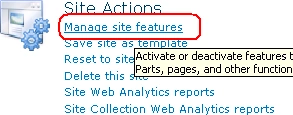
image5.gif

8. Then select your Event feature and Activate it.

image6.gif

9. Then go to site settings and select Delete this site from Site Actions.
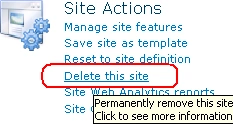
image7.gif

10. Then you can see our event is fired and will get the following error message whenever a user tries to delete the site.
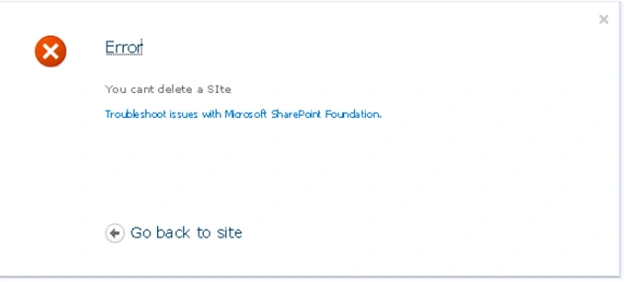
image8.gif

Login to add your contents and source code to this article
share this article :
post comment
 

You can give full URL

Posted by Destin joy Nov 08, 2010

Destin

In mycase i want to deploy it to particular site collection.So if i have to give the full url containing site collection or only the web application url?

Posted by John Samuel Nov 08, 2010
Team Foundation Server Hosting
Become a Sponsor
PREMIUM SPONSORS
  • Finally – a virtual platform that delivers next-generation Windows Server 2008 Hyper-V virtualization technology from a managed hosting partner you can truly depend on. Visit www.maximumasp.com/max for a FREE 30 day trial. Hurry offer ends soon. Climb aboard the MaxV platform and take advantage of High Availability, Intelligent Monitoring, Recurrent Backups, and Scalability – with no hassle or hidden fees. As a managed hosting partner focused solely on Microsoft technologies since 2000, MaximumASP is uniquely qualified to provide the superior support that our business is built on. Unparalleled expertise with Microsoft technologies lead to working directly with Microsoft as first to offer IIS 7 and SQL 2008 betas in a hosted environment; partnering in the Go Live Program for Hyper-V; and product co-launches built on WS 2008 with Hyper-V technology.
    ceTE software specializes in components for dynamic PDF generation and manipulation. The DynamicPDF™ product line allows you to dynamically generate PDF documents, merge PDF documents and new content to existing PDF documents from within your applications. Visit DynamicPDF here
Nevron Gauge for SharePoint
Become a Sponsor