SIGN UP MEMBER LOGIN:    
ARTICLE

Fusion Chart in SharePoint using SharePoint Designer

Posted by Destin joy Articles | SharePoint September 04, 2010
In this article I am showing how to make a very nice Dashboard using Fusion chart. First of all let me thank Fusion chart for the wonderful implementation of charts in Flash. It's really nice and cool. You can see an online demo of Fusion chart. Here I am showing a Funnel chart for the task list status.
Reader Level:
Download Files:


In this article I am showing how to make a very nice Dashboard using Fusion chart. First of all let me thank Fusion chart for the wonderful implementation of charts in Flash. It's really nice and cool. You can see an online demo of Fusion chart.

Here I am showing a Funnel chart for the task list status.

1. You can down load the free version of fusion chart from the following URL.

2. http://www.fusioncharts.com/free/download/?gMenuItemId=5

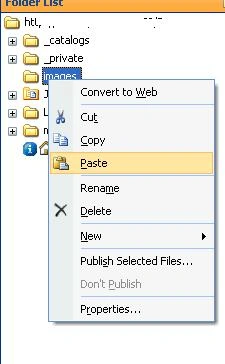
3. First you have to upload these Flash files to the image folder of your web application

4. For that you have to open your web application in designer then find the folder named Images. Just copy and paste the Flash files to there.
sharepoint1.JPG

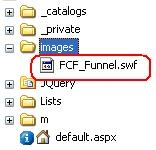
5. Now you can see the fusion chart added to your image folder. I have pasted FCF_Funnel.swf. There are other charts also free. You can choose any.
sharepoint2.JPG

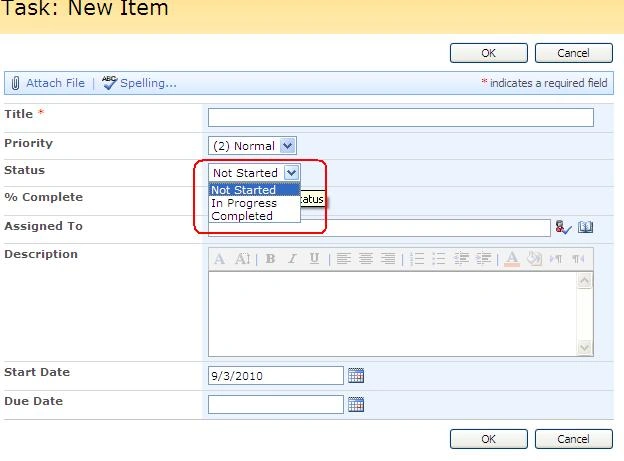
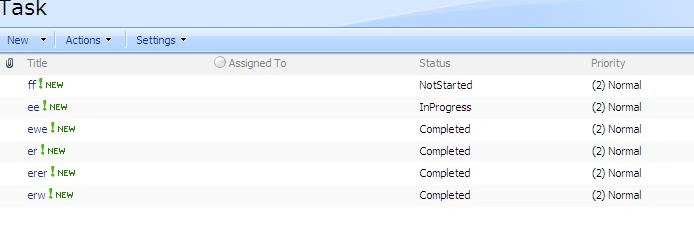
6. You have to create a default task list also. I have a task list as shown below and have a column of choice named Status. It has the values:

  • NotStarted
  • InProgress
  • Completed

sharepoint3.JPG

7.
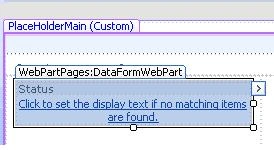
Now you have to create a data view web part for the task list with status column as the field.

8. You can refer to my article "Working with Dataview Webpart" for more details.

9. I have added one Dataview web part with status as the field.
sharepoint4.JPG

10.
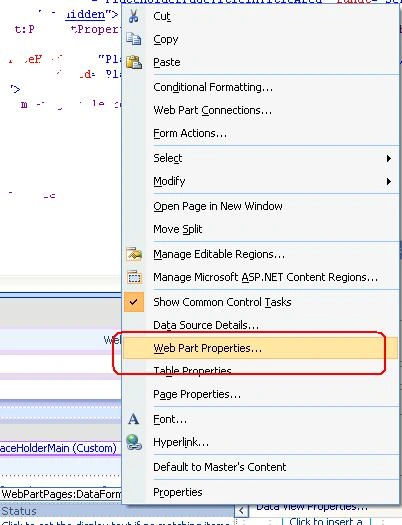
Right click on the Dataview web part and select Web part Properties.
sharepoint5.JPG

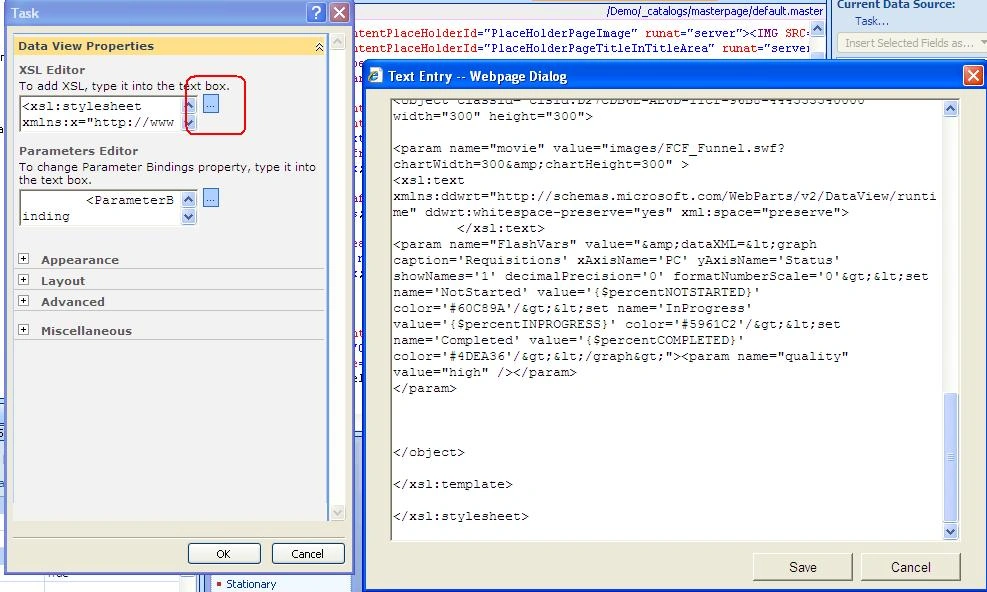
11. Click on the XSL Editor marked in red and paste the code there (I have attached the code in the article itself).
sharepoint6.JPG

12. Click Save.

13. Save the changes in the file and check in.

14. Now add some value in the task list.
sharepoint7.JPG

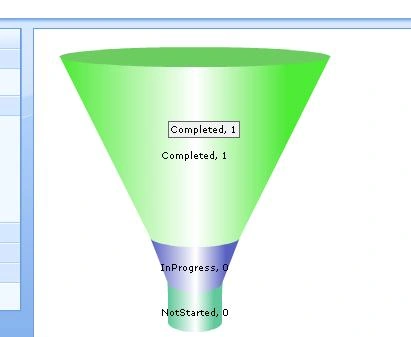
15. Then go to your page where you added data view web part; you will see the Fusion chart working there.
sharepoint8.JPG

16. Note: Please change the with your list column fields (In My case it is NotStarted, InProgress, Completed) Change the type of chart you selected in my case it is FCF_Funnel.swf.

Login to add your contents and source code to this article
share this article :
post comment
 

What does the classid attribute in the object element refer to (classid="clsid:D27CDB6E-AE6D-11cf-96B8-444553540000"). Thanks,

Posted by starkey bel Dec 30, 2010

That i didnt tried but i hopes you can use the same logic with a data source to connect to SQL database

Posted by Destin joy Dec 30, 2010

Hi, Can you please give an example of how to create a chart from an SQL database thru Sharepoint Designer Thanks

Posted by Ant A Dec 23, 2010

Oh Great!! Happy to hear that

Posted by Destin joy Nov 02, 2010

It helped me to achieve a good charting solution using Designer................

Posted by Kavin Francis Nov 02, 2010
Nevron Gauge for SharePoint
Become a Sponsor
PREMIUM SPONSORS
  • Finally – a virtual platform that delivers next-generation Windows Server 2008 Hyper-V virtualization technology from a managed hosting partner you can truly depend on. Visit www.maximumasp.com/max for a FREE 30 day trial. Hurry offer ends soon. Climb aboard the MaxV platform and take advantage of High Availability, Intelligent Monitoring, Recurrent Backups, and Scalability – with no hassle or hidden fees. As a managed hosting partner focused solely on Microsoft technologies since 2000, MaximumASP is uniquely qualified to provide the superior support that our business is built on. Unparalleled expertise with Microsoft technologies lead to working directly with Microsoft as first to offer IIS 7 and SQL 2008 betas in a hosted environment; partnering in the Go Live Program for Hyper-V; and product co-launches built on WS 2008 with Hyper-V technology.
    Get 2 Months Free of ASP.NET Hosting for Only $4.95/month! Receive FREE MS SQL and MySQL Databases Including ASP.NET 4/3.5, MVC 3.0, Silverlight 4, Windows 2008/IIS 7.0 Plus FREE IIS 7 Modules. Host UNLIMITED ASP.NET Web Sites - Click Here!
6 Months Free & No Setup Fees ASP.NET Hosting!
Become a Sponsor