In Focus
C# Corner Mumbai Chapter: Learn Windows Presentation Foundation (WPF) with CMUG
Jabalpur Chapter Meet July 13: Register Now
Chandigarh Chapter: Developers Day on 29 June 2013
Delhi Chapter Hands On June 22: Limited Seats Register Now
Email :
Password :
Remember me?
Forgot password
Contribute
An Article
A Blog
A News
A Video
A Link
An Interview Question
Ask a Question
TECHNOLOGIES
.NET 4.5
Chapters
JavaScript, CSS
SharePoint 2010
Web Development
.NET Assemblies
Coding Best Practices
JQuery
SharePoint 2013
Web Services in C#
ADO.NET in C#
Current Affairs
JSP
Silverlight with C#
Windows 8
AJAX in C#
Databases & DBA
Leadership
Smart Devices
Windows Azure
Android Programming
Design & Architecture
Learn .NET
SQL
Windows Controls C#
Articles C#
Exception Handling C#
LightSwitch 2012
SQL Server 2012
Windows Forms C#
ASP.NET Controls in C#
Expression Studio
LINQ
Testing
Windows Phone 8
ASP.NET MVC with C#
Graphics Design
Mobile & Embedded
TypeScript
Windows Server 2012
ASP.NET Programming
How do I
Office 2013
Visual C#
Windows Store Apps
BizTalk Server
HTML 5
OOP/OOD
Visual Studio .NET
Workflow Foundation in C#
C# Language
Internet & Web
Operating Systems
Visual Studio 2010
WPF
C# Tutorials
iPhone/iPad
PHP
Visual Studio 2012
XAML
C, C++, MFC
Java
Products
WCF with C#
XML
Career Advice
Java and .NET
Project Management
Request a new Category
|
View All
ANSWERS
BLOGS
VIDEOS
INTERVIEWS
BOOKS
LINKS
NEWS
CHAPTERS
CAREER ADVICE
Simple Tooltip Using HTML and CSS
Kolkata Chapter Developer Day Official Recap
Object Oriented Programming Using C#: Part 9
JsAction with T4 Template
Learn OOP Interface Using C#
Logging Using Log4net in Compact Framework 2 ...
S.O.L.I.D Principle Inversion of Control and ...
How To Find A Doctor Near Your Home in SQL S ...
Creating Simple MVVM Application With Data B ...
How to Add an Alias (CNAME) Resource Record ...
ARTICLE
24
4,130
SharePoint Designer Work flow: Part II
Posted by
Destin joy
in
Articles
|
SharePoint 2010
on
August 20, 2010
Tags:
SharePoint Designer Work flow
,
sharepoint
,
work flow
In this article I am explaining, how to copy one list item to another list item.
Tweet
4026
0
0
Reader Level:
Part I
In this article I am explaining, how to copy one list item to another list item. I will explain in my coming articles.
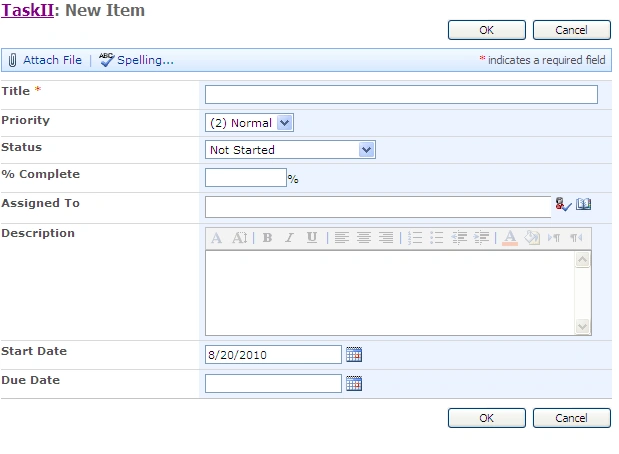
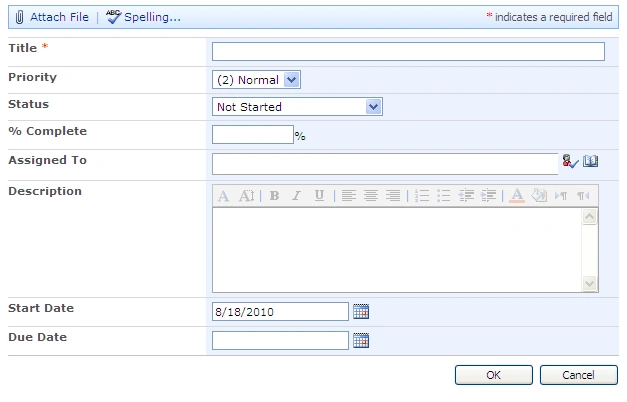
This is the first list say Task List 1. I am trying to copy to second list say Task List II
First of all you have to open your web application in sharepoint designer
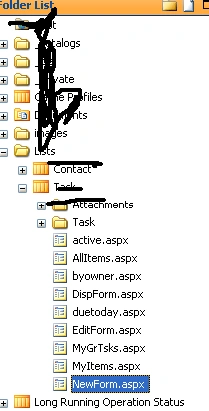
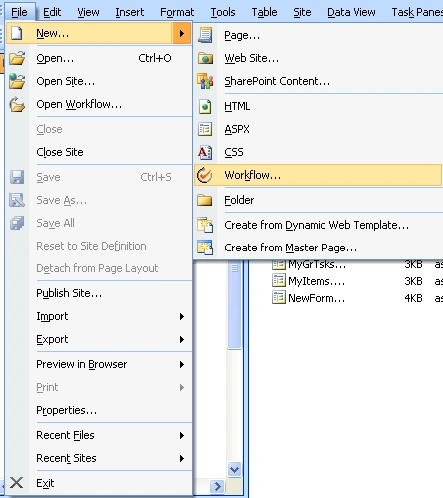
You have to go to File --> New --> Work Flow as shown below
From the next screen, You have to give a name for your work flow.
Select the List where you want to incorporate the work flow from the second drop down as shown below
Select Automatically start this work flow when new item is changed.
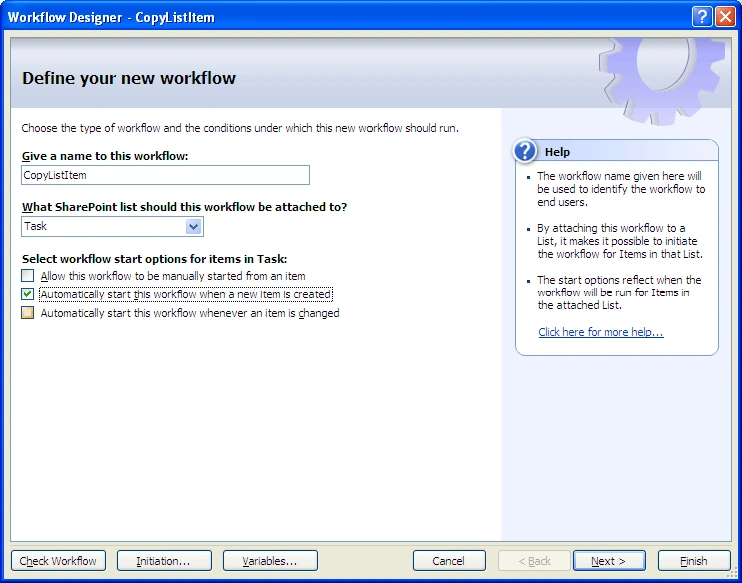
Click Next
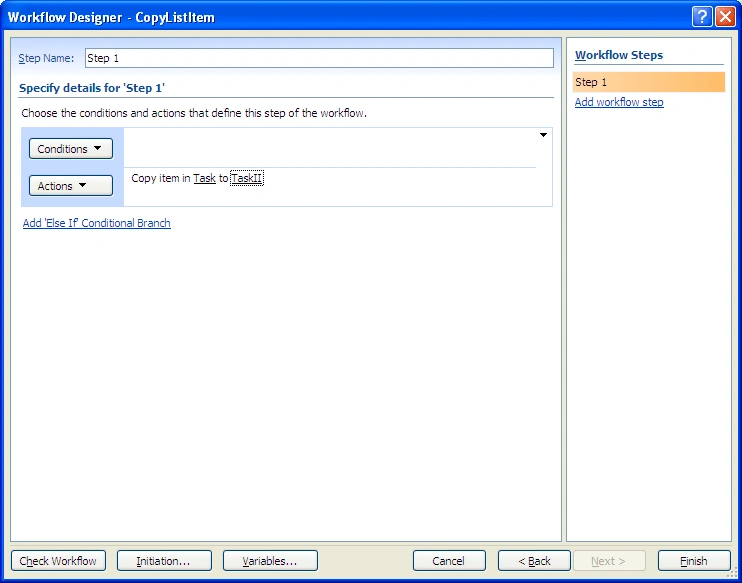
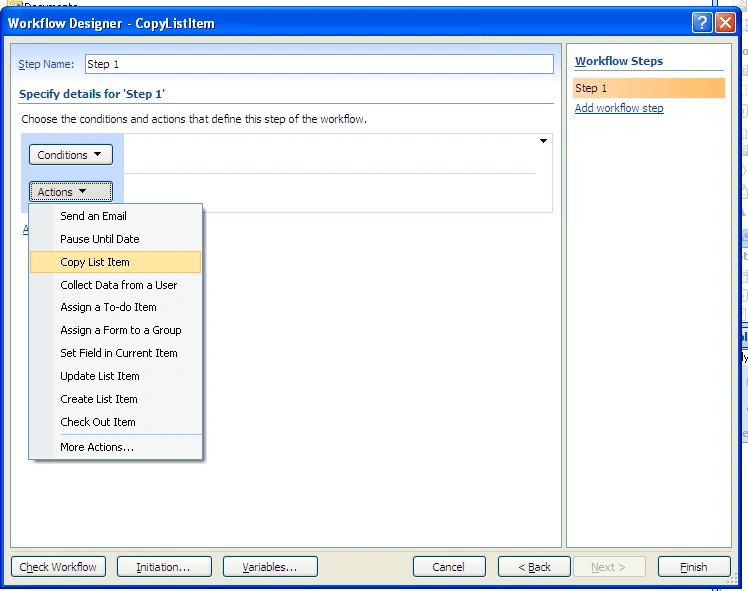
From the next screen click on Actions then Copy List Item
You will get the below screen. Click on This List
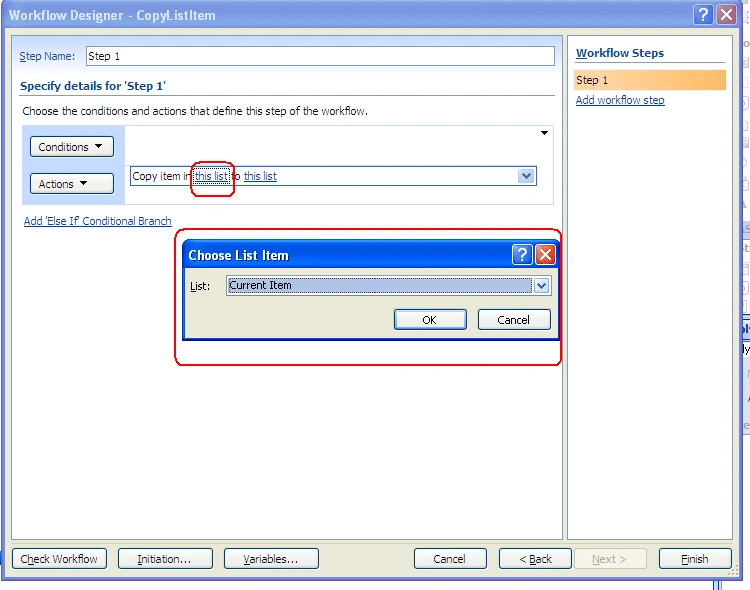
From the Second List Select Task II as shown below
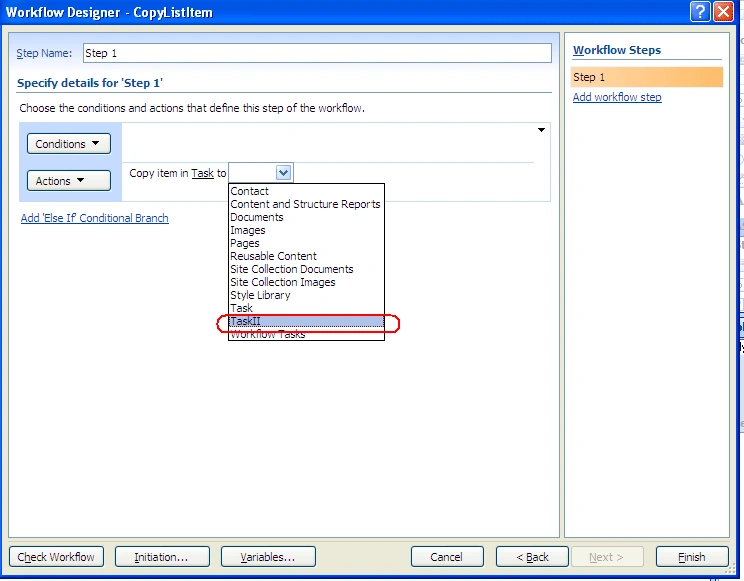
Click Finish. Thats all
Just add one entry in Task list, you can see the same data get copied to Task II also.

Login
to add your contents and source code to this article
This Feature is Sponsored By
.NET Diagramming framework designed for creating advanced solutions
SharePoint Designer Work flow: Part I
Tags:
SharePoint Designer Work flow
,
SharePoint Work flow
,
SharePoint Designer
,
Work flow
SharePoint Designer Work flow: Part III
Tags:
SharePoint Designer Work flow
,
SharePoint Designer
,
SharePoint
Related Articles
SharePoint Designer Work flow: Part I
8 Steps to create workflows using SharePoint designer
SharePoint Designer Work flow: Part III
Exporting SharePoint Designer 2010 Work flow to Visual Studio
Three State Work flow in Sharepoint
The NeFs Application Demo Part 2: Designing Application Oriented Server Controls
Sequential Work Flow in SP 2010 Using VS 2010
Share Point Designer Work Flow: Part IV
How to Set Item Level Permission Using SharePoint Designer 2010 Work Flow
Introduction to User Interface of SharePoint Designer 2010
comments
View Previous Comments
of
COMMENT USING
PREMIUM SPONSORS
Nevron
Nevron Software is a global leader in component based data visualization technology for a diverse range of Microsoft centric platforms. Nevron Data Visualization components are used by many companies, educational and government organizations around the world.
TRENDING UP
Simple Tooltip Using HTML and CSS
Kolkata Chapter Developer Day Official Recap
Object Oriented Programming Using C#: Part 9
JsAction with T4 Template
Learn OOP Interface Using C#
Logging Using Log4net in Compact Framework 2.0 in Visual Studio 2008
S.O.L.I.D Principle Inversion of Control and Resolution With Dependency Injection
How To Find A Doctor Near Your Home in SQL Server
Creating Simple MVVM Application With Data Binding
How to Add an Alias (CNAME) Resource Record to a Zone
View All
MOST LIKED ARTICLE
WCF Introduction and Contracts - Day 1
Create SSRS Report Using Report Wizard
CREATE READ UPDATE and DELETE - CRUD Operation Using LINQ to SQL
WCF - Data Contract - Day 4
Factory Design Pattern
Follow @twitterapi
HOT KEYWORDS
Client object model
Dashboard
menu
MOSS 2007
Object Model
Power Shell
PowerShell
PowerShell script
properties
RBS
RSS
share point
SharePoint 2007
SharePoint 2010
sharepoint 2010 tutorials
sharepoint articles
SharePoint Designer
sharepoint foundation server
sharepoint list
SharePoint Server 2010
sharepoint tutorials
User
VS 2010
VS2010
webpart
SPONSORED BY
Get the industry leading .NET Charting component
.NET Charting component with full set of charting and gauge types.
My Facebook Friends
WHITEPAPERS AND BOOKS
Interview Questions on SharePoint 2013
SharePoint 2010 Administration & Development
Getting Started with Managed Metadata Service in SharePoint 2010
Windows Phone 7 Hileleri
Windows Phone Development Step by Step Tutorial
Essentials of SharePoint 2010: Business Intelligence Capabilities
Working with Directories in C#
FileInfo in C#
Programming List with C#
Source Code: Graphics Programming with GDI+
View All
Poll
Result
All Polls
Speed of C# Corner
How do you find speed of C# Corner when visiting the site?
Very Fast
OK
Slow
Very Slow
How do you find speed of C# Corner when visiting the site?
Options
Votes
%
Very Fast
5
8.33
OK
47
78.33
Slow
5
8.33
Very Slow
3
5.00
Total
60
100%