

A repeater control in ASP.NET is a databound
control. Repeater controls are used in scenarios where we need to display data
that changes, however the template in which data is displayed remains the same
and repeats several times.
For example, a repeater control can be used in case of displaying questions for
an exam(where template is similar for all questions ie question and answer
options), or a survey or user comments etc. In this article we are going to
write a repeater control which fetches user comments data and displays in a
repeater control. We are also going to take care of Paging for the repeater.
Note : This article assumes that the reader knows how to fetch data from
SQL using LINQ. If not, please go through this article http://www.c-sharpcorner.com/UploadFile/scottlysle/L2SinCS06022008035847AM/L2SinCS.aspx.
Getting started section will give an introduction on how to use LINQ with SQL
At the end of the article we are going to have a control which looks like this.
There are six comments and the pagesize is set to 2
On page 1 : 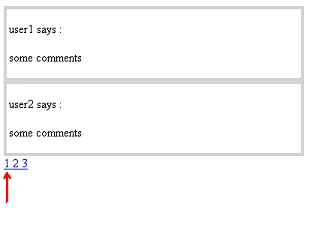
On page 2 : 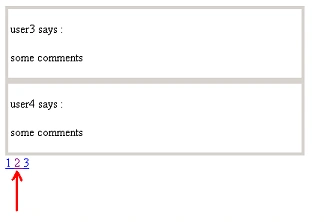
For this article we have a simple sql table called "Comments" which has two
columns "User" and "Comment".
Create a new Web site using visual studio. Drag and drop the "Repeater" control
from the DATA section of the toolbox on the designer page.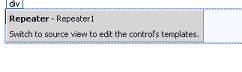
We are going to fetch data from the SQL using LINQ and bind it to the repeater
control using the Datasource property.
The repeater control repeats the data in a particular template. This template
can be programmed as per our requirement. by writing a class which implements
ITemplate interface. Point # 3 explains this in detail.
- Page load : Above the page load we
have two global variables. One contains the pagesize which can be set and
one contains the count of the total data present in the comments table. At
the page load we fire a LINQ query to get the count of the comments data and
assign it to 'datacount' variable. We call the fetchData method once with
the parameters as PageSize and 0 because we are going to fetch data of size
= pagesize at first. The two parameters of fecthData method are explained in
point 5 of this article
public partial class _Default : System.Web.UI.Page
{
int pagesize = 2;
int datacount;
protected void Page_Load(object sender, EventArgs e)
{
commentdataDataContext cntxt = new commentdataDataContext();
var temp = from comments in cntxt.comments
select comments;
datacount = temp.Count();
if (!IsPostBack)
{
fetchData(pagesize, 0);
}
else
{
createPagingControl(datacount,pagesize);
}}
}
- Fetch data from SQL : Now we write
a function fetchData that takes two parameters. Why these parameters are
required is explained in point 5 in this article.
public void fetchData(int take, int skip)
{
using (commentdataDataContext cntxt = new commentdataDataContext())
{
var usrcmnts = from comments in cntxt.comments
.Take(take)
.Skip(skip)
select new
{
user = comments.User,
comment = comments.comment1
};
Repeater1.ItemTemplate = new rptrTemplate();
PagedDataSource pgds = new PagedDataSource();
pgds.AllowCustomPaging = true;
pgds.AllowPaging = true;
pgds.DataSource = usrcmnts;
pgds.PageSize = pagesize;
Repeater1.DataSource = pgds;
Repeater1.DataBind();
}
createPagingControl(datacount, pagesize);
}Here we have fetched data using LINQ from SQL inside usrcmnts. We create a new PagedDataSource and provide the datasource as usrcmnts. PAGED data source is selected as this would help us in handling paging for this repeater control.
- Repeater1.ItemTemplate = new rptrTemplate();
So what is the above statement ? This statement creates a template in the repeater control which repeates itself. We can program it as follows. We write a class which implements ITemplate interface.
public class rptrTemplate : ITemplate
{
public void InstantiateIn(Control container)
{
Table tbl = new Table();
TableRow tr = new TableRow();
TableCell cl = new TableCell();
LiteralControl lc = new LiteralControl();
tbl.Width = 400;
tbl.Height = 100;
tbl.BorderStyle = BorderStyle.Solid;
cl.Controls.Add(lc);
tr.Cells.Add(cl);tbl.Rows.Add(tr);
lc.DataBinding += new EventHandler(bindrptrdata);
container.Controls.Add(tbl);
}
public void bindrptrdata(object sender, EventArgs e)
{
LiteralControl lc = (LiteralControl)sender;
RepeaterItem container = (RepeaterItem)lc.NamingContainer;
lc.Text = DataBinder.Eval(container.DataItem, "user").ToString() + " says : </BR></BR>" +
DataBinder.Eval(container.DataItem, "comment").ToString();
}
}
Here our repeater will repeat data in a table which has a literal control in it. This literal control gets its data from bindrptrdata method.
- Creating Paging control : Now we
are going to create a paging control which displays links "1 2 3…" depending
on the number of comments and the page size. In this method, based on the
pagesize and the total number of comments present, we create link buttons by
the below given logic. Eg for page size 2 and number of comments 6, we
create 3 link buttons.
public void createPagingControl(int datacount, int pagesize)
{
decimal lnkbtns = (decimal)datacount / pagesize;
for (int i = 0; i <Math.Ceiling(lnkbtns); i++)
{
LinkButton lnk = new LinkButton();
lnk.Text = (i+1).ToString()+ " ";lnk.Click += new EventHandler(handlePaging);
Repeater1.Controls.Add(lnk);
}
}
public void handlePaging(object sender, EventArgs e)
{
LinkButton lnk = (LinkButton)sender;
int nextpage = int.Parse(lnk.Text);
fetchData(nextpage * pagesize, (nextpage - 1) * pagesize);
}
The Math.Ceiling has been used if the datacount is not perfectly divisible by pagesize for example datacount=6 and pagesize=4. In this case we would need 2 pages.
handlePaging method handles the data fetching when we click on links to change the page. This method calls fetchData with two parameters. Here we are going to see why we have used the TAKE and SKIP in linq queries.
- TAKE and SKIP : TAKE = 3 and
SKIP = 1 : Now here, what the LINQ query will do is, it will retrieve
first three rows from the table and skip the first one. So the result is 2nd
and 3rd row.
var usrcmnts = from comments in cntxt.comments
.Take(3)
.Skip(1)
select new
{
user = comments.User,
comment = comments.comment1
};
This logic has been used for paging. On the
link button click we are sending the appropriate parameters to display the data
related to that page number.
For Example : If the page size is 2 and the total comment data is 6 (ie 3
pages in all). Suppose we are on page number 1. Now when I click on 2 ie next
page of the paging control, we should be displayed 3rd and 4th row right ?
So we call the function as
fetchData(nextpage * pagesize, (nextpage - 1) *
pagesize); where nextpage=2 here
this will call function as :
fetchData(2*2,(2-1)*2) = fetchData(4,2)
Therefore the fetchData function has TAKE=4 and
SKIP=2. So it displays 3rd and 4th row for the 2nd page where Pagesize 2.
Similary, you can work out for page size 3 also.
The completed c# code file is attached here. Have a look though it.
Cheers !!
Dheeraj RajpootPosted Mar 21, 2012, 8:59 PM
.