

Implementation
First include asp.net ajaxtoolkit accordion control as shown below.
<%@ Page Language="C#" AutoEventWireup="true" CodeFile="Demo.aspx.cs" Inherits="Demo" %>
<%@ Register
Assembly="AjaxControlToolkit"
Namespace="AjaxControlToolkit"
TagPrefix="ajaxToolkit" %>
<!DOCTYPE html PUBLIC "-//W3C//DTD XHTML 1.0 Transitional//EN" "http://www.w3.org/TR/xhtml1/DTD/xhtml1-transitional.dtd">
<html xmlns="http://www.w3.org/1999/xhtml" >
<head runat="server">
<title>Enhancing the Accordian Extender</title>
<link href="StyleSheet.css" rel="stylesheet" type="text/css" />
</head>
<body> <form id="form1" runat="server">
<asp:ScriptManager ID="ScriptManager1" runat="server" />
<ajaxToolkit:Accordion ID="MyAccordion" runat="server" SelectedIndex="0"
HeaderCssClass="accordionHeader" HeaderSelectedCssClass="accordionHeaderSelected"
ContentCssClass="accordionContent" FadeTransitions="false" FramesPerSecond="40"
TransitionDuration="250" AutoSize="None" RequireOpenedPane="false" SuppressHeaderPostbacks="true">
<Panes>
<ajaxToolkit:AccordionPane ID="AccordionPane1" runat="server">
<Header><a href="" class="accordionLink" >1. Accordion</a></Header>
<Content>
The Accordion is a web control that allows you to provide multiple panes and display them one at a time.
It is like having several CollapsiblePanels where only one can be expanded at a time. The Accordion is implemented as a web control that contains
AccordionPane web controls. Each AccordionPane control has a template for its Header and its Content.
We keep track of the selected pane so it stays visible across postbacks.
</Content>
</ajaxToolkit:AccordionPane>
<ajaxToolkit:AccordionPane ID="AccordionPane2" runat="server">
<Header><a href="" class="accordionLink" >2. AutoSize</a></Header>
<Content>
<p>It also supports three AutoSize modes so it can fit in a variety of layouts.</p>
<ul>
<li><b>None</b> - The Accordion grows/shrinks without restriction. This can cause other elements
on your page to move up and down with it.</li>
<li><b>Limit</b> - The Accordion never grows larger than the value specified by its Height
property. This will cause the content to scroll if it is too large to be displayed.</li>
<li><b>Fill</b> - The Accordion always stays the exact same size as its Height property. This
will cause the content to be expanded or shrunk if it isn't the right size.</li>
</ul>
</Content>
</ajaxToolkit:AccordionPane>
<ajaxToolkit:AccordionPane ID="AccordionPane3" runat="server">
<Header><a href="" class="accordionLink" >3. Control or Extender</a></Header>
<Content>
The Accordion is written using an extender like most of the other extenders in the AJAX Control Toolkit.
The extender expects its input in a very specific hierarchy of container elements (like divs), so
the Accordion and AccordionPane web controls are used to generate the expected input for the extender.
The extender can also be used on its own if you provide it appropriate input.
</Content>
</ajaxToolkit:AccordionPane>
</Panes>
</ajaxToolkit:Accordion>
</form>
</body>
</html>
If you run the application , you will see the following output.
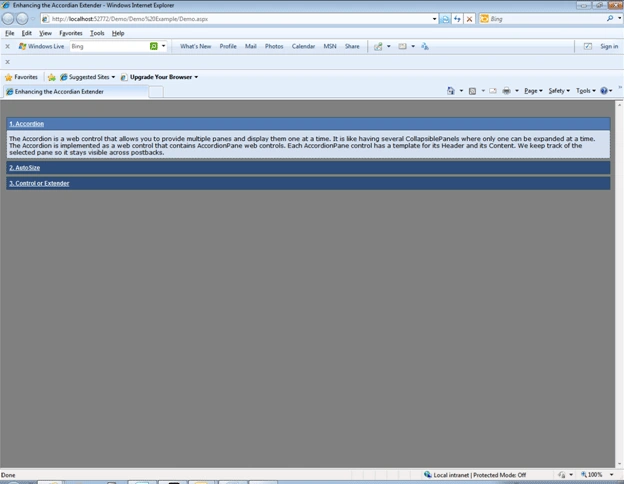
As you can see, the first pane is expanded.if you try to expand the second pane by clicking the link 'Autosize' , the first pane will be collapsed automatically. This is the default behavior. If you want to change this behavior to keep the first pane open after expanding the second pane. We can use the following script.
function ToggleAccordionPane(paneno) {
$find('MyAccordion_AccordionExtender')._changeSelectedIndex(-1);
if( $find('MyAccordion_AccordionExtender').get_Pane(paneno).content.style.display == "block") {
$find('MyAccordion_AccordionExtender').get_Pane(paneno).content.style.display = "none";
$find('MyAccordion_AccordionExtender')._changeSelectedIndex(paneno);
}
else {
$find('MyAccordion_AccordionExtender').get_Pane(paneno).content.style.display = "block";
}
return false;
}
Modify the 'header' tag of first pane of accordion as shown below.
<Header><a href="" class="accordionLink" onclick="ToggleAccordionPane(0);">1. Accordion</a></Header>
Similarly, modify second and third panes.
<Header><a href="" class="accordionLink" onclick="ToggleAccordionPane(1);">2. AutoSize</a></Header>
<Header><a href="" class="accordionLink" onclick="ToggleAccordionPane(2);" >3. Control or Extender</a></Header>
Now if you run the application, you can have multiple panes open as shown below.
Disclaimer:
This article is a result of notes made by my understanding on this subject and is meant purely for educational purposes. Any resemblance to other material is un-intentional.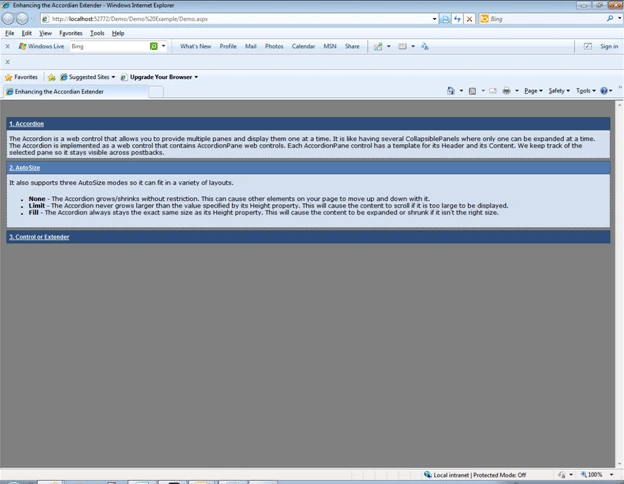
Conclusion:
By allowing all panes to be open at the time , the Accordion control can be used in multiple scenarios where one would want to get a complete snapshot of the data, with the flexibility to expand /collapse each pane.
References:
http://www.asp.net/ajaxLibrary/AjaxControlToolkitSampleSite/Accordion/Accordion.aspx
Mukesh KumarPosted Oct 19, 2015, 1:05 AM
Good One.. thanks for sharing
Sunil DasPosted Apr 23, 2014, 4:10 AM
Unable to get property '_changeSelectedIndex' of undefined or null reference $find('MyAccordion_AccordionExtender')._changeSelectedIndex(-1); with master page showing this error
Sunil DasPosted Apr 23, 2014, 4:10 AM
Unable to get property '_changeSelectedIndex' of undefined or null reference $find('MyAccordion_AccordionExtender')._changeSelectedIndex(-1);
halifaxdalPosted Jul 5, 2013, 3:23 PM
I am on VS 2008 and ASP.NET 3.5, so when I open the project, it asked me for conversion and I did. Then the Demo.aspx has an error saying unknown server tag ajaxToolkit:AccordionPane, the control can't be created, how do I fix it? Thanks
Dinesh BeniwalPosted Sep 29, 2011, 12:01 AM
Welcome to the Mindcracker Community.