

Here is a quick example of how to use an AutoComplete ComboBox in DataGridView in a Windows Application.
- Create one Windows Application and add DataGridView from toolbox to design.
- Now create two DataGridViewComboBoxColumns and add them to the DataGridView:
public void ComboList1() { DataGridViewComboBoxColumn combo1 = new DataGridViewComboBoxColumn(); combo1.HeaderText = "Country"; combo1.Items.Add("Antarctica"); combo1.Items.Add("Belgium"); combo1.Items.Add("Canada"); combo1.Items.Add("Finland"); combo1.Items.Add("Albania"); combo1.Items.Add("India"); combo1.Items.Add("Barbados"); dataGridView1.Columns.Add(combo1); } public void ComboList2() { DataGridViewComboBoxColumn combo2 = new DataGridViewComboBoxColumn(); combo2.HeaderText = "Types of Jobs"; combo2.Items.Add("Accounting"); combo2.Items.Add("HR"); combo2.Items.Add("Finance"); combo2.Items.Add("Transportation"); combo2.Items.Add("Testing"); dataGridView1.Columns.Add(combo2); } - Call both these methods from the Form Constructor.
- Now Click on DataGridView and generate EditingControlShowing event and write the folllowing code in it:
This will work for all comboBoxes which are present in the DataGridView.if (e.Control is DataGridViewComboBoxEditingControl) { ((ComboBox)e.Control).DropDownStyle = ComboBoxStyle.DropDown; ((ComboBox)e.Control).AutoCompleteSource = AutoCompleteSource.ListItems; ((ComboBox)e.Control).AutoCompleteMode = System.Windows.Forms.AutoCompleteMode.Suggest; }
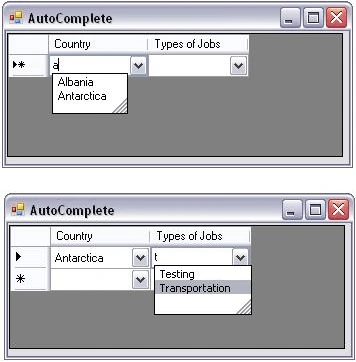
The AutoCompleteMode and AutoCompleteSource properties create a ComboBox that automatically completes input strings by comparing the prefix being entered to the prefixes of all strings in a maintained source. This is useful for ComboBox controls in which URLs, addresses, file names, or commands will be frequently entered. If there are duplicate entries in the maintained source, automatic completion behaves unpredictably.
KaungHtet SanPosted Jun 20, 2022, 4:09 AM
Thanks good article
Gowtham RajamanickamPosted Apr 9, 2015, 4:35 AM
useful
Gowtham RajamanickamPosted Apr 9, 2015, 4:35 AM
good
paresh bijamPosted Nov 19, 2014, 2:16 AM
nice dude
Hussain AfridiPosted Nov 11, 2014, 7:13 AM
nice 100 Stars
mazhar hayatPosted Feb 28, 2013, 3:29 AM
nice artical
Rajshri ShitolePosted Nov 20, 2012, 2:23 AM
this we can apply for normal dropdown combobox only difference is we want this from set properities windows as same above.
Rajshri ShitolePosted Nov 20, 2012, 2:20 AM
thanks good article its basic thing and this always help us.
subrahmanyam gurramPosted Jun 19, 2012, 6:33 AM
Srikanth its very nice following the article, its very help full to me. I need one more feature that How can i get the complete list of autosuggestion items in a list
jayakrishnan MorayurPosted May 2, 2012, 12:29 AM
thanks
faizan ahmadPosted Apr 16, 2012, 8:35 AM
but i wan to get value from one table and display in datagridview combobox column plz help me
Dattaram GarudPosted Jan 14, 2012, 1:31 AM
thanks boss
lakhan aanjanaeditedPosted Dec 2, 2011, 2:08 AMEdited Dec 2, 2011, 2:09 AM
actually i have datagridview which already bind data and want to combo box in particular cell as user enter on cell in (C#.net) please help me [email protected] Regards Lakhan Anjana
bhrugesh thakkarPosted Oct 11, 2011, 6:36 AM
Its really vry gud code..it saves my time also reduce my coding length its in vb If TypeOf e.Control Is DataGridViewComboBoxEditingControl Then DirectCast(e.Control, ComboBox).DropDownStyle = ComboBoxStyle.DropDown DirectCast(e.Control, ComboBox).AutoCompleteSource = AutoCompleteSource.ListItems DirectCast(e.Control, ComboBox).AutoCompleteMode = System.Windows.Forms.AutoCompleteMode.SuggestAppend End If
tara deoPosted Jun 28, 2011, 1:04 AM
Thanks Bose
surender bhyanPosted Apr 4, 2011, 4:13 PM
thanks