
Blue Theme Orange Theme Green Theme Red Theme
 
6 Months Free & No Setup Fees ASP.NET Hosting!
Home | Forums | Videos | Advertise | Certifications | Downloads | Blogs | Interviews | Jobs | Beginners | Training
 | Consulting  
Submit an Article Submit a Blog 
 Jump to
Skip Navigation Links
TechnologyExpand Technology
WebsiteExpand Website
Nevron Chart
Search :       Advanced Search »
Home » BizTalk Server » Parsing BizTalk messages in .NET Components through Orchestration

Parsing BizTalk messages in .NET Components through Orchestration

This article discusses how to parse BizTalk messages in .NET Components through Orchestration.

Page Views : 3092
Downloads : 0
Rating :
 Rate it
Level : Beginner
   Print Read/Post comments Post a comment  Similar Articles  
   Email to a friend  Bookmark  Author's other articles  
 
Team Foundation Server Hosting
Become a Sponsor
 Tag Cloud
assemblies BizTalk BizTalk Server Calling external assemblies Calling external assemblies from maps in BizTalk external assemblies maps in BizTalk .NET CF Development biztalk Biztalk Server 2006 Installation Biztalk Server Messaging Message-Oriented Middleware (MOM) CF Development Consuming Web Services in BizTalk mapping database lookup mapping transformation messaging server microsoft biztalk business process automation orchestration enterprise application integration port messages xml workflow management interoperability Parsing BizTalk messages Parsing BizTalk messages in .NET Components Parsing BizTalk messages through Orchestration Pipeline in BizTalk Server Publish schemas as web services Sending an HTML-Formatted E-Mail Message from BizTalk Serialization/Deserialization Validating Messages using Pipelines in BizTalk Server
 Latest Jobs
More ... 
 Latest Interview Questions
More ... 


In most of our orchestrations where we need to parse a message, let's say for storing data from the message in a database to loop through the records in the message, we use XML Parsing. For this purpose, we have XpathNavigator class or we can use XMLDocument SelectNodes method, which returns an iterator and we can iterate the records in the XML. But consider a complex XML. For example, if there are many parent child nodes and we have to dig deeper into the nodes come back again to the parent and use nested while loops for parsing the whole XML.

Well for a good coder this won't be much of a problem but like a messy coder like me will run into exceptions and bugs. :)
Well how about if we take advantage of .NET Serialization/Deserialization? We pass the message as an XMLDocument object to our component method as a parameter we deserialize the xmldocument to an object. But wait which object? From where will this class come from?

We just need a proxy class of the web message type. The proxy class will contain the web message type and all of its nodes and then we can deserialize the xmldocument object containing the xml into a much managed object which we can iterate easily. You can generate the proxy class from visual studio command prompt and giving the proper switches will create the proxy class.
You can see the MSDN help for more switches of wsdl.
 wsdl /out:[dir]proxy.cs http://localhost/[webservice URI].asmx?wsdl
If you notice the webservice URI is missing from the command and we need a wsdl of the web service.

A simple workaround for this is in our BizTalk Schema project, which contains the type of message (schema) is built and then a web message should be published from the BizTalk Web Services Publishing Wizard. Just build your project and run the wizard. In the first step select the "Publish schemas as web services" option.

You will get a tree in the next step and yes the web service requires at least a request and response schemas.
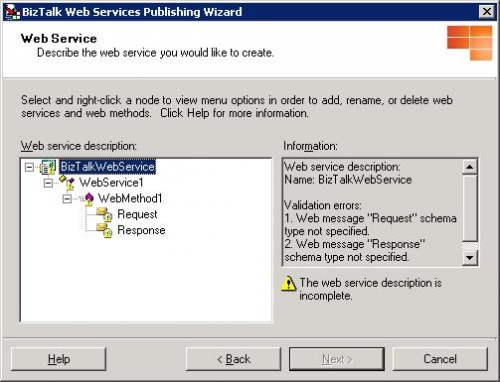
 web_pub_1
 Right click the request schema and select the assembly (This assembly should be your BizTalk schemas project).
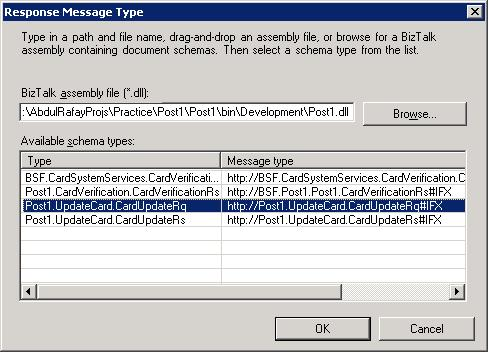
 choose_schema
  Select the root node of your schema, in the same way configure the response message as well (of your own choice) and you are done.
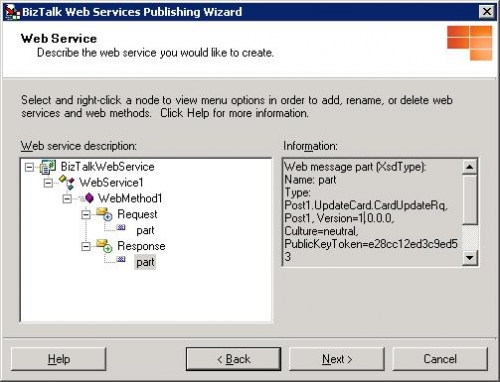
 web_pub
 In the next step give the URI of the web service and then the hierarchy in your IIS.
By running the command given above you will get the proxy class. Include this class in your component project (which will be most likely a .NET library project). (Note: If you don't see your schema type class in the intellisense, do check the proxy class and your component project namespaces). In your components method which will be parsing your message deserialize your xmldocument object to the object type of the proxy class. This will be the Root node (If you have one) name of your schema. In my case I used the code below. Xdoc is the object variable name of the type XMLDocument which will contain my xml data. And one more thing which I am sure most of the BizTalk guys will know you can assign your message freely to the XMLDocument type variable in your orchestration.
IFX response = new IFX();
XmlSerializer xs = new XmlSerializer(response.GetType());
XmlNodeReader reader = new XmlNodeReader(xdoc.DocumentElement,"Namespace");
response = (IFX)xs.Deserialize(reader);
In the above code, I was receiving a response and wanted to insert the records from the response into my table. This made me comfortably access the inner child records and arrays of the XML. May be you would get xml document runtime errors. Do check your XML that if it contains namespaces then deserialization will give exceptions. For this supply the Namespace of the root node in the XmlNodeReader constructor.

Comment Request!
Thank you for reading this post. Please post your feedback, question, or comments about this post Here.
Login to add your contents and source code to this article
 [Top] Rate this article
 
 About the author
 
Abdul Rafay
Looking for C# Consulting?
C# Consulting is founded in 2002 by the founders of C# Corner. Unlike a traditional consulting company, our consultants are well-known experts in .NET and many of them are MVPs, authors, and trainers. We specialize in Microsoft .NET development and utilize Agile Development and Extreme Programming practices to provide fast pace quick turnaround results. Our software development model is a mix of Agile Development, traditional SDLC, and Waterfall models.
Click here to learn more about C# Consulting.
 
Introducing MaxV - one click. infinite control. Hyper-V Hosting from MaximumASP.
Finally – a virtual platform that delivers next-generation Windows Server 2008 Hyper-V virtualization technology from a managed hosting partner you can truly depend on. Visit www.maximumasp.com/max for a FREE 30 day trial. Hurry offer ends soon. Climb aboard the MaxV platform and take advantage of High Availability, Intelligent Monitoring, Recurrent Backups, and Scalability – with no hassle or hidden fees. As a managed hosting partner focused solely on Microsoft technologies since 2000, MaximumASP is uniquely qualified to provide the superior support that our business is built on. Unparalleled expertise with Microsoft technologies lead to working directly with Microsoft as first to offer IIS 7 and SQL 2008 betas in a hosted environment; partnering in the Go Live Program for Hyper-V; and product co-launches built on WS 2008 with Hyper-V technology.
Dynamic PDF
ceTE software specializes in components for dynamic PDF generation and manipulation. The DynamicPDF™ product line allows you to dynamically generate PDF documents, merge PDF documents and new content to existing PDF documents from within your applications.
Discover the Top 5 .NET Memory Management Fundamentals
To write the best .NET code, you need to know exactly how the .NET framework really manages memory. Ricky Leeks presents the Top 5 fundamental facts of .NET memory management. Learn more.
Nevron Chart for .NET 2010.1 Now Available
The leading .NET charting control now features PDF, Flash and Silverlight export, visualization of large datasets and more. Deliver true charting functionality to your BI, Scorecard, Presentation or Scientific apps. Download evaluation now.
ASP.NET 4 Hosting
Get 2 Months Free of ASP.NET Hosting for Only $4.95/month! Receive FREE MS SQL and MySQL Databases Including ASP.NET 4/3.5, MVC 3.0, Silverlight 4, Windows 2008/IIS 7.0 Plus FREE IIS 7 Modules. Host UNLIMITED ASP.NET Web Sites – Click Here!
 
 Post a Feedback, Comment, or Question about this article
Subject:
Comment:
6 Months Free & No Setup Fees ASP.NET Hosting!
Become a Sponsor
 Comments
Missing images by Mahesh On May 10, 2009
Abdul,
Can you edit this article and fix the images?

Thanks,
Mahesh
Reply | Email | Modify 
You can comment on this article and give a feedback by Abdul On May 18, 2009
You can comment on this article and give a feedback. You can read the original article on my blog http://abdulrafaysbiztalk.wordpress.com/2008/10/15/63/ and you can visit my blog at http://abdulrafaysbiztalk.wordpress.com/
Reply | Email | Modify 
sss by Suvasish On September 23, 2009
xxx
Reply | Email | Modify 

 © 2012  contents copyright of their authors. Rest everything copyright Mindcracker. All rights reserved.