SIGN UP MEMBER LOGIN:    
ARTICLE

LinearGradientBrush in XAML Silverlight

Posted by Abhimanyu Kumar Vatsa Articles | Silverlight with C# April 19, 2011
In this article you will learn about LinearGradientBrush in XAML Silverlight.
Reader Level:

Introduction


In Silverlight, LinearGradientBrush paints an area with a gradient. A linear gradient defines a gradient along a line. The line's end point is defined by the Start and End points properties of the linear gradient. LinearGradientBrush paints these stops along this line.


image002.jpg


Using LinearGradientBrush by hand is a very tedious job especially when we have many colors. Here the color picker will be very useful. Let's talk about how to work with this.


To work with the color picker, select the third tab which allows visual editing of gradient brushes. The gradient brush editor is fully based on the GradientStop slider. Look at below:


image004.jpg


In the above image, we have used 5 stoppers and each has a different color gradient. A stopper location is known as an Offset point. An Offset value always varies between 0 to 1. Each stopper has an offset value which locates the position on the slider.
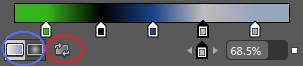

image006.jpg


By using the point marked with a red circle we can reverse the gradient stopper. By using the point marked with a blue circle we can convert the brush in a radial or linear form. If you wish to change the gradient color of any point (stopper) then select the stopper first and then pick the color.


We can inset the new stopper in slider by just clicking on slider and we can even delete the stopper by dragging the stopper icon.


If we unhide the advanced properties of brushes then we will find some more stuff. Look at the image below:
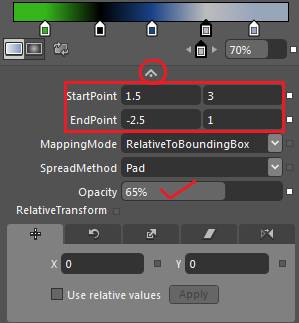

image008.jpg


In above image,


StartPoint


This gets or sets the two dimensional coordinates for the start point of the linear gradient.


EndPoint


This gets or sets the two dimensional coordinates for the end point of the linear gradient.


MappingMode


This gets or sets the value that specifies whether the gradient brush positioning coordinates are absolute or relative to the output area.


SpreadMethod


This gets or sets the type of spread method that specifies how to drag a gradient that starts or ends inside the bounds of the object to be painted.


Opacity


This is a very useful option by which we can get or set the opacity of the brush.
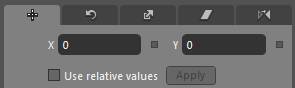

image010.jpg


The above icons are very useful, by which we can make transformation in a brush. This will create an interesting color output in our art.


Be tuned for the next article.


HAVE A HAPPY CODING!!


Login to add your contents and source code to this article
share this article :
post comment
 
6 Months Free & No Setup Fees ASP.NET Hosting!
Become a Sponsor
PREMIUM SPONSORS
  • Finally – a virtual platform that delivers next-generation Windows Server 2008 Hyper-V virtualization technology from a managed hosting partner you can truly depend on. Visit www.maximumasp.com/max for a FREE 30 day trial. Hurry offer ends soon. Climb aboard the MaxV platform and take advantage of High Availability, Intelligent Monitoring, Recurrent Backups, and Scalability – with no hassle or hidden fees. As a managed hosting partner focused solely on Microsoft technologies since 2000, MaximumASP is uniquely qualified to provide the superior support that our business is built on. Unparalleled expertise with Microsoft technologies lead to working directly with Microsoft as first to offer IIS 7 and SQL 2008 betas in a hosted environment; partnering in the Go Live Program for Hyper-V; and product co-launches built on WS 2008 with Hyper-V technology.
    Finally – a virtual platform that delivers next-generation Windows Server 2008 Hyper-V virtualization technology from a managed hosting partner you can truly depend on. Visit www.maximumasp.com/max for a FREE 30 day trial. Hurry offer ends soon. Climb aboard the MaxV platform and take advantage of High Availability, Intelligent Monitoring, Recurrent Backups, and Scalability – with no hassle or hidden fees. As a managed hosting partner focused solely on Microsoft technologies since 2000, MaximumASP is uniquely qualified to provide the superior support that our business is built on. Unparalleled expertise with Microsoft technologies lead to working directly with Microsoft as first to offer IIS 7 and SQL 2008 betas in a hosted environment; partnering in the Go Live Program for Hyper-V; and product co-launches built on WS 2008 with Hyper-V technology.
Become a Sponsor