

Introduction
In this
post we are going to cover following points:
- Binding
tabular data to a GridView control using the SqlDataSource control
- Filtering the data using quick method
- Focus
on imperative code rather than declarative code
I am going
to explain it using step by step method so that you can follow it and create
the sample application. Follow the steps:
Step 1:
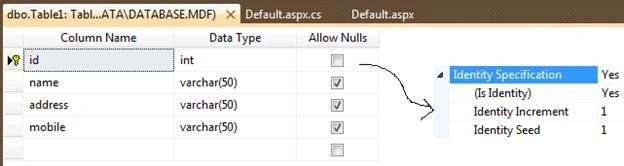
Create the
database as its structure given below in screenshot.
Step 2:
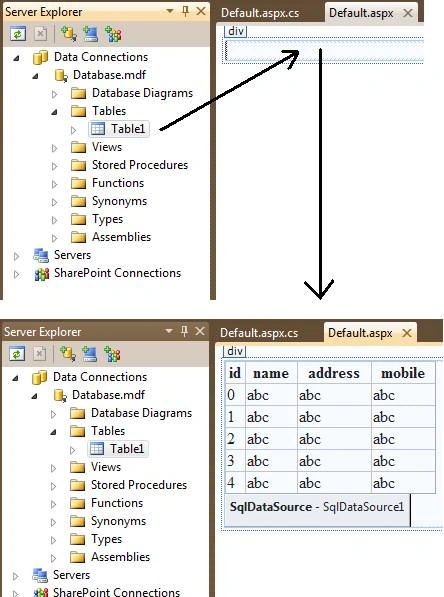
Now drag
the database table from Server Explorer to form (which should be in design
mode), find the screenshot given below.
Step 3:
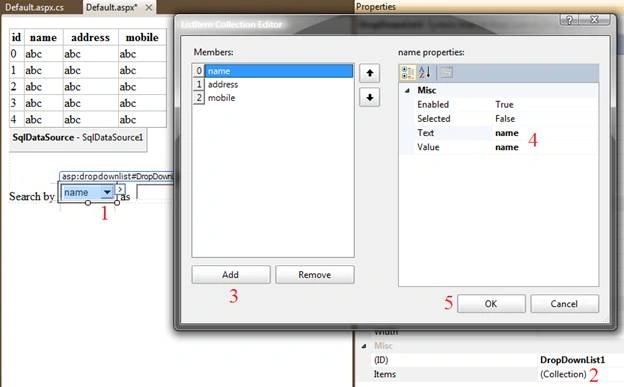
Now add a DropDownList
box and list some item in this. For this you need to create a DropDownList on
form in design mode and then select its Items properties this will pop a window
which will allow you to add the items for this. You can simply add the items
using code as given below.
<asp:DropDownList ID="DropDownList1" runat="server">
<asp:ListItem>name</asp:ListItem>
<asp:ListItem>address</asp:ListItem>
<asp:ListItem>mobile</asp:ListItem>
</asp:DropDownList>
Step 4
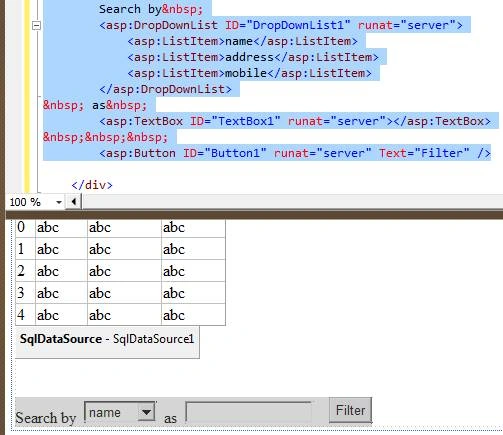
When you
done with DropDownList, you need to add a TextBox that will accept the textual
data to filter records and also you need to add a Button to perform filter task
by its click event.
Step 5
Now our
design work is over, let's place some code in button click event to filter
records. Remember I already have place some records in my database table. Here
is the code.
protected void Button1_Click(object
sender, EventArgs e)
{
string
FilterExpression = string.Concat(DropDownList1.SelectedValue,
" LIKE '%{0}%'");
SqlDataSource1.FilterParameters.Clear();
SqlDataSource1.FilterParameters.Add(new ControlParameter(DropDownList1.SelectedValue,
"TextBox1", "Text"));
SqlDataSource1.FilterExpression = FilterExpression;
}
When I run
the application, I have following records.
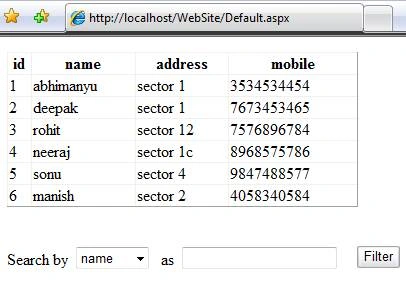
Let's
filter it by name or address or mobile, I am trying filter records by name by
typing just 'o' in text box. It will filter all names contain character 'o'.
Here is my output.
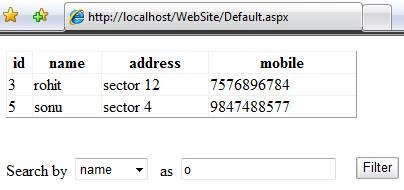
In the same
way, you can try by address or mobile as well.
I hope you like it. Comments Please.
mz dashtiPosted Jul 7, 2014, 9:47 AM
hi, how do can search data type integer in gridview?
JudyPosted May 23, 2013, 2:20 PM
LOVED IT!! This was what I wanted to add to my form. Your directions were very clear and it worked perfect! Not too complicated for a newbie like me. Thanks!
sarvenaz HoodehshenasPosted Jul 24, 2012, 5:19 AM
Hi ,I used your code and it was very helpful,but when I type a name in text box for example "Anna" I encounter the error missing the the operand after 'Anna' . What can I do to fix the problem?
sarvenaz HoodehshenasPosted Jul 24, 2012, 5:16 AM
Hi ,I used your code and it was very helpful,but when I type a name in text box for example "Anna" I encounter the error missing the the operand after 'Anna' . What can I do to fix the problem?
abdul muqeetPosted May 23, 2012, 2:29 AM
i am waiting bro just tell me , i am stuck
abdul muqeetPosted May 23, 2012, 2:27 AM
bro just tell what should i do for Int , i will do it , just give me the ides
abdul muqeetPosted May 22, 2012, 5:39 AM
bro can you please show me how to do it for Int.
abdul muqeetPosted May 22, 2012, 4:58 AM
please give me solution , i would be very help full for me , i am new i serching every thing on net i have to get experience ,,.. and also if my grid view is connected in inner join will it work same as its working with one table??? can you please show me how can i filter Int or numeric in my grid view...
Abhimanyu K VatsaPosted May 22, 2012, 4:49 AM
@abdul: in this example i've all fiend in varchar type. you need to go for some workaround.
abdul muqeetPosted May 22, 2012, 4:42 AM
I have used your code it is awesome but its showing some problem for filtering numeric , when i filter the data its showing certain error , -->>Exception Details: System.Data.EvaluateException: Cannot perform 'Like' operation on System.Int32 and System.String. Source Error: An unhandled exception was generated during the execution of the current web request. Information regarding the origin and location of the exception can be identified using the exception stack trace below. can you please show me the solution .. please
Pradip PandeyPosted Oct 12, 2011, 4:56 AM
Good for filtering data in GridView.
Ervin RamosPosted Oct 10, 2011, 2:41 PM
Hi!! Abhimanyu great work !!!!
Michell JohnsonPosted Oct 10, 2011, 2:41 PM
Hi, abhimanyu have a great article really , I also trying to do this with XML database