

Introduction
In Silverlight, we create animations to compete "adobe flash" but untill now we have not created a project that assumes something like this; we just saw how to transform an element by using static compositions. As we saw multiple types of transformations, we'll see multiple types of animations too in my coming articles. Here you will see "DoubleAnimation"; also we have "DoubleAnimationUsingKeyFrames" (discussed it later). The following only uses "DoubleAnimation":
XAML Code
<UserContro xmlns="http://schemas.microsoft.com/winfx/2006/xaml/presentation" <TextBlock Text="Abhimanyu Kumar Vatsa" FontSize="32" Foreground="Red" </Grid>
xmlns:x="http://schemas.microsoft.com/winfx/2006/xaml"
x:Class="SilverlightApplication1.MainPage"
Width="400" Height="400" Background="SkyBlue">
<Grid RenderTransformOrigin="0.5,0.5">
<Grid.RenderTransform>
<TransformGroup>
<RotateTransform x:Name="Welcome" Angle="0"/>
</TransformGroup>
</Grid.RenderTransform>
<Grid.Triggers>
<EventTrigger RoutedEvent="Grid.Loaded">
<BeginStoryboard>
<Storyboard RepeatBehavior="Forever" AutoReverse="True">
<DoubleAnimation Storyboard.TargetName="Welcome"
Storyboard.TargetProperty="Angle"
From="0" To="360" Duration="0:0:5"/>
</Storyboard>
</BeginStoryboard>
</EventTrigger>
</Grid.Triggers>
HorizontalAlignment="Center" VerticalAlignment="Center"/>
Use the above code and test your animation; you will get a 360 degree moving animation. Let's look at the screenshot:
Explanation of above code Find each and every attribute's details below: <!--[if !supportLists]-->(i) <!--[endif]--><Grid.RenderTransform> This attribute is used here to apply the render transform to Grid element. For more details about this please read my post "Basics of Transformation in XAML Silverlight". <!--[if !supportLists]-->(ii) <!--[endif]--><TransformGroup> This attribute is used to combine every type of transformations at one place. For more details about this please read my post "TransformGroup in XAML Silverlight". <!--[if !supportLists]-->(iii) <!--[endif]--><RotateTransform……> This attribute is used to rotate element by using angle value. For more details about this please read my post "RotateTransform in XAML Silverlight". <!--[if !supportLists]-->(iv) <!--[endif]--><Grid.Triggers> This attribute defines the way the system reacts to certain events. <!--[if !supportLists]-->(v) <!--[endif]--><EventTrigger RoutedEvent="Grid.Loaded"> This attribute set to "Grid.Loaded" means when grid is fully loaded then corresponding event fires. <!--[if !supportLists]-->(vi) <!--[endif]--><BeginStoryboard> When the "Grid.Loaded" event fires, the Storyboard will begin; that means that the "BeginStoryboard" event is in progress. <!--[if !supportLists]-->(vii) <!--[endif]--><Storyboard RepeatBehavior="Forever" AutoReverse="True"> This attribute is used to setup the repeat behavior of the storyboard and auto reverse of storyboard. Instead of 'RepeatBehaviour's value to "Forever" we may use 1x, 2x, 3x and so on means repeat once, twice, thrice and so on. "AutoReverse" means scene will go back to its beginning state. If we set this to false, animation does not reverse. Try it yourself by changing "RepeatBehaviour" and "AutoReverse" values. <!--[if !supportLists]-->(viii) <!--[endif]--><DoubleAnimation Storyboard.TargetName……> This attribute is used to target the element by name. This is an attached property to element. "TargetProperty" specifies which property will be animated and here the Angle property of target element will animate. "From" and "To" attributes defined the angle to start and cycle to the "To" value. "From" is not compulsory like "To". We can replace "From" and "To" with "By" attribute. The "By" attributes means, how many units the scene will be modified. So, From="0" and To="360" can replaced by the By="360". Try this yourself. Duration specifies the time (DD.HH:MM:SS), DD-Date, HH-Hour, MM-Minutes and SS-Seconds, that is required for the animation to run. If we set "AutoReverse" to "true" animation takes double way (one way and move back to beginning and repeats it). Be tuned for next article. HAVE A HAPPY CODING!!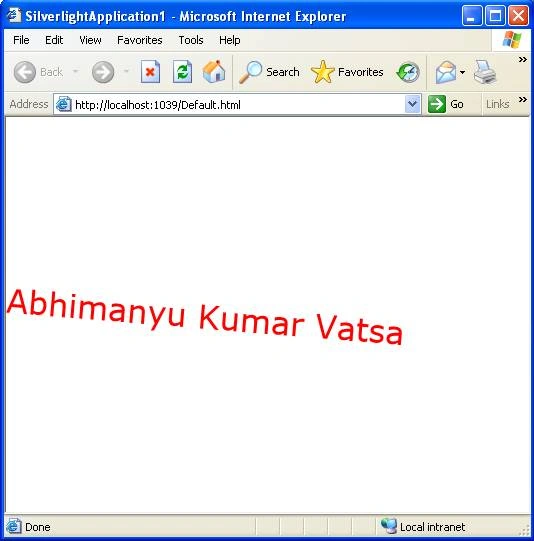
yuvaraj rPosted Dec 24, 2013, 3:39 AM
nice
Karthikeyan AnbarasanPosted Apr 18, 2011, 3:26 AM
Nice article...