
Blue Theme Orange Theme Green Theme Red Theme
 
Discover the top 5 tips for understanding .NET Interop
Home | Forums | Videos | Advertise | Certifications | Downloads | Blogs | Interviews | Jobs | Beginners | Training
 | Consulting  
Submit an Article Submit a Blog 
 Jump to
Skip Navigation Links
TechnologyExpand Technology
WebsiteExpand Website
Discover the top 5 tips for understanding .NET Interop
Search :       Advanced Search »
Home » Office Development » Interoperation & Processing EXCEL Sheet Data

Interoperation & Processing EXCEL Sheet Data

Here we are discussing INTEROPERATION with example of Excel Sheet processin

Page Views : 6683
Downloads : 0
Rating :
 Rate it
Level : Intermediate
   Print Read/Post comments Post a comment  Similar Articles  
   Email to a friend  Bookmark  Author's other articles  
 
6 Months Free & No Setup Fees ASP.NET Hosting!
Become a Sponsor
 Tag Cloud
 Latest Jobs
More ... 
 Latest Interview Questions
More ... 


The process of interaction b/t managed code & unmanaged code is called Interoperation.

Here we are discussing INTEROPERATION with example of Excel Sheet processing.

Now the question here arises why we need interoperation, the 2 major reasons we have:-

  1. There are many development technologies available & lot of codes has been written. Now to rewrite them again in .NET will be prove very expensive.
  2. There are many Windows APIs those not wrapped in .NET Framework.

COM Component

COM Framework provides components to developers to interact with Windows OS. .NET Framework supports to import COM Component. By importing COM Components in .net application we are able to work with Windows components like MS Office components.

Mechanism used by .NET Runtime to communicate with COM Components is called RUNTIME CALLABLE WRAPPER [RCW].

RCF handles all works like marshalling data type, handling events b/t .NET & COM.

Here we are taking example of Excel sheet processing in .NET Win Forms Application. Here we are importing data from excel sheet to database.
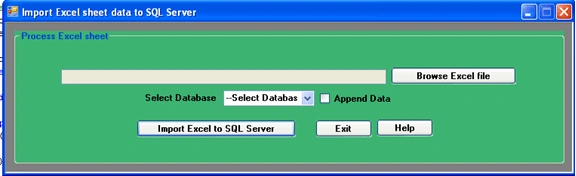
ExcelSheet1.gif

How to use it & what is the purpose of this utility also provided on HELP button
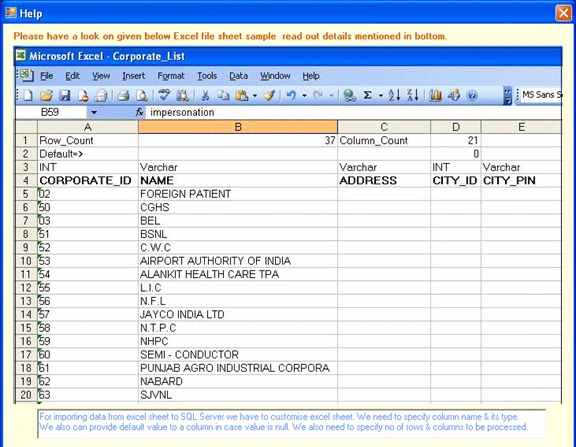
ExcelSheet2.gif

Excel sheet data format has been shown below.
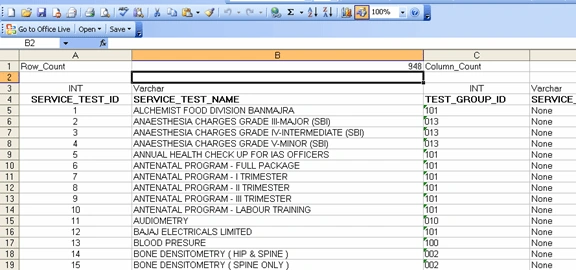
ExcelSheet3.gif

Data type column name, & no of rows/column specified in above figure will be used in program to fetch value in each cell & push in database corresponding to their column name.

Import COM Component
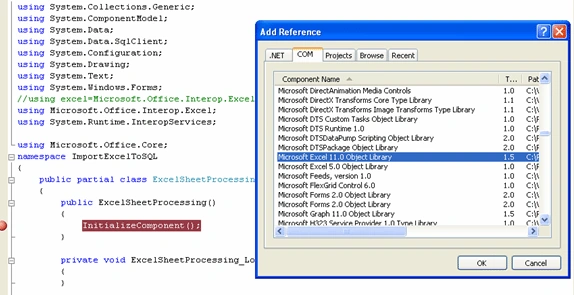
ExcelSheet4.gif

Using COM Object

using Microsoft.Office.Interop.Excel;
using System.Runtime.InteropServices;

        private void btnImport_Click(object sender, EventArgs e)
        {
            if (txtFilePath.Text.Trim() != "")
            {
                if(cmbDatabaseList.SelectedItem.ToString()!= "--Select Database--")
                {
                ImportExcelToSQLServer();
                }
                else
                {
                    MessageBox.Show("Please select Database!!");
                }
            }
            else
            {
                MessageBox.Show("Please enter Excel file path!!");
            }
        }

//HERE IN THIS METHOD, WE PROCESS EXCEL SHEET FOR EACH CELL AND //CHECKING ITS DATATYPE SO ACCORDINGLY CREATED A TABLE HAVING THOSE //DATATYPE FIELDS. THEN DATA ENTERED IN THE TABLE FROM EXCEL SHEET.

//FINALLY IT IS MOVED TO SQL DATABASE.

public void ImportExcelToSQLServer()
        {
            Microsoft.Office.Interop.Excel.Application excel = null;
            Microsoft.Office.Interop.Excel.Workbook wb = null;
            object missing = Type.Missing;
            try
            {
                btnImport.Text = "Data importing in Process";
                btnImport.Enabled = false;
                excel = new Microsoft.Office.Interop.Excel.Application();
                string ExcelFile = txtFilePath.Text.Trim();
                wb = excel.Workbooks.Open(ExcelFile, missing, missing, missing, missing, missing, missing, missing, missing, missing, missing, missing, missing, missing, missing);
                foreach (Microsoft.Office.Interop.Excel.Worksheet x in wb.Worksheets)
                {
                    object rowIndex = 1;
                    object colIndex1 = 2;
                    //Getting total no of rows available in Excel sheet.
                    int rowCount = Convert.ToInt32(((Microsoft.Office.Interop.Excel.Range)x.Cells[rowIndex, colIndex1]).Text.ToString());
                    rowIndex = 1;
                    colIndex1 = 4;
                    //Getting total no of columns available in Excel sheet.
                    int columnCount = Convert.ToInt32(((Microsoft.Office.Interop.Excel.Range)x.Cells[rowIndex, colIndex1]).Text.ToString());
                    string tblName = x.Name;
                    System.Data.DataTable dtnew = new System.Data.DataTable(tblName);
                    for (int i = 4; i <= rowCount; i++)
                    {
                        DataRow drn = dtnew.NewRow();
                        for (int j = 1; j <= columnCount; j++)
                        {
                            //Creating Table structure with assigning Column name & types
                            if (i == 4)
                            {
                                rowIndex = i - 1;
                                colIndex1 = j;
                                string columnType = ((Microsoft.Office.Interop.Excel.Range)x.Cells[rowIndex, colIndex1]).Text.ToString().Trim();
                                rowIndex = i;
                                colIndex1 = j;
                                string columnName = ((Microsoft.Office.Interop.Excel.Range)x.Cells[rowIndex, colIndex1]).Text.ToString().Trim();
                                string columnTypeValue = "";
                                switch (columnType)
                                {
                                    case "INT":
                                        columnTypeValue = "System.Int32";
                                        break;
                                    case "Varchar":
                                        columnTypeValue = "System.String";
                                        break;
                                    case "Bool":
                                        columnTypeValue = "System.Boolean";
                                        break;
                                    case "Date-Time":
                                        columnTypeValue = "System.DateTime";
                                        break;
                                    case "Bit":
                                        columnTypeValue = "System.Int32";
                                        break;
                                    case "Decimal":
                                        columnTypeValue = "System.Decimal";
                                        break;
                                    default:
                                        columnTypeValue = "System.String";
                                        break;
                                }
                                dtnew.Columns.Add(columnName, Type.GetType(columnTypeValue));
                            }
                            else
                            {
                                //Pushing data from each column to DataTable. Note: Here 4 as hardcoded appearing used as upto 4 rows sheet description given.
                                if (i > 4)
                                {
                                    rowIndex = i;
                                    colIndex1 = j;
                                    string columnValue = ((Microsoft.Office.Interop.Excel.Range)x.Cells[rowIndex, colIndex1]).Text.ToString().Trim();
                                    //Setting default value in case of column having null value.
                                    if (columnValue == "")
                                    {
                                        rowIndex = 2;
                                        columnValue = ((Microsoft.Office.Interop.Excel.Range)x.Cells[rowIndex, colIndex1]).Text.ToString().Trim();
                                    }
                                    if (columnValue == "")
                                    {
                                    }
                                    drn[j - 1] = columnValue;
                                }
 
                            }
                        }
                        if (i != 4)
                        {
                            dtnew.Rows.Add(drn);
                        }
                    }
                    //
                    if (dtnew.Rows.Count > 0)
                    {
                        // SQL Server Connection String
                        string dataBaseName = cmbDatabaseList.SelectedItem.ToString();
                        string sqlConnectionString = "";
                        //Getting connection value on behalf of selected database.
                        switch (dataBaseName)
                        {
                            case "A":
                                sqlConnectionString = ConfigurationSettings.AppSettings["A_Database"].ToString();
                                break;
                            case "B":
                                sqlConnectionString = ConfigurationSettings.AppSettings["B"].ToString();
                                break;
                            case "C":
                                sqlConnectionString = ConfigurationSettings.AppSettings["C"].ToString();
                                break;
                            case "D":
                                sqlConnectionString = ConfigurationSettings.AppSettings["D"].ToString();
                                break;
                            case "E":
                                sqlConnectionString = ConfigurationSettings.AppSettings["E"].ToString();
                                break;
                            default:
                                sqlConnectionString = "Not available";
                                break;
                        }
                        if (sqlConnectionString == "Not available")
                        {
                            MessageBox.Show("Proper database connection not available!!\n Please check it.");
                            return;
                        }
                        using (SqlBulkCopy bulkCopy = new SqlBulkCopy((sqlConnectionString), SqlBulkCopyOptions.KeepIdentity))
                        {
                            //Truncating the table before entring data from Excel sheets.
                            if (chkbxAppendData.Checked == false)
                            {
                                SqlConnection con = new SqlConnection(sqlConnectionString);
                                SqlCommand CMD = new SqlCommand("truncate table " + dtnew.TableName, con);
                                if (con.State == ConnectionState.Closed)
                                    con.Open();
                                CMD.ExecuteNonQuery();
                                con.Close();
                            }
                            //Inserting data in bulk in SQL Table from excel sheet.
                            bulkCopy.DestinationTableName = dtnew.TableName;
                            bulkCopy.BatchSize = 1000;
                            bulkCopy.WriteToServer(dtnew);
                            MessageBox.Show(dtnew.TableName + " Table" + " successfuly imported from Excel sheet to SQL Server.");
                            if(chkbxAppendData.Checked == true)
                              chkbxAppendData.Checked = false;
                        }
                    }

                }
                txtFilePath.Text = "";
            }
            catch (COMException ex)
            {
                MessageBox.Show("Error accessing Excel: " + ex.ToString());
            }
            catch (Exception ex)
            {
                MessageBox.Show("Error: " + ex.ToString());
            }
            finally
            {
                btnImport.Enabled = true;
                btnImport.Text = "Import Excel to SQL Server";
            }

        }


I hope this will help developers looking to process excel sheet data and want to use in .NET Application.

Comment Request!
Thank you for reading this post. Please post your feedback, question, or comments about this post Here.
Login to add your contents and source code to this article
 Article Extensions
Contents added by nguyen chien on May 03, 2010
Download File: Department Management System.zip
thank
Contents added by nguyen chien on May 03, 2010
thank you,
 [Top] Rate this article
 
 About the author
 
Amit Dhania

Amit Dhania is a Microsoft Certified Professional in developing web,desktop applications in C#. He has spent near four years developing Microsoft technologies, including building .NET applications,and has a background in Health domain.He currently works for NVISH Solutions Pvt. Ltd., IT Park Chandigarh[India].

Looking for C# Consulting?
C# Consulting is founded in 2002 by the founders of C# Corner. Unlike a traditional consulting company, our consultants are well-known experts in .NET and many of them are MVPs, authors, and trainers. We specialize in Microsoft .NET development and utilize Agile Development and Extreme Programming practices to provide fast pace quick turnaround results. Our software development model is a mix of Agile Development, traditional SDLC, and Waterfall models.
Click here to learn more about C# Consulting.
 
Introducing MaxV - one click. infinite control. Hyper-V Hosting from MaximumASP.
Finally – a virtual platform that delivers next-generation Windows Server 2008 Hyper-V virtualization technology from a managed hosting partner you can truly depend on. Visit www.maximumasp.com/max for a FREE 30 day trial. Hurry offer ends soon. Climb aboard the MaxV platform and take advantage of High Availability, Intelligent Monitoring, Recurrent Backups, and Scalability – with no hassle or hidden fees. As a managed hosting partner focused solely on Microsoft technologies since 2000, MaximumASP is uniquely qualified to provide the superior support that our business is built on. Unparalleled expertise with Microsoft technologies lead to working directly with Microsoft as first to offer IIS 7 and SQL 2008 betas in a hosted environment; partnering in the Go Live Program for Hyper-V; and product co-launches built on WS 2008 with Hyper-V technology.
Dynamic PDF
ceTE software specializes in components for dynamic PDF generation and manipulation. The DynamicPDF™ product line allows you to dynamically generate PDF documents, merge PDF documents and new content to existing PDF documents from within your applications.
Discover the Top 5 .NET Memory Management Fundamentals
To write the best .NET code, you need to know exactly how the .NET framework really manages memory. Ricky Leeks presents the Top 5 fundamental facts of .NET memory management. Learn more.
Nevron Chart for .NET 2010.1 Now Available
The leading .NET charting control now features PDF, Flash and Silverlight export, visualization of large datasets and more. Deliver true charting functionality to your BI, Scorecard, Presentation or Scientific apps. Download evaluation now.
ASP.NET 4 Hosting
Get 2 Months Free of ASP.NET Hosting for Only $4.95/month! Receive FREE MS SQL and MySQL Databases Including ASP.NET 4/3.5, MVC 3.0, Silverlight 4, Windows 2008/IIS 7.0 Plus FREE IIS 7 Modules. Host UNLIMITED ASP.NET Web Sites – Click Here!
 
 Post a Feedback, Comment, or Question about this article
Subject:
Comment:
Discover the top 5 tips for understanding .NET Interop
Become a Sponsor
 Comments
Source Code? by Matt On May 18, 2010
Could you please post the souce code for your project?
Reply | Email | Modify 
Re: Source Code? by Amit On May 18, 2010
Whole code already available in Article. You need to create a Window application and add required DLLs for Excel Component. Prepare an Excel sheet according to format mentioned in article.
Reply | Email | Modify 
Discover the top 5 tips for understanding .NET Interop
 © 2012  contents copyright of their authors. Rest everything copyright Mindcracker. All rights reserved.