
Dataset is the most powerful and easy-to-use component of ADO.Net. In this section, you will see how to get distinct values from the Dataset.
CODE
- #region DATASET HELPER
- private bool ColumnEqual(object A, object B) {
- // Compares two values to see if they are equal. Also compares DBNULL.Value.
- if (A == DBNull.Value && B == DBNull.Value) // both are DBNull.Value
- return true;
- if (A == DBNull.Value || B == DBNull.Value) // only one is BNull.Value
- return false;
- return (A.Equals(B)); // value type standard comparison
- }
- public DataTable SelectDistinct(DataTable SourceTable, string FieldName) {
- // Create a Datatable – datatype same as FieldName
- DataTable dt = new DataTable(SourceTable.TableName);
- dt.Columns.Add(FieldName, SourceTable.Columns[FieldName].DataType);
- // Loop each row & compare each value with one another
- // Add it to datatable if the values are mismatch
- object LastValue = null;
- foreach(DataRow dr in SourceTable.Select("", FieldName)) {
- if (LastValue == null || !(ColumnEqual(LastValue, dr[FieldName]))) {
- LastValue = dr[FieldName];
- dt.Rows.Add(new object[] { LastValue });
- }
- }
- return dt;
- }
- #endregion
Example
Consider the following Dataset dsOrders,
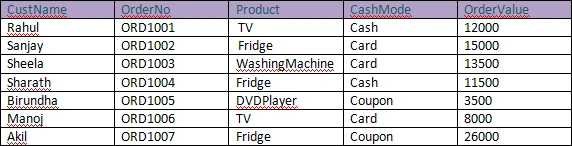
Get distinct Product from this Dataset,
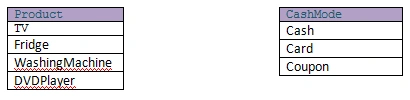
- DataTable distinctDT = SelectDistinct(dsOrders.Tables[0], "Product");
For CashMode,
- DataTable distinctDT = SelectDistinct(dsOrders.Tables[0], "CashMode");
Output
pooja shetePosted Jun 28, 2011, 6:01 AM
You can select distinct from dataset as datatable dt= dsOrders.Tables[0]..DefaultView.ToTable(True, "ColumnName")
sunil tPosted Jun 7, 2010, 3:53 AM
Goode one