

Description:
In this article we will be seeing how to check whether the SharePoint list is an
External list or not using SharePoint Object Model and Powershell.
Prerequisites:
- Microsoft SharePoint Server 2010 or Microsoft SharePoint Foundation 2010 on the server.
- Microsoft Visual Studio.
- At least one external content type registered in the BDC Metadata Store and an external list based on the external content type.
SPServiceContext Class:
SPServiceContext class is required to make a call to the Service Application.
Namespace: Microsoft.SharePoint
Assembly: Microsoft.SharePoint (in Microsoft.SharePoint.dll)
SPServiceContextScope class:
Namespace: Microsoft.SharePoint
Assembly: Microsoft.SharePoint (in Microsoft.SharePoint.dll)
Using SharePoint Object Model:
- Open Visual Studio 2010.
- Go to File => New => Project.
- Select a C# Console application project template.
- Select .NET Framework 3.5 when you create the project.
- From the View menu, click Property Pages to bring up the project properties.
- In the Build tab, for the Platform target, select Any CPU.
- Add the following references
- Microsoft.SharePoint
- System.Web
- Add the following namespaces
- using Microsoft.SharePoint;
- using System.Net;
- Replace Program.cs with the following code
using System;
using System.Collections.Generic;
using System.Linq;
using System.Text;
using Microsoft.SharePoint;
using System.Net;
namespace HTTPSTesting
{
class Program
{
static void Main(string[] args)
{
using (SPSite site = new SPSite("https://serrvername.com/r/R/"))
{
SPServiceContext context = SPServiceContext.GetContext(site);
SPServiceContextScope scope = new SPServiceContextScope(context);|
using (SPWeb web = site.RootWeb)
{
SPList list = web.Lists.TryGetList("DEV09 External List - Remote");
if (list != null)
{
if (list.HasExternalDataSource)
{
Console.WriteLine(list.Title + " is an external list");
}
else
{
Console.WriteLine(list.Title + " is not an external list");
}
}
else
{
Console.WriteLine("List does not exists");
}
Console.ReadLine();
}
}
}
}
}
- Hit F5.
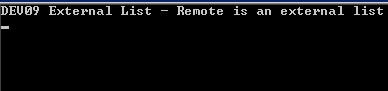
- Output:
Using Powershell:
- Go to Start => All Programs => Microsoft SharePoint 2010 products => SharePoint 2010 Management Shell.
- Run as an administrator.
- Run the following script.
$site=Get-SPSite "https://servername.com/r/R/"
$context=[Microsoft.SharePoint.SPServiceContext]::GetContext($site)
$scope=New-Object Microsoft.SharePoint.SPServiceContextScope($context)
$web=$site.RootWeb
$list=$web.Lists.TryGetList("DEV09 External List - Remote")
if ($list -ne $null)
{
if ($list.HasExternalDataSource)
{
write-host $list.Title " is an external list"
}
else
{
write-host $list.Title " is not an external list"
}
}
else
{
write-host "List does not exists"
}
Join the conversation! Your thoughts help the community grow.