
SIGN UP MEMBER LOGIN:    
ARTICLE

How to assign the Subscriptions to the Partitioned User Profile Service Application Proxy in SharePoint 2010

Posted by Vijai Anand Articles | SharePoint February 04, 2011
How to assign the subscriptions to the partitioned user profile service application proxy in SharePoint 2010.
Reader Level:


In this article we will be seeing how to assign the subscriptions to the partitioned user profile service application proxy in SharePoint 2010.

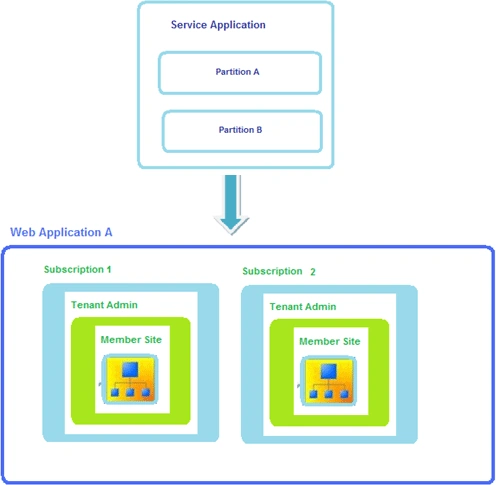
I have a partitioned User Profile service application and proxy. And I have one web application in which I have 2 subscriptions. In this I am going to assign the subscriptions to the partitioned user profile service application proxy.
share1.gif

Get the User Profile Service Application Proxy

$getUserProfileServiceApplicationProxy= Get-SPServiceApplicationProxy | ? {$_.DisplayName.Contains("Partitioned User Profile Service Application Proxy ")}

Get the SPSiteSubscription

Get-SPSiteSubscription => You will be getting all the subscriptions as shown in the following.

share2.gif

I am going to assign a single subscription to the user profile service application proxy so I am going to get that subscription id.

$subscription=Get-SPSiteSubscription -Identity "5ccd890c-6fad-411e-bbd0-e3699a612057"

To Check:

$subscription

share3.gif

Adding the subscription to the user profile service application proxy

Add-SPSiteSubscriptionProfileConfig -Identity $subscription -ProfileServiceApplicationProxy $getUserProfileServiceApplicationProxy

Same way I have added another subscription to the user profile service application proxy.

Go to Central Administration => Application Management => Manage service applications => Partitioned User Profile Service Application.

share4.gif

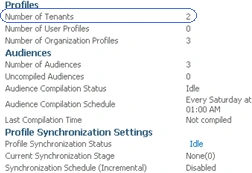
Click on the "Partitioned User Profile Service Application" to see the Manage User Profiles page, you could see Number of tenants equal to 2.
share5.gif

Login to add your contents and source code to this article
share this article :
post comment
 
Team Foundation Server Hosting
Become a Sponsor
PREMIUM SPONSORS
  • Finally – a virtual platform that delivers next-generation Windows Server 2008 Hyper-V virtualization technology from a managed hosting partner you can truly depend on. Visit www.maximumasp.com/max for a FREE 30 day trial. Hurry offer ends soon. Climb aboard the MaxV platform and take advantage of High Availability, Intelligent Monitoring, Recurrent Backups, and Scalability – with no hassle or hidden fees. As a managed hosting partner focused solely on Microsoft technologies since 2000, MaximumASP is uniquely qualified to provide the superior support that our business is built on. Unparalleled expertise with Microsoft technologies lead to working directly with Microsoft as first to offer IIS 7 and SQL 2008 betas in a hosted environment; partnering in the Go Live Program for Hyper-V; and product co-launches built on WS 2008 with Hyper-V technology.
    Get 2 Months Free of ASP.NET Hosting for Only $4.95/month! Receive FREE MS SQL and MySQL Databases Including ASP.NET 4/3.5, MVC 3.0, Silverlight 4, Windows 2008/IIS 7.0 Plus FREE IIS 7 Modules. Host UNLIMITED ASP.NET Web Sites - Click Here!
Nevron Gauge for SharePoint
Become a Sponsor