

In this article we are going to create a custom Application Page using visual studio 2010.
Steps Involved:
Creating Empty SharePoint Project:
- Open Visual Studio 2010.
- Go to File => New => Project.
- Select 2010 from the installed templates SharePoint and choose Empty SharePoint Project.
- Name it as CustomApplicationPage.
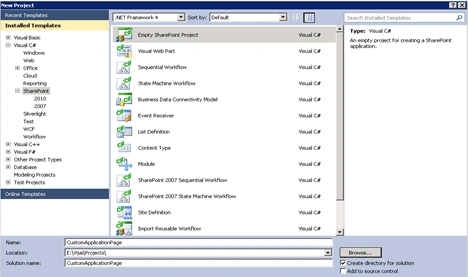
- Click Add.
- Enter the SharePoint server farm URL.
- Select 'Deploy it as a Farm Solution".
- Click Finish.
Adding Application Page:
- Right click the Solution Explorer and select Add a new item.
- Select Application Page from the installed templates SharePoint and name it as CustomApplicationPage.
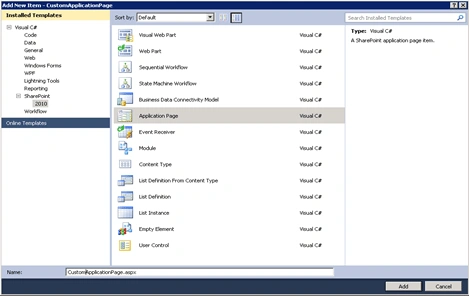
- Once you add the application page it will automatically create the Layouts Folder.
- In the solution explorer you could see Layouts -> CustomApplicationPage ->CustomApplicationPage.aspx.
- Once you deploy the solution the pages will be automatically placed in the 14 hive layouts folder.
- Open CustomApplicationPage.aspx from the solution explorer.
- In the "PlaceHolderMain" add one asp label control.
- And change the "PlaceHolderPageTitle" content to 'My Application Page" as shown in the following code.
<%@ Assembly Name="$SharePoint.Project.AssemblyFullName$" %>
<%@ Import Namespace="Microsoft.SharePoint.ApplicationPages" %>
<%@ Register Tagprefix="SharePoint" Namespace="Microsoft.SharePoint.WebControls" Assembly="Microsoft.SharePoint, Version=14.0.0.0, Culture=neutral, PublicKeyToken=71e9bce111e9429c" %>
<%@ Register Tagprefix="Utilities" Namespace="Microsoft.SharePoint.Utilities" Assembly="Microsoft.SharePoint, Version=14.0.0.0, Culture=neutral, PublicKeyToken=71e9bce111e9429c" %>
<%@ Register Tagprefix="asp" Namespace="System.Web.UI" Assembly="System.Web.Extensions, Version=3.5.0.0, Culture=neutral, PublicKeyToken=31bf3856ad364e35" %>
<%@ Import Namespace="Microsoft.SharePoint" %>
<%@ Assembly Name="Microsoft.Web.CommandUI, Version=14.0.0.0, Culture=neutral, PublicKeyToken=71e9bce111e9429c" %>
<%@ Page Language="C#" AutoEventWireup="true" CodeBehind="CustomApplicationPage.aspx.cs" Inherits="CustomApplicationPage.Layouts.CustomApplicationPage.CustomApplicationPage" DynamicMasterPageFile="~masterurl/default.master" %>
<asp:Content ID="PageHead" ContentPlaceHolderID="PlaceHolderAdditionalPageHead" runat="server">
</asp:Content>
<asp:Content ID="Main" ContentPlaceHolderID="PlaceHolderMain" runat="server">
</asp:Content>
<asp:Content ID="PageTitle" ContentPlaceHolderID="PlaceHolderPageTitle" runat="server">My Application Page
<asp:Label runat="server" Text="My Custom Page"></asp:Label>
</asp:Content>
<asp:Content ID="PageTitleInTitleArea" ContentPlaceHolderID="PlaceHolderPageTitleInTitleArea" runat="server" >
My Application Page
</asp:Content>
- Build the solution.
- Deploy the solution.
Testing:
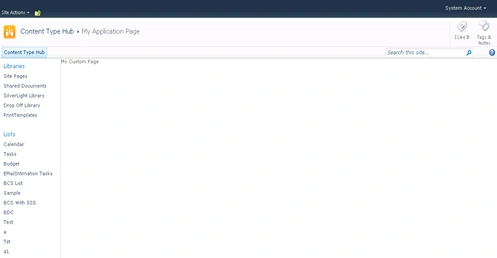
- Go to the http://servername:2010/_layouts/CustomApplicationPage/ CustomApplicationPage.aspx.
- A new custom application page has been created in SharePoint 2010 as shown below.
Summary:
This article is mainly written to explain that a new template "Application Page" is available in the installed templates "SharePoint " -> "2010" and how to use that in visual studio 2010.
Rajkiran SwainPosted Sep 1, 2016, 3:11 AM
Nice
Kumaresh RajalingamPosted Mar 24, 2016, 9:58 AM
Nice one sir
Amirhossein HashemzadehPosted Aug 23, 2011, 6:04 AM
i use this post, it was very useful
William KarmaPosted Feb 9, 2011, 12:23 PM
Hi Vijai, your article is very impresive. I want to do something similar in SharePoint. Maybe you can help. I have a site, which is displaying the contant as an html. I want to display same data in SharePoint, but I am not sure I can do that. Does that application page supports html /css codes? So that I can just copy/paste the contact to the application page. Also, Will the new page enherit the site settings/etc from the parent site? Thanks in advance for your support.
vivek patelPosted Dec 13, 2010, 2:26 PM
Hi, I am using VS 2008 and Sharepoint 2010. I was able to implement FBA on my site. Now I want to create a Custom Login Page for my Site so i can redirect user after the authentication. I am using Visual Studio 2008 for my code. I dont see the option of creating Empty SharePoint Project when I start a new project in Visual Studio 2008. Do I have to have VS 2010 for this or I can download these templates from internet and then use VS 2008 to accomplish the same task. Please help. Thanks, Vivek