
In this article we will be seeing how to remove "Add new item link" form the
SharePoint list.
In this article, I have created a custom list definition and in that I have
modified the Schema file to remove the Add new item link.
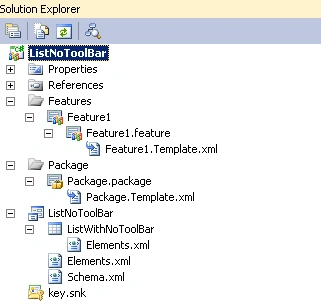
My solution looks like the following
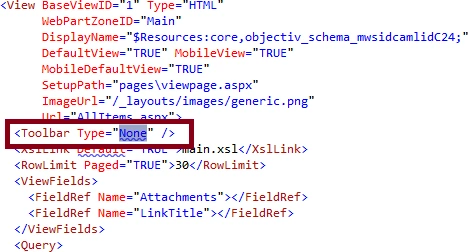
Open the Schema.xml and change the Toolbar Type from "Standard" to "None".
Deploy the solution and check the SharePoint custom list.


How to remove add new item link from the SharePoint list
Join the conversation! Your thoughts help the community grow.
Sign in to leave a comment
It is the same account you read, post and publish with — and you will come straight back to this page.
tola dyPosted Jan 14, 2014, 2:40 AM
HI, how can i do it on SharePoint 2013 Apps, I tested it not working please help
gautam shethPosted May 10, 2012, 1:25 AM
Hi ,i tested this implementation and it worked perfectly . But the problem is that it renders my custom ribbon ineffective. What should i do ?